How to Book China Train Tickets on 12306 as a Foreigner

Contents
- What Is 12306 and Can Foreigners Use It?
- Ticket Sales Windows and Advance Booking
- How to Register on 12306 with a Foreign Passport
- How to Book a China Train Ticket on 12306
- Booking China Train Tickets via 12306 Website
- Booking China Train Tickets via 12306 Mobile APP
- Train Types and Seat Classes Explained
- Train Number Prefixes: G, D, C, Z, T and K
- Seat Classes and Sleeper Types
- Boarding with Your Passport: What Happens at the Station
- What to Bring and How to Clear the Gate
- Refunds and Changes on 12306
- Refund and Change Fees at a Glance
- 12306 vs Trip.com: Which Should You Book With?
- Which One Should You Choose?
Show more
China's high-speed rail network reaches most major cities, and the cheapest way to book a seat is directly with the railway. 12306 is the official booking platform of China State Railway Group, and it now runs an English website and an English mode in its app. This guide walks through registration with a foreign passport, identity verification, booking on the website and in the app, payment, boarding and refunds, plus the cases where booking through Trip.com is the simpler option.
12306 (12306.cn) is the China Railway customer service and ticketing system. It sells the same seats at the same fares as station counters, with no booking fee, and lets you search live availability, buy, change and refund tickets online.
Foreign travelers can use it. The English site at www.12306.cn/en accepts valid foreign passports for registration and booking, while the Chinese-language version is built around Chinese ID cards. In the Railway 12306 app you can switch the language to English on first launch, or later in Settings.
| Official site | 12306.cn (English: 12306.cn/en) |
| Who can use the English site | Holders of valid foreign passports |
| Fares | Official railway fares, no booking fee |
| Payment | Chinese or foreign bank cards, Alipay, WeChat Pay |
| Advance sales | 15 days before departure |
| Online sales hours | 05:00 to 01:00 Beijing time; Tuesday 05:00 to 23:30 |
Two timing rules matter when you plan. Tickets normally go on sale 15 days before departure, and online sales run from 05:00 to 01:00 the next day Beijing time (05:00 to 23:30 on Tuesdays). Timetables and refunds are available 24 hours a day.
Since July 2026 China Railway has also been piloting a reservation service on more than 200 Beijing-Shanghai high-speed and conventional trains: you can submit a request 60 to 17 days before departure in the app, and the railway confirms orders 20 to 16 days ahead.
Registration takes about ten minutes, but identity verification can take longer when the system cannot match your passport automatically. Do it days before tickets open, not on the morning of sale.
Step 1: Open the English site. Go to www.12306.cn/en. The page loads in English, and the language menu in the top right switches between English and Chinese at any time.
Step 2: Click Register. The form opens as Create an account. Note the line beside Nationality: on the English site, only foreign passports are accepted for registration.
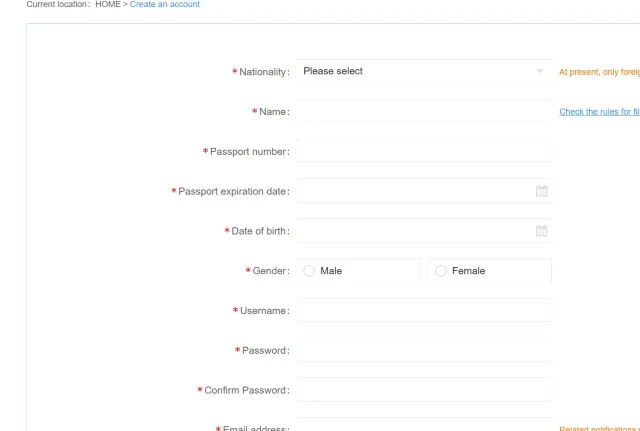
Step 3: Enter your passport details exactly as printed. Choose nationality, type every given name in order, add the passport number without spaces or punctuation, the expiry date, date of birth and gender. Use the Check the rules for filling out passport information link if your name has several parts.
Step 4: Set your login details. Pick a username and password, confirm the password, add an email address for notifications, tick the terms box and click Next step. 12306 sends an activation email; open it before you try to book.
Step 5: Complete identity verification. 12306 tries to verify you automatically. If that fails, upload a photo of the passport information page for manual review, or take the passport to a staffed ticket office at any railway station. Your status must show as verified, or ready to be verified, before you can buy.
Step 6: Add your travel companions. Open My 12306 and add each passenger under My Passengers with the same passport details. Every passenger needs their own verified record.
Book with the passport you will actually carry. A renewed passport has a new number, and a booking made on the old one will not match the document at the gate.
There are two ways to book on 12306: the English website at www.12306.cn/en, and the Railway 12306 app. Both use the same account, the same verified passport and the same tickets, so the choice is about how you like to plan. The website is easier for comparing many departures side by side; the app keeps your order and e-ticket with you on travel day. The steps below follow the website first, then the app.
On the website, search by station rather than by city. Beijing has Beijing, Beijing West, Beijing South and Beijing Chaoyang stations; Shanghai has Shanghai, Shanghai Hongqiao and Shanghai South. A train leaving from the wrong station can add an hour of city travel.


Step 1: Fill the search box. Set From and To, pick the date, and tick High-speed trains only if you want G, D and C services. In this example, Beijing to Shanghai on a Thursday shows 44 departures.

Step 2: Compare the results. Each row shows the train number, the exact stations, the journey time and a price for every class, with the discounted fare and seats left. Departures are sorted by time, and the arrows above the list switch to the next day.
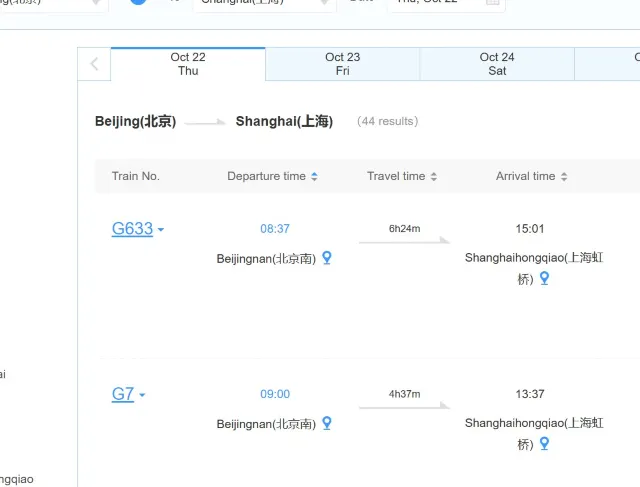
Step 3: Pick a class and click Book. Second class is the 3+2 layout and the cheapest option; first class is 2+2; business class is the most spacious. On the day we checked, second class on this route ranged from about CNY 576 to CNY 661 depending on the departure.
Step 4: Sign in. Clicking Book opens the login box, and new users can jump straight to Register from it. Sessions time out quickly, so sign in before you start comparing trains.
Step 5: Choose the passenger and seat. Select the verified passenger record, confirm the class, and add a seat preference if the train supports it. Freight is not the only thing that sells out: holiday trains can show Sold out within minutes of release.
Step 6: Pay. The payment page lists the options available for your order. 12306 accepts Chinese and foreign bank cards and mobile payment such as Alipay and WeChat Pay.
Step 7: Keep the order number. Save the order number and train number as a screenshot, so you can find them at the station without mobile data. The passport is still the ticket.
The app follows the same rules as the website, but the buttons are laid out for a phone. Set the language to English before you register, because the menus you need for that switch are still in Chinese.
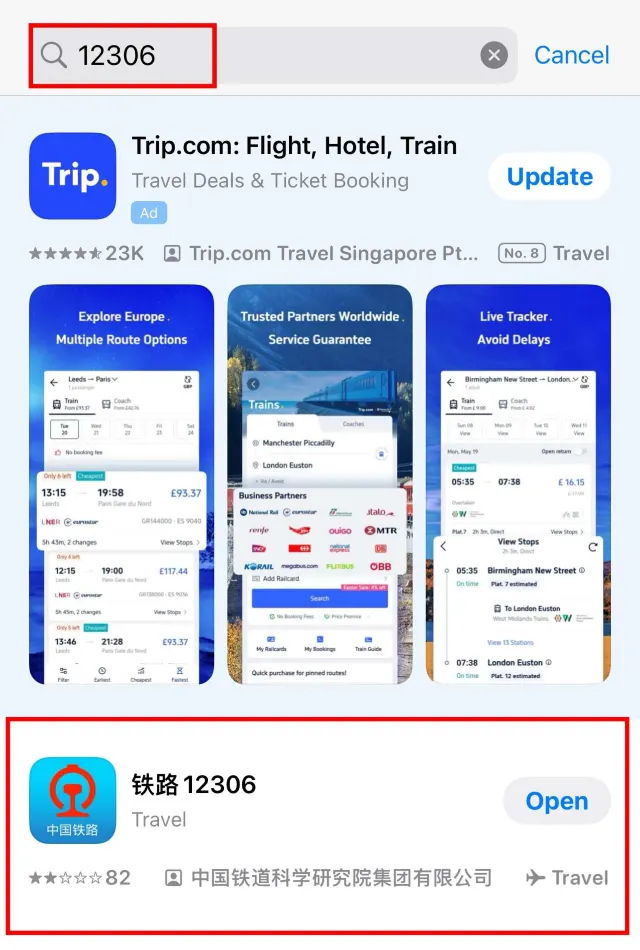
Step 1: Download the app. Search for 12306 in the App Store or Google Play and install 铁路12306, published by the China Academy of Railway Sciences. Third-party apps with similar icons are not the official one.
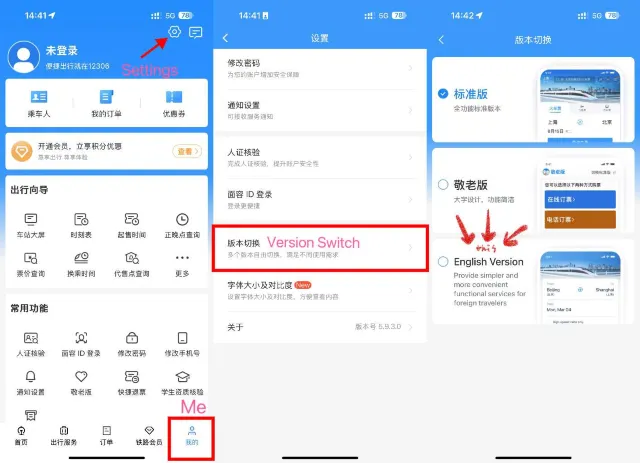
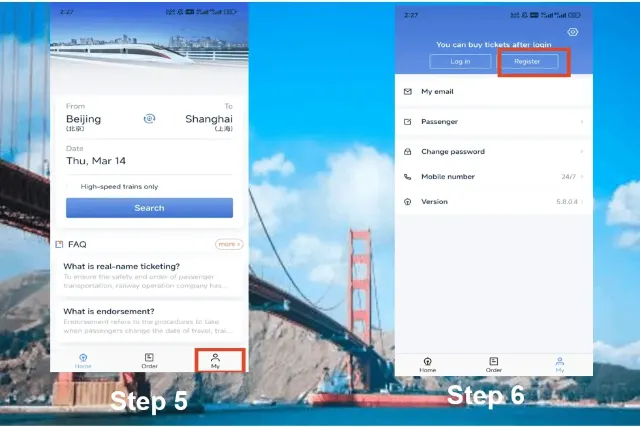
Step 2: Switch to English. Open the app in Chinese, tap 我的 (Me) in the bottom right, then the gear icon. Go to 版本切换 (Version Switch), choose English Version and confirm. The app restarts in English and keeps your settings.
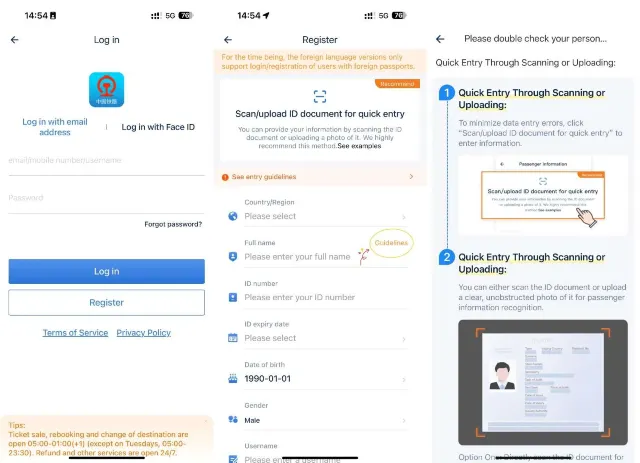
Step 3: Register or log in. Tap My, then Register. The English version only supports foreign passports. You can scan the passport information page or upload a photo instead of typing every field, which avoids name and number errors. Verification usually takes three to five working days.
Step 4: Search trains. On the Home tab, enter the departure and arrival cities, choose the date and tap Search. Leave High-speed trains only unticked if you also want overnight sleeper services.
Step 5: Choose train and seat. Tap a departure, pick the class, and add the passenger from your saved list. Seat letters work the same way as on the website: A and F are windows, C and D are aisles, B is the middle seat in second class.
Step 6: Pay in the app. Confirm the order, then pay with an international card, Alipay or WeChat Pay. Payment must be completed within the countdown shown on the confirmation screen, or the seats return to inventory.
Step 7: Find your order. Open Order at the bottom of the screen to view, change or refund the ticket. Changes and refunds follow the same fee rules as the website.
The letter at the front of a train number tells you what kind of service it is, which matters more than the number itself when you compare options.
| Prefix | Service | Typical use |
| G | High-speed EMU, around 300 to 350 km/h | Long intercity trips such as Beijing to Shanghai |
| D | Higher-speed EMU, around 200 to 250 km/h | Routes and overnight sleepers where G trains do not run |
| C | Intercity EMU | Short hops between neighboring cities |
| Z | Direct express, conventional rail | Overnight trips with sleeper berths |
| T | Express, conventional rail | Slower daytime services with more stops |
| K | Fast, conventional rail | Cheap regional services |
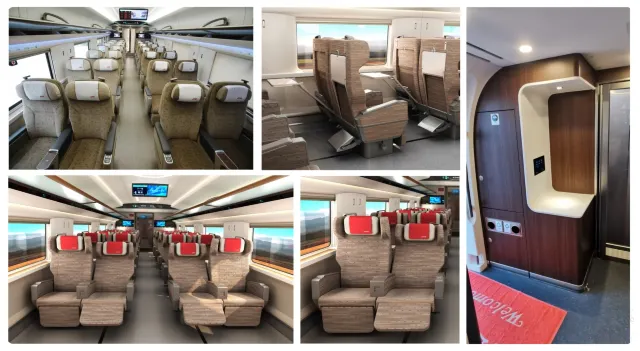
On high-speed trains the three main classes are second class, first class and business class. Overnight conventional trains add sleepers.
| Class | Layout | Who it suits |
| Second class | 3+2 seats, standard legroom | Short and medium trips on a budget |
| First class | 2+2 seats, wider with more recline | Longer journeys where comfort matters |
| Business class | 1+2 or 1+1 seats, lie-flat on some trains | Business travel and overnight high-speed runs |
| Soft sleeper | Four berths in an enclosed compartment | Overnight trains, couples and families |
| Hard sleeper | Six berths in an open bay | Overnight trains on a budget |
Children aged 6 to 13 travel on a discount child ticket in the same class as the adult; children under 6 travel free without their own seat, one per paying adult. A child who needs a separate seat or berth pays the full fare.
China uses electronic tickets, so there is nothing to collect. The passport you booked with is your ticket.
Gates close before departure, so do not plan to arrive at the last minute. If you lose your passport, get a replacement or temporary travel document from your embassy or the local exit-entry authority, and ask at the station for a temporary railway ID certificate before boarding.
You can refund or change a ticket online until departure, and the fee depends on how close to departure you act. Each ticket can be changed only once.
| Time before departure | Refund fee |
| 8 days or more | No fee |
| 48 hours to under 8 days | 5% of the fare |
| 24 to under 48 hours | 10% of the fare |
| Under 24 hours | 20% of the fare |
| Minimum charge | RMB 2 per ticket |
| When you change | Change fee |
| More than 48 hours before departure | Free, for any train on sale |
| 24 to 48 hours before, same date or earlier | Free |
| 24 to 48 hours before, later date | 5% of the lower fare |
| Under 24 hours before, later date | 15% of the lower fare |
| After departure, same-day train | Free |
| After departure, next day or later | 40% of the lower fare |
Changing the arrival station is a separate service: request it at least 48 hours before departure, and once it is done the ticket cannot be changed again. Refunds return to the original payment method; tickets paid in cash are refunded at a station window.
If you book the wrong date by mistake, 12306 offers one free refund per order per day when you cancel within 30 minutes of payment and at least 4 hours before departure. The rule covers orders for travel from 2 February 2026 and is a correction window, not a general free-cancellation policy.
Both sell the same trains, including the Beijing-Shanghai high-speed route below. The difference is how much of the process you want to handle yourself.

| Aspect | 12306 | Trip.com |
| Interface | English site and app, some notices in Chinese | English throughout, including support |
| Payment | Chinese or foreign bank cards, Alipay, WeChat Pay | International cards and common travel wallets |
| Cost | Official fare, no booking fee | Official fare plus a service fee per ticket |
| After-sales | Self-service changes and refunds online | Changes and refunds handled through Trip.com support |
Use 12306 if your passport verification is done, you have a card or mobile wallet the site accepts, and you are comfortable managing changes and refunds yourself. Use Trip.com if you want an English checkout, international cards without a Chinese phone number, and support in your own time zone; the trade-off is a service fee and after-sales handled by Trip.com rather than the railway.
Neither route can skip identity rules or hold a sold-out seat. Around public holidays, book as soon as sales open, and check both the departure and arrival stations before paying.
Planning the rest of the trip? Read our China traffic guide for metro, taxis and ride-hailing apps, and our 7 best bullet train routes in China for where to go next.
Ready to compare departure times for your dates? Start with the China train tickets hub, search trains on Trip.com, or read the full China train ticket guide before you book.
Popular recommendations

Latest Trip.com Promo Codes, Flight Discounts & Hotel Savings (Weekly Update)
 Trip.com Official
6 Things to know before Exploring the Montmorency Falls, Quebec
 _TS***4m
2026 Guide to Shanghai Pudong Airport: Transit Visa & PVG Airport Shuttle
_TS***4m
The World's Top-10 Best Nude Beaches
_TS***4m