How to Use Trip.com Promo Codes (2026)


Promo codes are a powerful way to save big on flights and hotels.
This ultimate guide makes using Trip.com promo codes easy, so you can unlock exclusive discounts and travel smarter every time you book.
To Shanghai
To Bangkok
To Tokyo
See all flights


Where Can You Find the Latest Promo Codes on Trip.com?
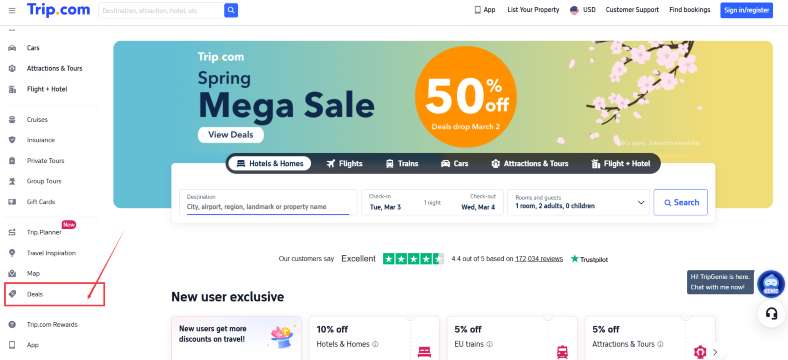
To find valid Trip.com promo codes, simply visit "Deals" on the main page of Trip.com, where the latest travel deals and special offers are listed for easy access.
Download the Trip.com app today and unlock exclusive app-only discounts! Simply scan the QR code for instant savings on flights and hotels—available for both Android and iPhone users.
Step-by-Step: How to Use a Promo Code on Trip.com App?
Option 1: Add your promo code directly from the app's main page.
You can save a promo code to your account before booking.
Step 1: Click "Account" in the bottom right corner.
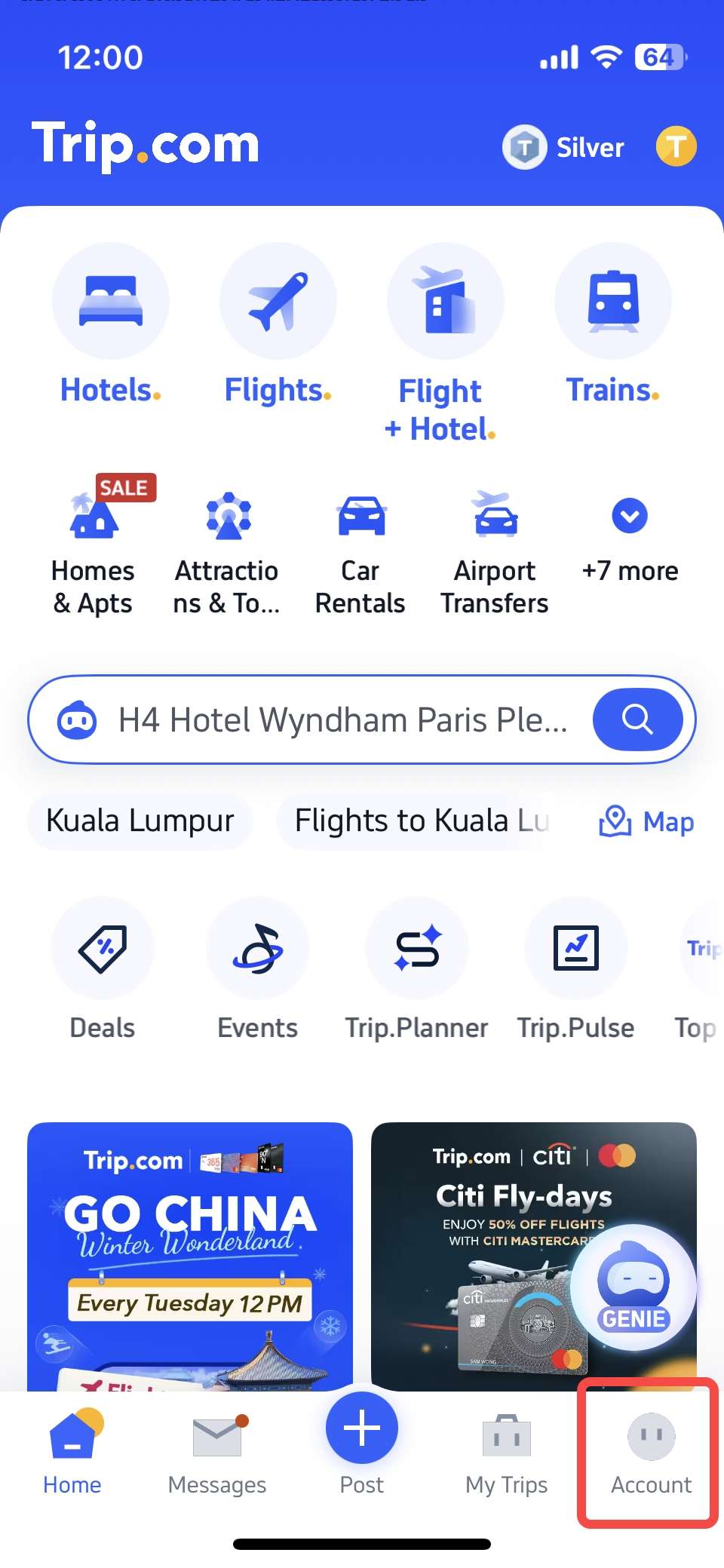
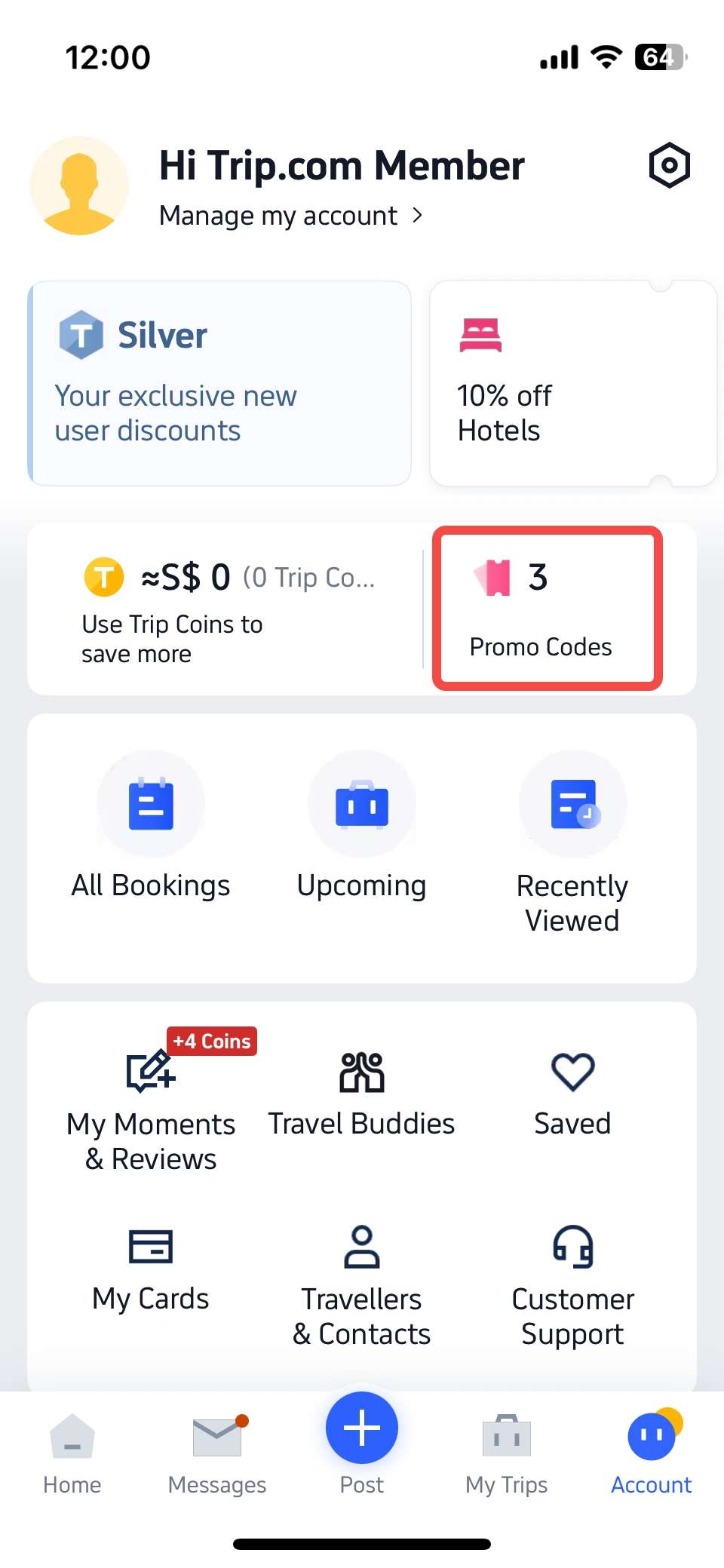
Step 2: On your account page, find and Click "Promo Code" in the top right corner.
Step 3: You can either type in your promo code manually or copy and paste it from a campaign page.
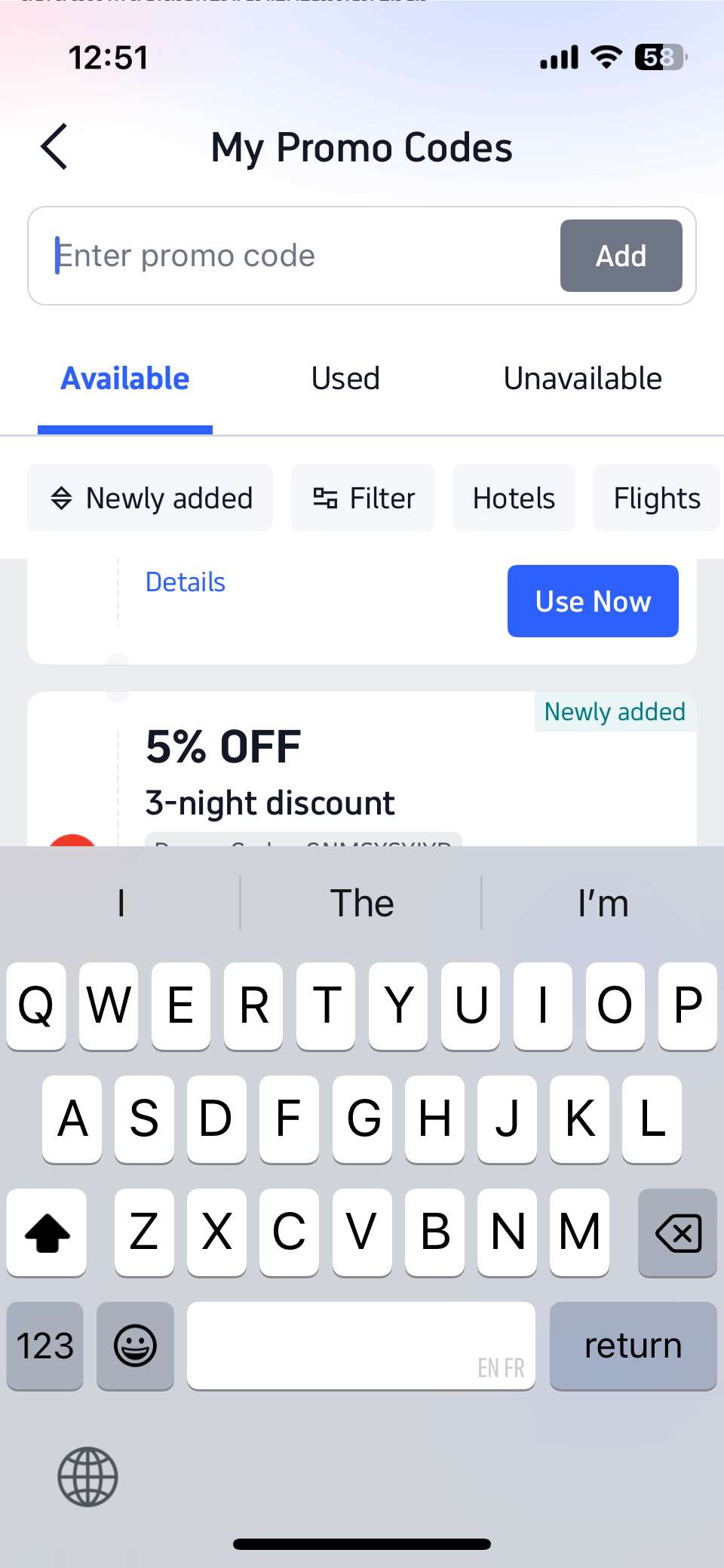
We recommend this method because once a promo code is saved to your account, it will be automatically appliedat checkout, so you don’t have to worry about missing out on savings when booking your flight.
Option 2: Enter a Promo Codebefore you check out
Step 1: After you've selected your traveler details, scroll down to the bottom of the booking page.Click "Add" in the "Promo codes" section.
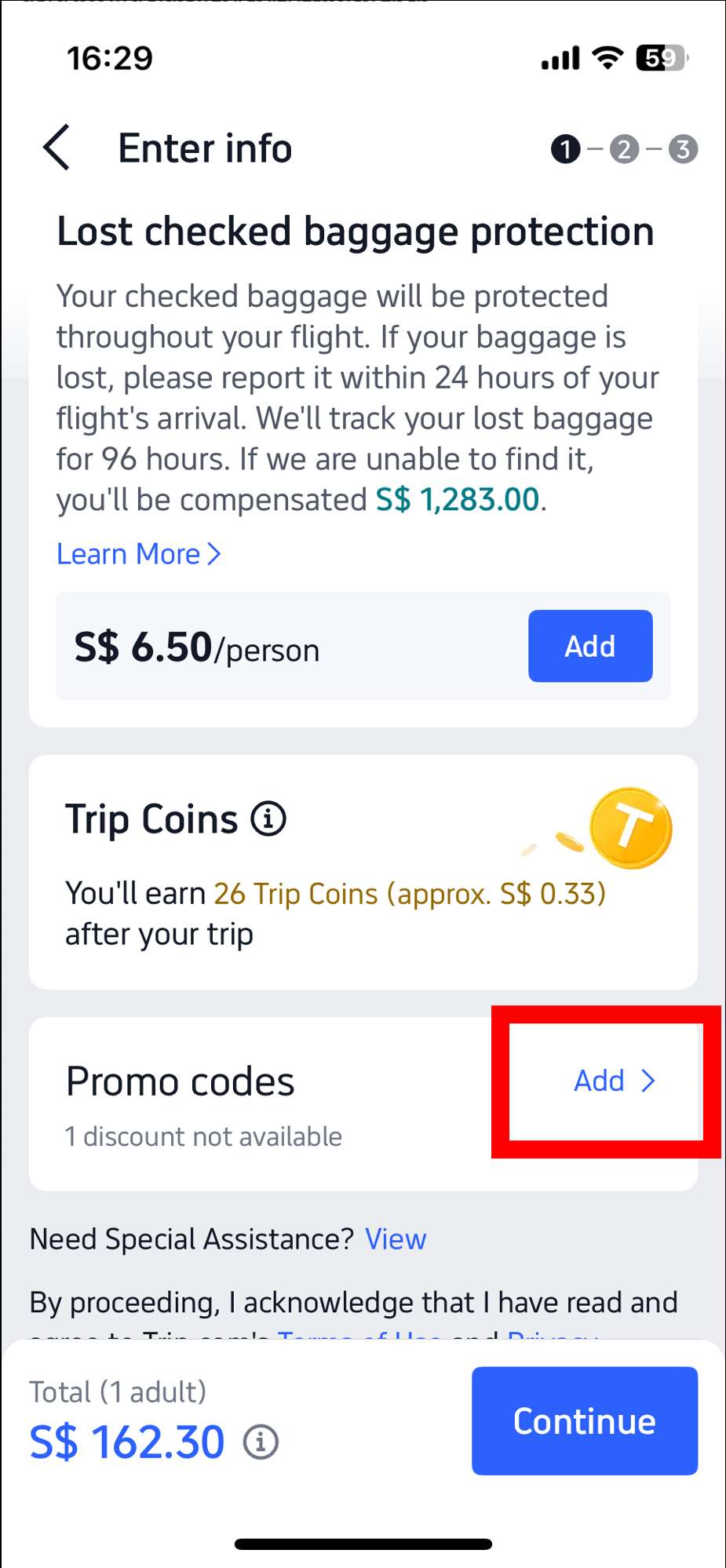
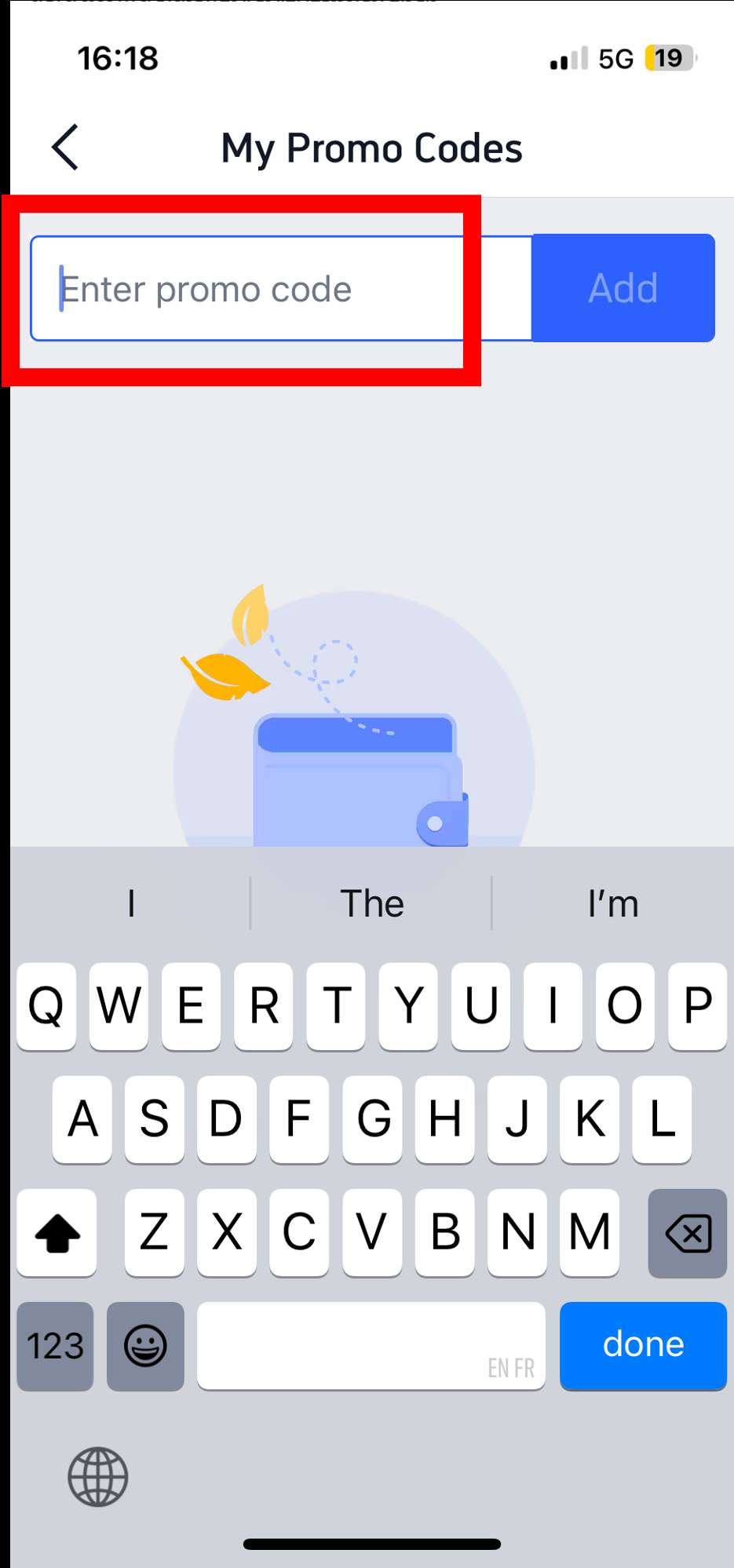
Step 2: Enter your promo code and Click "Add" again. Be sure to apply it before you finalize your payment!
Step-by-Step: How to Apply a Trip.com Promo Code on Desktop?
Step 1: On the Trip.com desktop site, click the account icon at the top right-hand corner of the website.
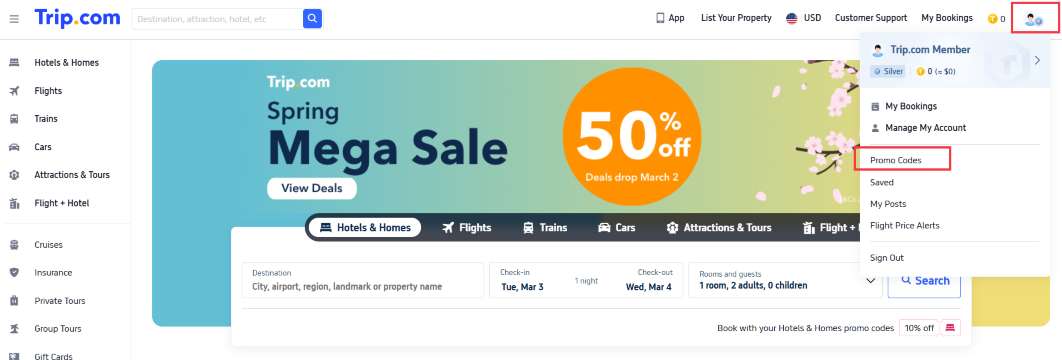
Step 2: In the drop-down menu, go to "Promo Codes".
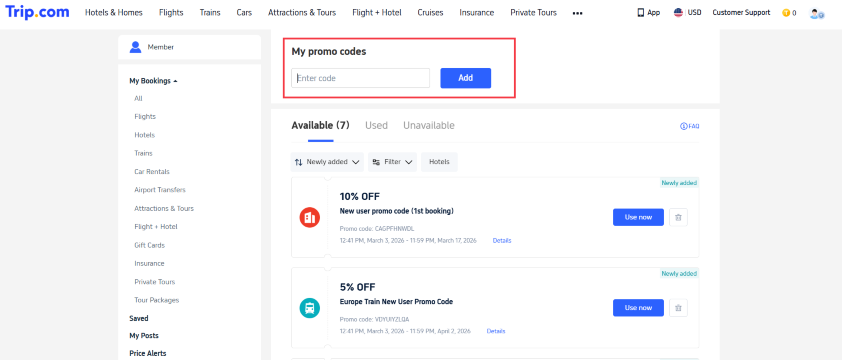
Step 3: You can either type in your promo code manually or copy and paste it from a campaign page.
Why Isn’t My Trip.com Promo Code Working?
Sometimes promo codes don’t work, and it’s usually for one of these common reasons:
Reason 1: The Code Has Expired
Promo codes are only valid for a limited time. If the expiration date has passed, the code won’t apply. Always double-check the validity before using it to make sure you don’t miss out on savings.
Reason 2: You Haven’t Met the Requirements
Some promo codes have specific conditions, such as:
- Minimum spend requirements
- Payment method restrictions (e.g., certain U.S. banks or credit cards like Chase, Citi, Bank of America, or American Express)
Make sure your booking meets the requirements so the discount can be applied.
Reason 3: The Code Isn’t for This Type of Booking
Promo codes are often category-specific, for example:
Check that the code matches the type of booking you’re making.
Reason 4: It’s a New User or App-Only Code
Some codes are exclusive to:
- New users – first-time Trip.com customers may get extra savings.
- App bookings – some promo codes only work when booking through the Trip.com mobile app.
💡 Tip: If you’re an existing user, you won’t be able to use new-user codes, and app-only codes won’t work on the website.
Reason 5: Your Account Location Isn’t Set to the U.S.
Some U.S.-specific promo codes only work if your Trip.com account is set to the correct country.
How to fix it on the Trip.com app
- Tap Account at the bottom right.
- Tap Settings at the top right of your account page.
- Under Country/Region, select United States.
- Set Language to English and Currency to USD.
Once your account is set correctly, you’ll see U.S.-specific campaigns and be able to use applicable promo codes.
✅ Pro Tip: Always check the fine print on promo codes. Some only apply to specific airlines, hotel chains, or minimum spending.
With these tips, using Trip.com promo codes in the U.S. is easier than ever—just a few clicks and you can unlock instant savings on flights, hotels, and more. Start booking smarter and maximize your travel value every time!
Get Well-Connected!
See all attractions
 508263 booked



[10% OFF] Recommended Hotels
Download Trip.com App to gain 10% off hotels right away for first-timers! Check out best hotels for your next adventure.
Top Global Hotels
Shanghai Hotels
Bangkok Hotels
Tokyo Hotels
See All Hotels










FAQ: Common Questions on Promo Codes
-
Can I use more than one promo code on Trip.com?
-
What are Trip Coins and how do they work with promo codes?
-
Do Trip.com promo codes work on both flights and hotels?
-
How do I get a Trip.com promo code for a new user?
-
Why did my promo code only give a small discount?
Disclaimer: This article has been provided by an individual contributor or third party platform. If there is any discrepancy regarding the copyright, please contact us directly and we will delete the content immediately.

Find Cheap Travel Deals & Explore Destinations on Trip.com
-
Latest flight deals
-
Air travel guide
-
Getting around
-
eSIM/SIM card
- Taiwan eSIM
- eSIM Thailand
- eSIM Vietnam
- eSIM USA
- Italy eSIM
- China Southern Airlines
- Flight Cancellation Insurance
- Taiwan Public Holidays
- Where to Stay in Chongqing
- Hong Kong Disneyland
- San Diego Zoo Safari Park Tickets
- Songkran Festival Thailand
- Great Wall of China
- Edge New York Tickets
- The Museum of Modern Art