Trip.com Cancellation Policy: How to Cancel Booking

By Trip.com
June 24, 2026

To Shanghai
To Bangkok
To Tokyo
See all flights


Instant Access to Trip.com Cancellation Policy: Flights & Hotels & Trains
Click to find out how to get refunds on Trip.com for flights, hotels, and trains.
Global eSIM
See all attractions
 2585 booked






How to Cancel a Flight on Trip.com?
Step 1: Enter the Trip.com App
- Sign in to your Trip.com account on your phone.
- Tap on the "Flight" section, then go to "My Trips" to view all of your flight bookings.
Step 2: Find the Flight You Booked
- Once you have signed in, go to "My Trips" then "All Bookings" or find "All Bookings" under your "Account" in the Trip.com app.
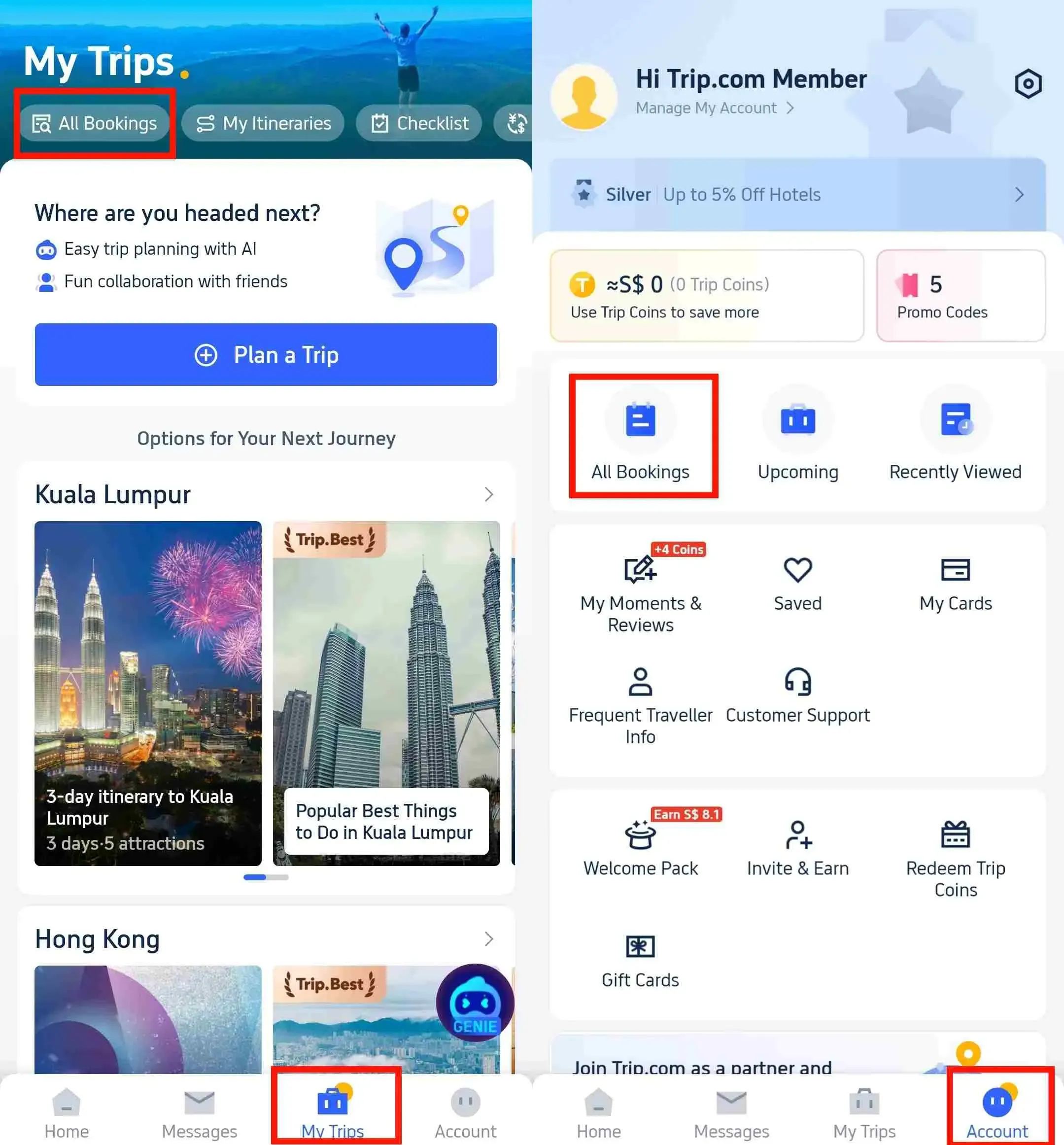
Step 3: Request Trip.com for Flight Cancellation
- Click "Manage My Booking", then tap "Cancel Booking" to cancel your flight. Remember, canceling flights at Trip.com may tag along with service and cancellation charges.
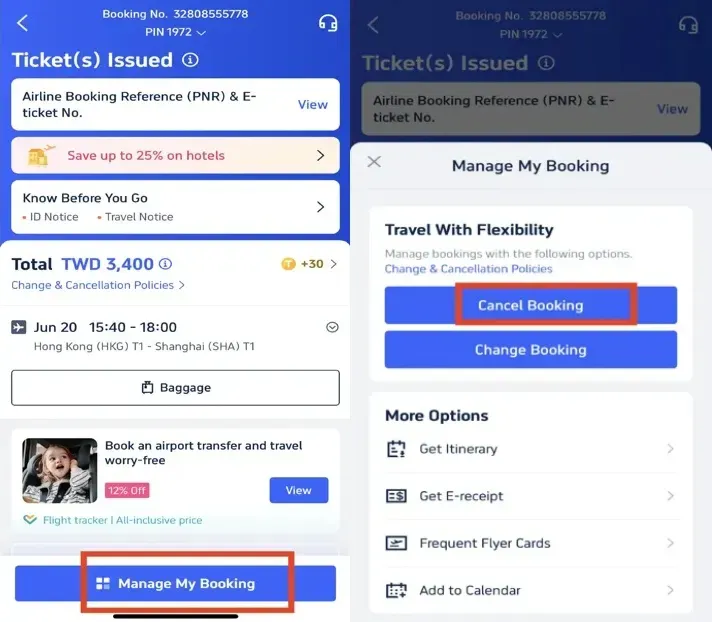
Step 4: Confirm Flight Cancellation
- Review the refund details, confirm any processing fees for canceling the flight, and then click "Next" to continue.
Step 5: Submit the Request to Trip.com
- Review your refund details and tap "Submit" to finish the cancellation process.
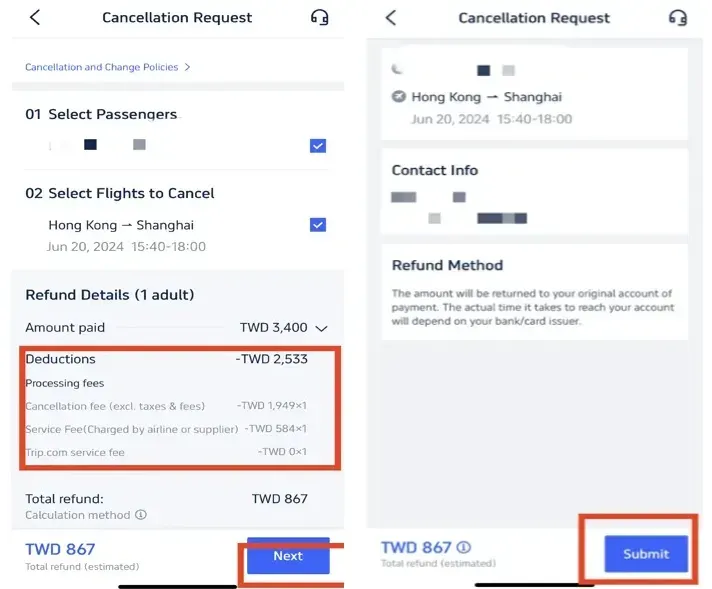
How to Cancel a Hotel Booking at Trip.com?
Step 1: Enter the Trip.com App to Cancel the Booking
- Log in to your Trip.com application (Install it on your mobile device if not).
Step 2: Find the Hotel Booking
- Find your hotel booking by going to "My Trips" then "All Bookings" or find "All Bookings" under your "Account" in the Trip.com app.
Step 3: Request the Trip.com hotel refund
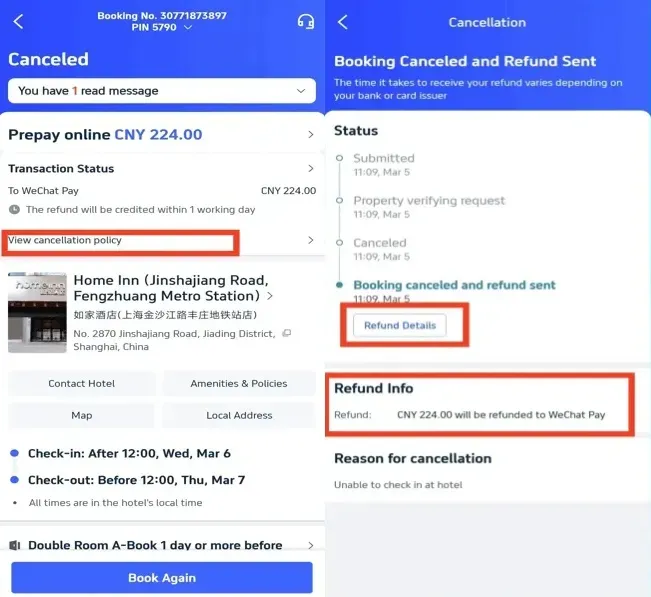
- Tap "Cancel Booking" to cancel the hotel reservation. Some hotels may have non-refundable policies, while others may offer full or partial refunds if you cancel by a certain date.
Step 4: Provide a resaon for cancellation
- Give the reason why you need to cancel the hotel booking and click on the button "Submit" to confirm your cancellation.
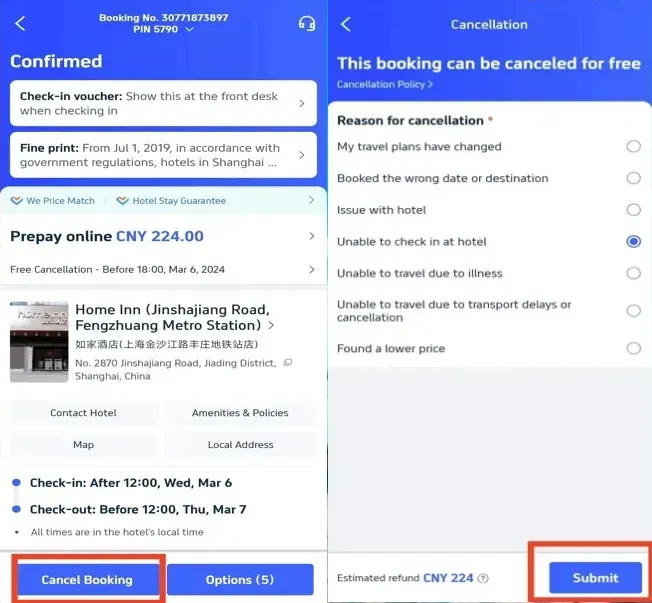
Step 5: Confirm that You Need the Refund
- Once you've submitted your request, click "View cancellation policy" to check all the refund details.
Step 6: Check the Hotel Refund Status
- Review your refund details and confirm to finish the cancellation process.
Shanghai Hotels
Bangkok Hotels
Tokyo Hotels
See All Hotels

























How to Cancel the Train at Trip.com?
Step 1: Enter the Trip.com App to Cancel the Booking
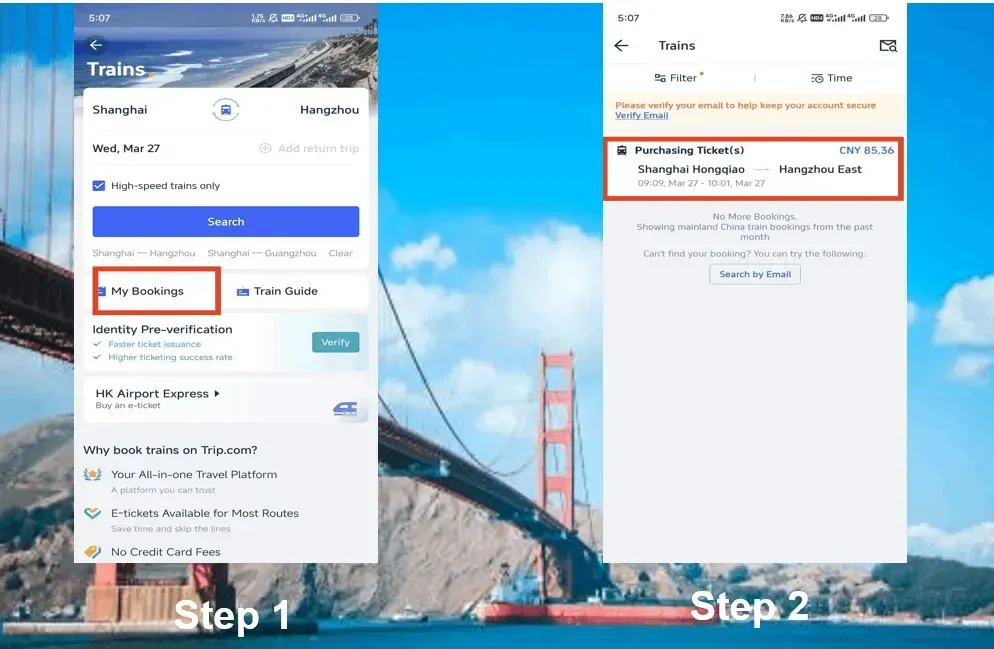
- Log in to the Trip.com account, click on "Train" section, then go to "My Bookings" to cancel the train booking.
Step 2: Select the Train You Want to Cancel
- Choose the China High-Speed train booking that you want to cancel and click on it to go to its booking page.
Step 3: Request Trip.com for Train Cancellation
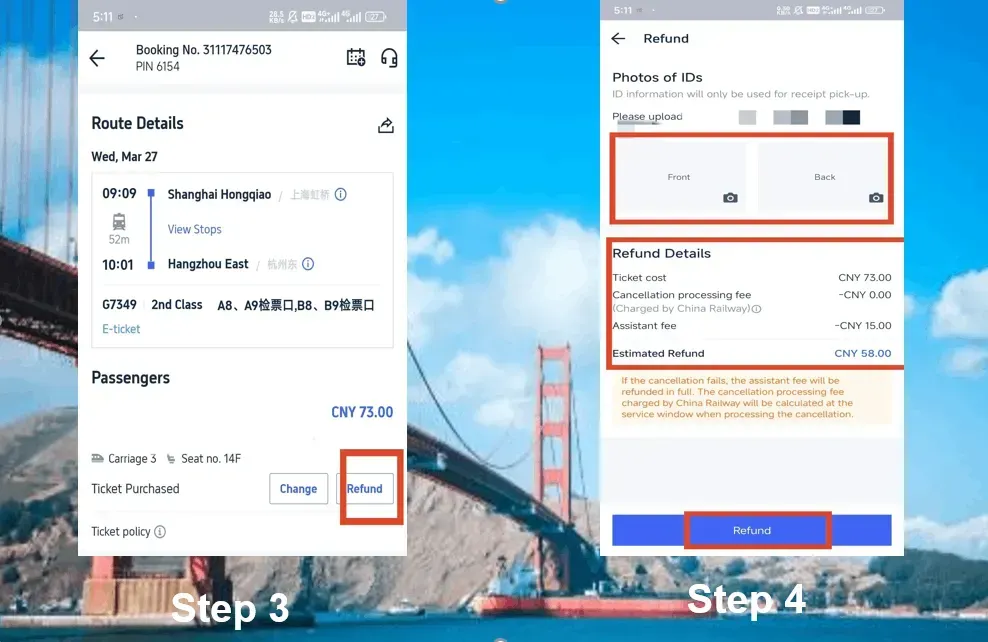
- Click the "Refund" button to cancel your China bullet train booking. Keep in mind that a service fee may be deducted for train refunds.
Step 4: Complete the Train Cancellation
- Provide images of the front and back of your ID, review the refund details, and then click "Refund" to finish the cancellation process.
China Bullet Train Refund Fee
The refund fee for China bullet trains usually varies based on how close to the departure time you cancel your ticket.
Here is a general overview:
Refund Time | Refund Fee |
More than 8 days | No fee |
48 hours-8 days | 5% of the ticket fare |
24 hours-48 hours | 10% of the ticket fare |
Less than 24 hours | 20% of the ticket fare |
Trip.com Membership Perks
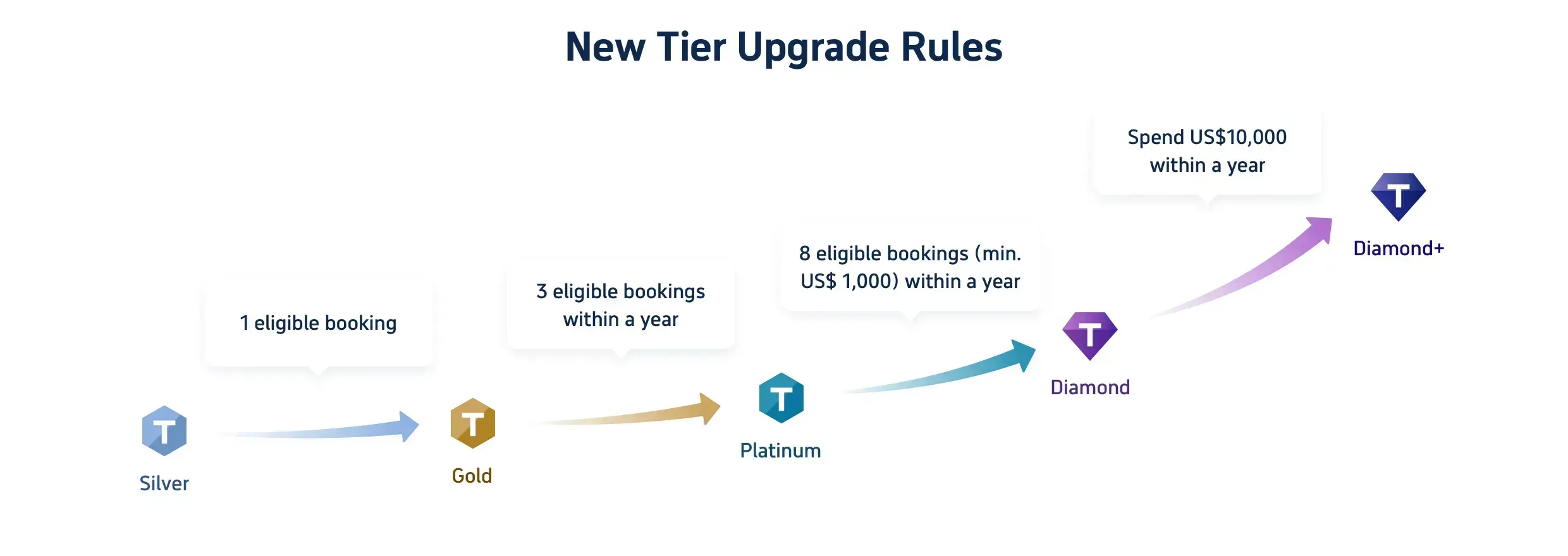
When you book with Trip.com—whether it's for flights, hotels, train rides, cruises, or even attraction tickets—you're earning rewards. Every booking accrues Trip Coins, which can be used for discounts on future bookings, and each type of booking helps you climb the membership tiers from Silver to Diamond+. Here's how each level upgrades your travel game:
Tier | Silver | Gold | Platinum | Diamond | Diamond+ |
Hotel Deals | exclusive hotel deals | exclusive hotel deals | exclusive hotel deals | exclusive hotel deals | exclusive hotel deals |
AdditionalTrip CoinsEarned | Standard earning rate | Earn 10% more Trip Coins | Earn 30% more Trip Coins | Earn 40% more Trip Coins | Earn 50% more Trip Coins |
Train Booking Benefits | - | No refund handling fees (1 time/year, app only) | No refund handling fees (2 time/year, app only) | No refund handling fees (4 time/year, app only) | No refund handling fees (8 time/year, app only) |
VIP Lounge Access | - | - | 1 time per year | 2 time per year | 3 time per year |
Free global eSIM data package NEW | - | - | 1GB/3 days data package*1 | 3GB/5 days data package*1 | 3GB/5 days data package*2 |
Airport transfer model upgrades NEW | - | - | - | Standard car to Medium car*2 | Standard car to Medium car*2+ Medium Van to Premium Van*2 |
Priority Support | - | - | - | - | Priority Support for calls and chats + One-Stop VIP Service |
Free attraction tickets NEW | - | - | - | - | Free Ticket*1 |
Start Stress-free Travels with Trip.com
Trip.com is a global travel booking website where you can find flights, hotels, trains, and things to do. They offer 24/7 customer support in many languages. If you book three or more things with them, you can get perks like free airport lounge access, earn Trip Coins (their rewards program), save money on hotels, and pay less in refund fees for trains.
FAQs about Trip.com Cancellation Policy
-
How can I cancel a flight, hotel, or train booking on the Trip.com platform?
-
Will I be eligible for a full refund if I decide to cancel my hotel reservation?
-
What kind of fees should I expect when canceling a flight ticket through Trip.com?
-
How are the refund fees calculated for China Bullet Train tickets based on timing?
-
What is the estimated timeframe for a refund to be processed and reach my account?
Disclaimer: This article has been provided by an individual contributor or third party platform. If there is any discrepancy regarding the copyright, please contact us directly and we will delete the content immediately.
Trending Searches
-
Air travel guide
-
Latest flight deals
-
Getting around
-
eSIM/SIM card
- China eSIM
- Taiwan eSIM
- eSIM UK
- eSIM USA
- eSIM Philippines
- Travel Credit Card
- Link Tickets to Disney App
- Best Solo Travel Destinations
- Do you need a passport to go to Puerto Rico
- Harbin Ice and Snow World
- The Bund Shanghai
- Great Wall of China
- Songkran Festival Thailand
- Tokyo Disneyland Early Entry
- georgia aquarium tickets