
Top picks for Madrid
Search attractions or local attractions & tours
Attractions & Tours category
Top Picks
10 results for Madrid
Sort by
Recommended
![Eurail Global Pass [Refundable If Not Activated/Official Agent/Instant Ticket Delivery/Explore 33 European Countries Freely]](https://ak-d.tripcdn.com/images//0586512000no69qh7B4AA_C_568_320.jpg?_fr=wc) Trip.Select
Trip.Select 93.3% of travelers recommendFree cancellationBook now for today4.6/5Satisfied· 105 reviews· 4.6k bookedFromAU$467.58
 22 consecutive positive reviewsBook now for today4.8/5Very good· 22 reviews· 867 bookedFromAU$26.62
 Tailored formulas are available offering unlimited travel within 33 countries and travel bonuses.Free cancellationBook now for today5.0/5Excellent· 1 review· 27 bookedFromAU$467.59
 27 bookings in 7 daysBook now for today4.8/5Very good· 13 reviews· 368 bookedFromAU$29.35
 Trip.Select97.5% of travelers recommendFree cancellationBook now for todayDuration: 35 mins4.7/5Very good· 79 reviews· 277 bookedFromAU$19.83
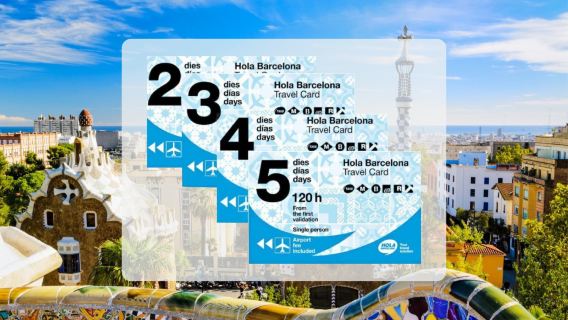 Unlimited rides on all public transport in Barcelona for 48, 72, 96, or 120 hrsBook now for todayFromAU$33.63
 Free cancellationBook now for today4.5/5Satisfied· 2 reviews· 108 bookedFromAU$55.85
 Book now for today4.0/5Good· 1 review· 77 bookedFromAU$49.74
 Explore this city at your own pace with a sightseeing pass.Book now for todayEnglishFromAU$130.23

Explore top experiences
See what other travelers love, based on ratings and bookings
Frequently asked questions about Madrid
How many are available in Madrid on Trip.com?
What are the best in Madrid?
What are the top-rated in Madrid?
How can I contact Trip.com customer support?
Can I change or cancel my booking?
How can I get discounted prices?
Reviews/Trip Moments
★
★
★
★
★
Reviews: Eurail Global Pass [Refundable If Not Activated/Official Agent/Instant Ticket Delivery/Explore 33 European Countries Freely]
Guest User2026-02-13
The hotel provided a comfortable and pleasant stay overall. The check-in and check-out processes were smooth and efficient, and the staff were courteous and helpful throughout the visit. The room was clean, well-maintained, and equipped with the essential amenities needed for a comfortable stay. Housekeeping was consistent and responsive to requests.
The location was convenient, with easy access to nearby attractions, restaurants, and transportation options, which made getting around very manageable. The hotel facilities were generally well-kept, and the common areas were clean and welcoming.
While there is always room for minor improvements, the overall experience was positive and offered good value for the price paid. This property is a solid choice for travelers looking for comfort, convenience, and reliable service. I would consider staying here again in the future.★
★
★
★
★
Reviews: Round Trip Cable Car Ticket for Montjuïc in Barcelona
Guest User2026-01-03
Great price, lower than through their website and in person, so definitely worth it! You have to still queue unfortunately to print your tickets, but after that you can go up in the cable cars and enjoy the beautiful views or Barcelona until you get to the citadel which is very scenic.★
★
★
★
★
Reviews: Interrail Global Mobile Pass
Guest User2025-08-18
Really easy to book these passes and to find them in the app.★
★
★
★
★
Reviews: Hola Barcelona Public Transport Card, Spain
Guest User2026-02-22
I was able to easily get my ticket by entering the number under the QR code on my TripComd voucher at the red machine at the station. This time, the ticket was valid for 48 hours. Since it's valid for 48 hours after the first use, I think it's valid for a 2-night, 3-day trip. Since I don't have to purchase tickets at the station ticket machine each time, it's smooth and there are no crowds.★
★
★
★
★
Reviews: Sagalés Shopping Bus: La Roca Village
Guest User2026-02-24
There is no need to worry about transportation at all when shopping at La Roca Village, because there is a Sagales dedicated bus, which is really convenient and useful! This dedicated line runs directly from downtown Barcelona to La Roca Village, which takes about 40 to 45 minutes.
The bus operates multiple times a day from the city center Plaça de Catalunya in a clear and easy-to-find location, convenient for both freelance tourists and locals. The schedule is very considerate, with an early bus in the morning and a return trip at lunch and dusk, which matches the shopping rhythm. Basically you leave in the morning, walk enough for a day, and you can easily catch a bus back to the city in the evening, without worrying about how to get back.
The Sagales bus cabins are clean and comfortable, air-conditioned in the summer, heated in the winter, and offer free Wi-Fi, which is more courteous than the average bus. The seats are spacious, so you don't have to worry about running out of space to hold your loot. Most importantly, this car parks directly in front of La Roca Village and gets off immediately into the shopping village, eliminating the inconvenience of traveling long distances or changing transport again.
Buying tickets is easy and can be booked on the Sagales official website or the La Roca Village website, and can be purchased on-site with electronic payment support. Reasonably priced, probably 10 euros round trip, compared to the hassle of taking the train plus transfers, this option really saves time and effort.
Overall, the dedicated bus from Sagales to La Roca Village is incredibly convenient—easy to find, frequent, short ride, and good environment, completely the most time-saving and worry-free way to shop at the outlet. Once you get in the car relax and rest, as soon as you get off the happy shopping, simple and direct, makes people unforgettable!
Trip.com Picks
Top Tours in Madrid
Best Experiences in Madrid
Popular Products
Trending Searches
More Popular Destinations
Toledo Ciudad y Catedral: Visita Guiada desde MadridEssential Madrid: Walking Tour of the Historic CenterParque Warner Madrid: Day Trip from MadridMadrid: Tapas, Taverns & History TourMadrid: excursión de día completo a Segovia y Ávila con entradas al Alcázar y a las murallasPalacio Real de Madrid + Zoo Aquarium de MadridMadrid: Visita guiada al Estadio Bernabéu con mejora MegafanTour panorámico en autobús por Madrid"Skip the line" Royal Palace + Prado MuseumMadrid: Guided Tour of Reina Sofía Museum with Entry TicketDesde Madrid: Excursión al Monasterio de El Escorial y Valle de los CaídosMadrid: Tour en grupo reducido por el Palacio Real y la Catedral de la AlmudenaMadrid: Ruta de bares y fiesta por Madrid con PUB CRAWLEspaña Palacio Real de Madrid + Plaza de la Villa de Madrid + Puerta de Toledo + Museo Nacional del Prado servicio de coche privado con conductorBig Bus Madrid: Autobús turístico
Water Activities in MadridMadrid SIM CardMadrid Cultural ExperienceMadrid Connectivity SolutionsMadrid Boat TicketsBoat Experiences in MadridMadrid Spa & MassageMadrid Shopping DiscountsMadrid SkydivingMadrid Yacht CharterMadrid Travel EssentialsMadrid JR PassMadrid Local Tour GuidesMadrid Bus TicketsMadrid Visa Application ServicesHa Long Sports & AdventureBoat Experiences in Ho Chi Minh CityPlailly Shopping DiscountsFrankfurt Travel ServicesRust City PassPhuket Travel EssentialsFussen Connectivity SolutionsYork Travel EssentialsXi'an Travel EssentialsNanjing Travel EssentialsAncient City Tour from Chiang Rai with Golden Triangle and Royal VillaExcursión de un día a Appenzell, Suiza Barcelona: Girona & Medieval Catalonia with Costa BravaZadar: Charming Coastal Cruise 4h Wooden Boat AdventureNYC: Tour VIP por el Rockefeller Center con entrada al observatorio3 BEST GALAPAGOS TOURS- BEST HIKE AND SNORKEL TOP EXPERIENCEBudapest: Paseo por el Distrito del Castillo con entrada a la Iglesia de MatíasExcursión de un día definitiva en Labuan Bajo: descubre Cunca Wulang, la Cueva Espejo, la Cueva Rangko y SylviaSpirited Away anime pilgrimage: 1-day tour of Katsuo-ji + Otagi Nenbutsu-ji Temple + Arashiyama hiking in OsakaVisita guiada por la Ciudad de las Tres Culturas y la Catedral de ToledoThings to do in BrisbaneThings to do in Wiang Pa PaoThings to do in Iskandar PuteriThings to do in YunnanThings to do in HubeiThings to do in JiangxiThings to do in HakoneThings to do in MaltaThings to do in CebuThings to do in BusanThings to do in Genting HighlandsThings to do in MongoliaThings to do in AzerbaijanThings to do in JapanThings to do in Chengdu



About
Payment methods


Our partners




Contact Center
of the year 2025
of the year 2025



Trip.com is part of Trip.com Group Limited, one of the world's leading providers of travel services.
Copyright © 2025 Trip.com Travel Singapore Pte. Ltd. All rights reserved
Site Operator: Trip.com Travel Singapore Pte. Ltd.
Site Operator: Trip.com Travel Singapore Pte. Ltd.