How to Book Trip.com Airport Transfer: Practical Tips


Book Trip.com Airport Transfer with discounts here! Learn how to book, baggage rules & cancellation policies.
To Shanghai
To Bangkok
To Tokyo
See all flights


How to Book Trip.com Airport Transfer on App?
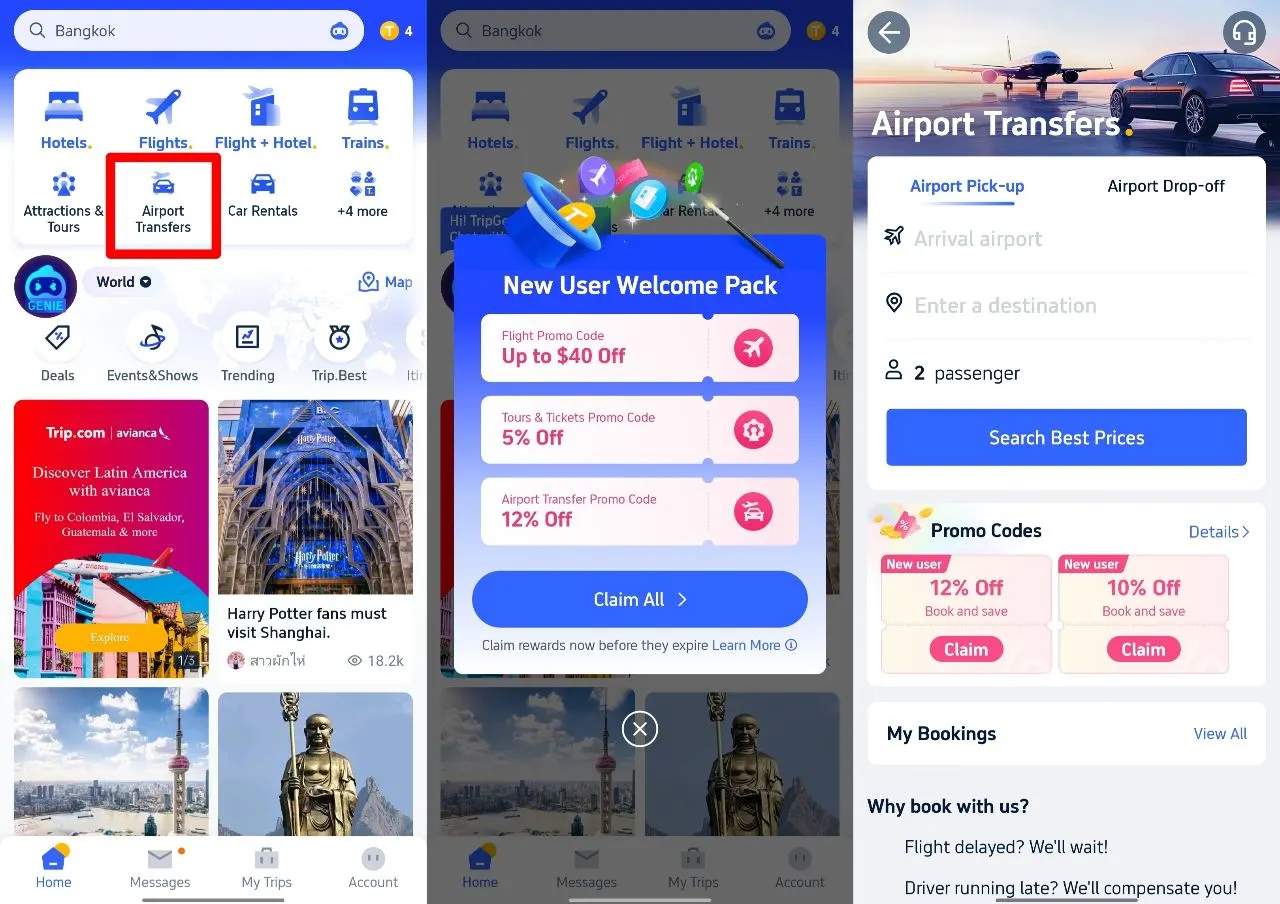
Download the app today and get your Trip.com Airport Transfer 12% Off in these 3 steps!👇
1. Download Trip.com app & Tap Airport Transfer
2. Claim Airport Transfer Promo Code
3. After Choosing the right car, enter promo code in the payment page
Is Trip.com Airport Transfer Reliable? Real User Reviews
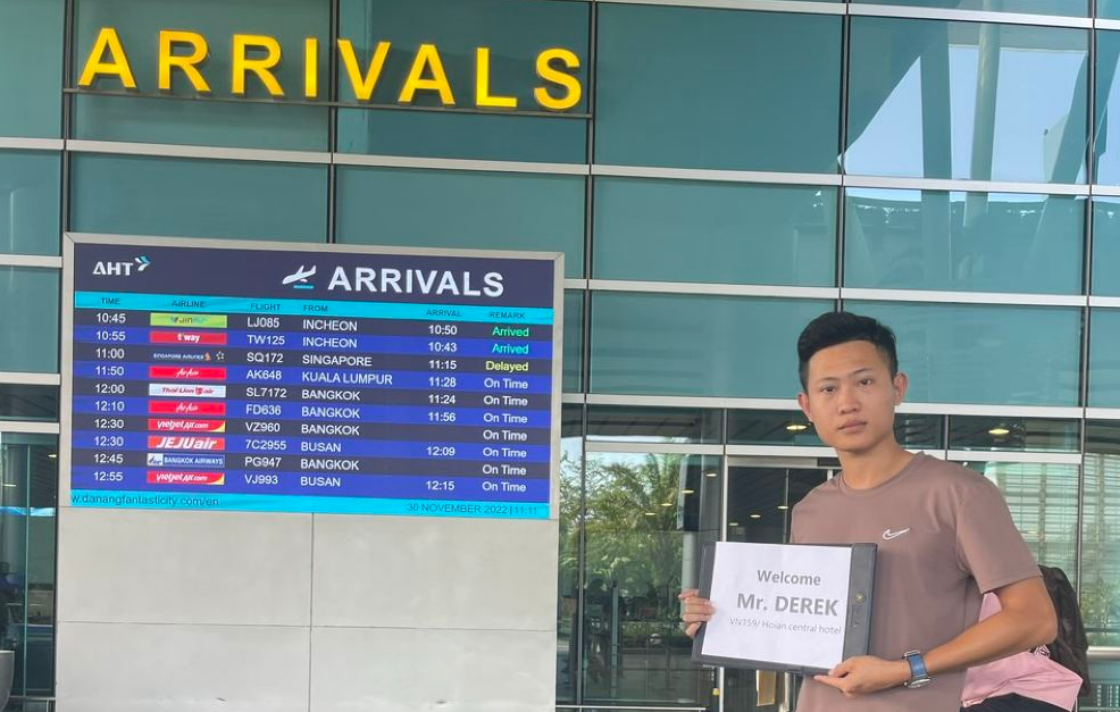
Great shuttle agent to arrange for driver well in advanced before pickup. The driver was on time and deliver us to airport safe and sound!
Very enjoyable travel with Ms Phượng from Trip.com, who had arranged the private car pick up for me & family. She had been a prompt response assistance to me, even last mins request from my family. Mr Nam ,our driver, he is very good and entertaining us thru out the journey. He brought us around and a very caring person. I am lucky to meet both of them who are really responsive to us. They had given us a smooth & memorable trip.
After I book this transfer ,the Dimo trip reply me in a short time and provide clear info to me. And the day we depart from hotel,the staff called Phuong Le carefully check the location and made the driver perfectly arrived on time and pick up us,even called to check we are successfully get on the car to the airport,very thoughtful service!Recommend a lot.
Phuong Le has been a helpful and sincere contact person, and the driver was also very nice. I would definitely consider using the airport pick-up service again if I visit Hanoi in the future.


Ho Chi Minh Airport Pickup & Sending at a Great Price (No Tips, Private)
4.9/5
34 reviewsIt was a 3-night, 4-day trip, and I barely managed to find it.
I was so pressed for time that I didn't want to waste a single minute at the airport.
I booked a pickup service, so I could be on my way as soon as I arrived.
It felt like my trip had been extended by at least 30 minutes, lol.

Vietnam VIP Exclusive Fast Track Pass Skip the Line
4.7/5
1772 reviewsYou took meticulous care of every detail from the moment I applied until the very end. Thanks to you, I was able to finish my interview and return home very comfortably as soon as I landed. I have plans for another trip to Da Nang, and I will definitely apply again. The cost wasn't burdensome like in other countries, and it was truly comfortable. Thank you.
Why Choose Trip.com Airport Transfers?

- 🕒 Free waiting time for flight delays.
- 🆓 Flexible cancellation for peace of mind.
- 🚗 Verified drivers and transparent pricing.
- 👍 Global Coverage: 500+ airports with localized support.
Get Well-Connected!
See all attractions
 457183 booked


How to Book Trip.com Airport Transfer in 5 Minutes (Screenshots Incl.)
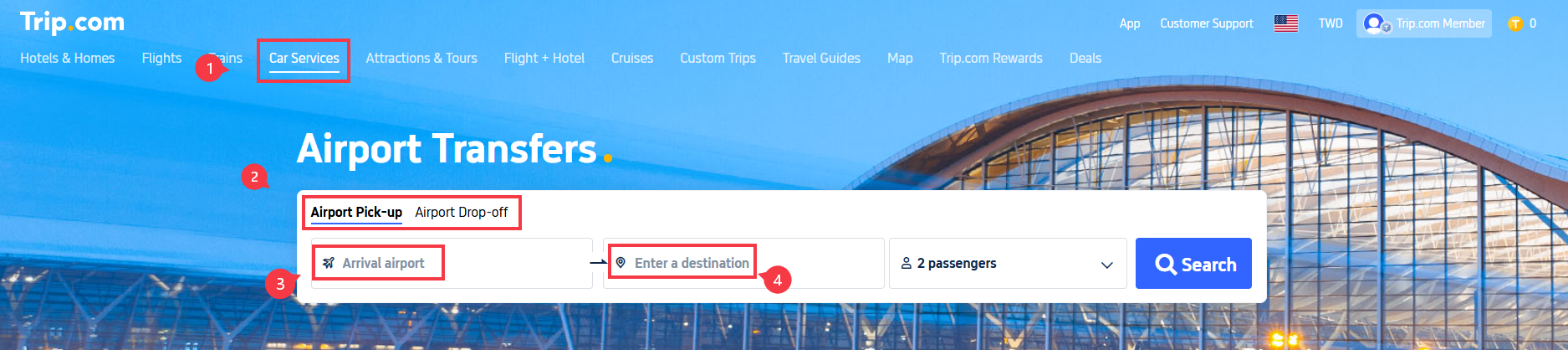
Step 1: Start on Trip.com’s Homepage
- Go to Trip.com’s homepage and select “Car Services” from the menu.
- Click on “Airport Transfer”.
- Choose between “Airport Pick-up” (for arrival) or “Airport Drop-off” (for departure).
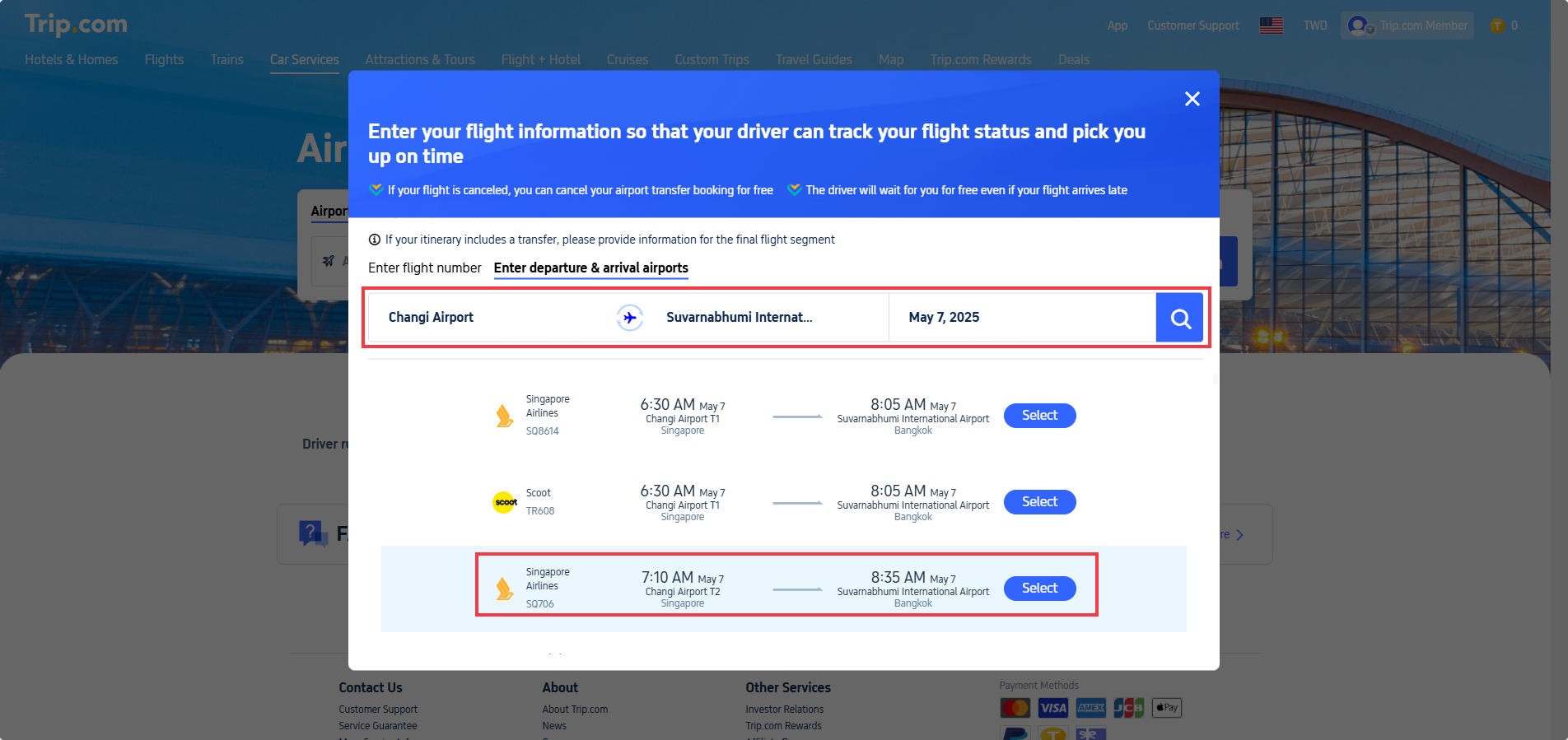
Step 2: Enter Flight Details
For Airport Pick-up (arrival):
- Select your arrival airport.
- On the flight information page:
- Option 1: Enter your flight number (recommended for accuracy).
- Option 2: Manually input Departure Airport, Arrival Airport, and Departure Date (local time).
- Click the “Search” icon and "Select" your flight from the results.
Important Notes
✅ Drivers track your flight status automatically.
✅ Free cancellation if your flight is canceled.
✅ The driver will wait for you for free even if your flight arrives late

Step 3: Enter Destination & Choose Your Car
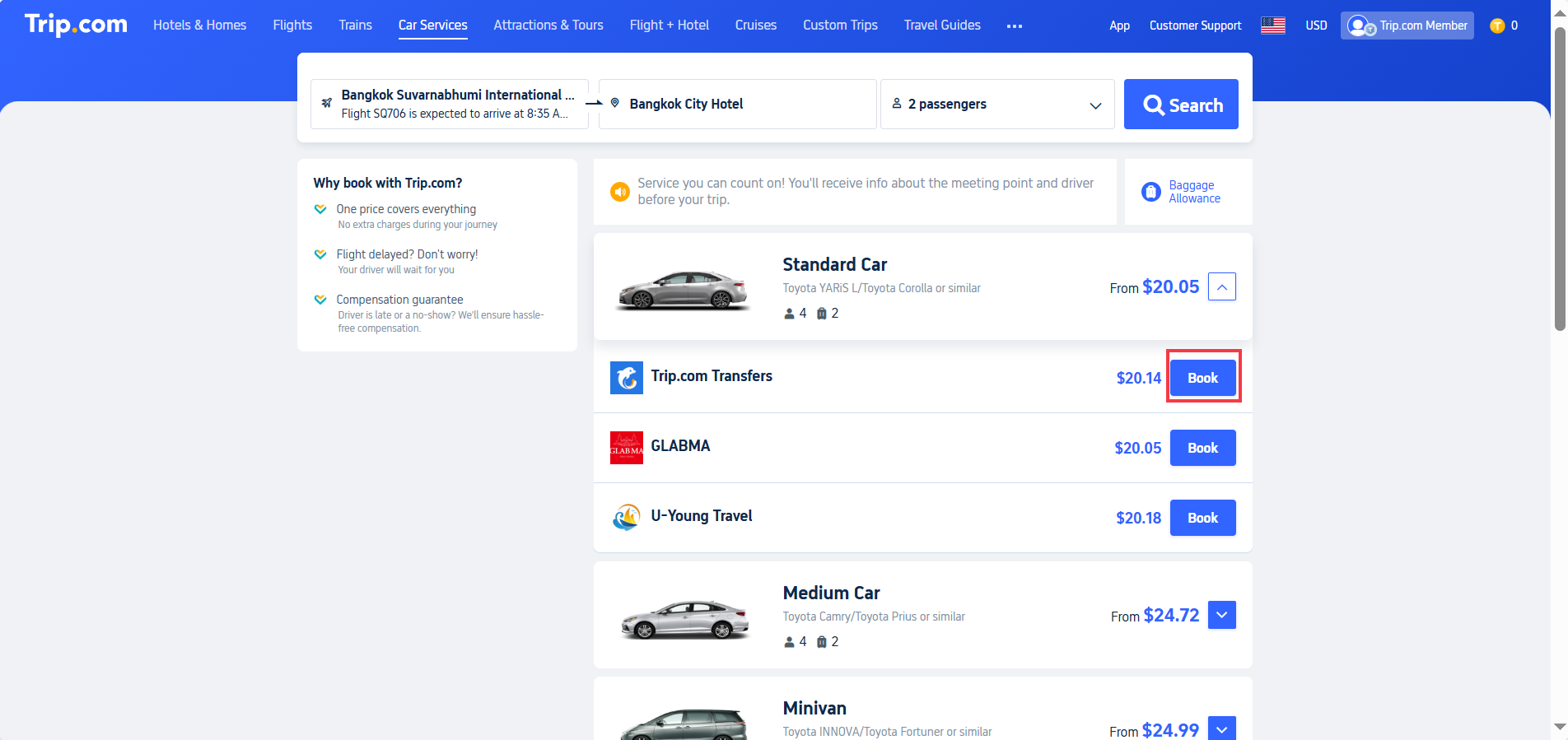
- Return to the airport transfer page and “Enter a destination” (e.g., your hotel name/address in the arrival city).
- Click “Search” to view available cars.
- Filter options by:
- Car type (Standard, SUV, Luxury).
- Passenger capacity (e.g., Max. 4 passengers).
- Supplier (select preferred provider).
- Click “Book” once you’ve chosen your vehicle.
Step 4: Confirm Booking & Payment
Review the booking details on the final page:
- Pick-up/Drop-off Time: Based on flight schedule.
- Route: Airport to destination (e.g., "Suvarnabhumi Airport → Bangkok City Hotel").
- Price: Total fare (e.g., $20.14).
Final Steps
- Enter contact information (ensure it’s correct for driver communication).
- Apply a promo code (if available) for discounts.
- Click “Continue to Pay” to complete your booking.
Trip.com Airport Transfer - Baggage Allowance & Luggage Rules
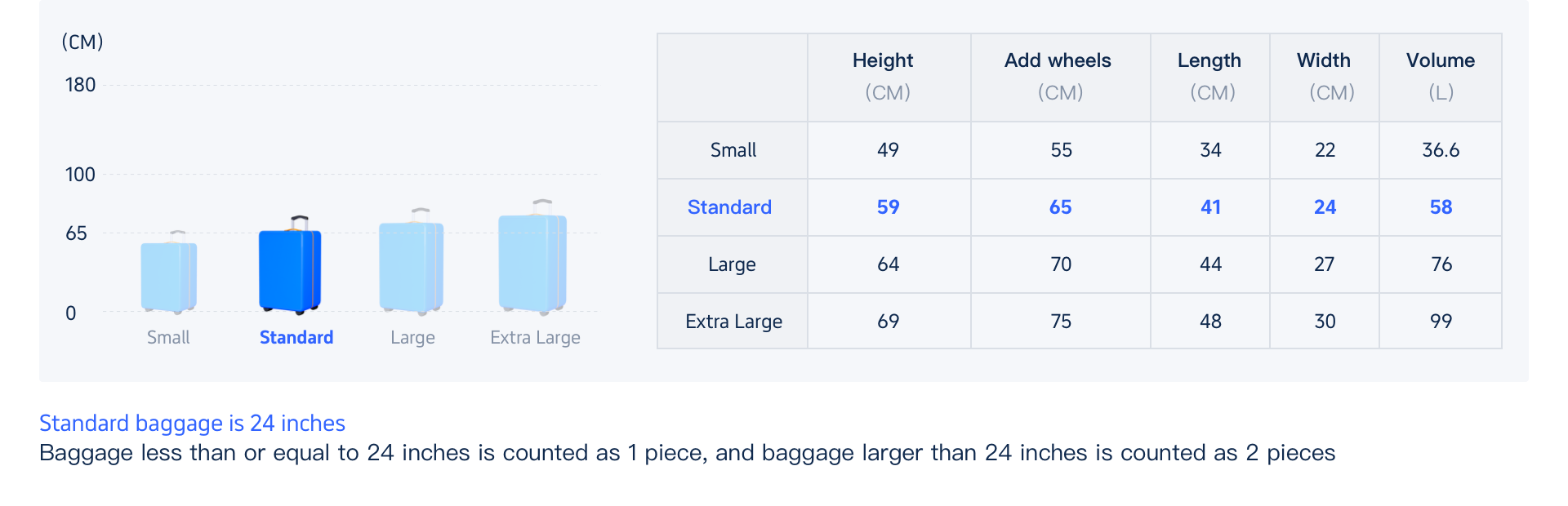
1. Standard Luggage Allowance
- Bags 24 inches (61 cm) or smaller count as one piece.
- Bags larger than 24 inches may count as two pieces.
Larger suitcases take up more trunk space, so they’re often counted double.
2. Can You Put Luggage on Seats?
- Small items like purses, backpacks, or briefcases can go on seats.
- Rolling suitcases must go in the trunk or cargo area for safety reasons.
Drivers typically won’t allow large bags on passenger seats.
3. What If You Have Extra Bags?
- Contact the provider before your ride if you’re unsure.
- Consider booking an SUV or minivan if you’re traveling with multiple large suitcases.
- Measure your bags before booking to avoid problems at pickup.
4. Why It Matters
- Children and infants count as passengers, even if they sit on a lap.
- If your group or luggage exceeds the vehicle’s capacity, the driver may refuse service.
Trip.com Airport Transfer Cancellation Policy: What You Need to Know

- Free cancellation: Cancel at no cost before the deadline listed in your confirmation email. Deadlines follow the pickup location’s local time.
- Flight delays: Pickup time automatically adjusts based on your updated arrival time. Check your Trip.com order details for the new schedule.
- Flight canceled or diverted: You can request a full refund and rebook later.
- Late cancellation: Canceling after the free window results in a 100% charge.
- Free waiting time: Drivers typically wait 1–2 hours after your scheduled (or adjusted) pickup time.
- Extra waiting: Additional time may require a cash payment directly to the driver.
- Extra stops: Airport transfers are usually direct. Extra stops may be possible for an added fee.
How to Track Your Trip.com Airport Transfer Driver?

About 24 hours before your pickup, you’ll receive your driver’s contact details and license plate number by email or in the Trip.com app.
Once you land, open the Trip.com app, go to “My Orders,” and you can track your driver in real time using GPS.
If you don’t have signal at the airport, head directly to the designated meeting point listed in your booking details (for example, “Arrivals Level, Door 2”).
Trip.com Airport Transfer: Car Types for Every Budget

Trip.com offers multiple suppliers per vehicle class worldwide. Let's look at some of the BKK Airport cars for instance.
You can also check on ur own by searching on Trip.com Airport Transfer page.
Car Type | Passengers | Bags | Example Models | Best For |
Economy | 4 | 2 | Toyota Corolla | Solo/couples |
SUV/Minivan | 4-6 | 4 | Toyota Innova | Families/small groups |
Premium Van | 6 | 4 | Mercedes V-Class | Business/luxury travelers |
Minibus | 9-12 | 6 | Toyota HiAce | Large groups/sports teams |
Trip.com Airport Transfer vs. Taxis/Rideshares vs. Car Rentals
Trip.com Airport Transfer is Best For: Travelers prioritizing reliability, especially with tight schedules or language barriers.
Feature | 🚖 | Taxis/Rideshares 🚕 | 🚗 |
Pricing | ✅ Fixed upfront price (no hidden fees) | Metered/surge pricing | Base rate + fuel, insurance, tolls |
Convenience | ✅ Door-to-door service | ✅ On-demand pickup | ❌ Self-drive; must navigate |
Flight Tracking | ✅ Auto-adjusted for delays | ❌ Manual updates | (you’re the driver) |
Waiting Time | ✅ Free unlimited waits for delays | ❌ Extra charges after 5–10 mins | - |
Vehicle Choice | ✅ Pre-select exact size/type | ❌ Depends on availability | ✅ Choose any class (but may sell out) |
Customer Support | ✅ 24/7 multilingual help | ❌ Limited local support | ✅ Rental desk (often limited hours) |
Payment | ✅ Prepaid (no cash) | ❌ Cash/card on arrival | ✅ Prepaid + deposit (card required) |
Luggage Space | ✅ Guaranteed (book by size) | ❌ Unpredictable | ✅ Flexible (trunk + seats) |
Flexibility | Usually Fixed route (no detours), but maybe can pay to change routes | ✅ Can add stops (extra fee) | ✅ Go anywhere, anytime |
Best For | Stress-free arrivals, groups, tight schedules | Short trips, spontaneity | Road trips, remote areas, multi-stop itineraries |
Car Rentals
Car Rental Promo Code - 8% Off
New User Enjoy up to 8% Off
TRIPCAR8
Top Tips for a Smooth Trip.com Airport Transfer Experience

- Book early: Reserve at least 48 hours in advance to ensure availability, especially during busy travel periods.
- Enter your flight number: Always include your flight number (not just arrival time) so your driver can track delays in real time.
- Check your meeting point: Review your voucher for exact pickup instructions, such as “Gate 3, Column B.”
- Use in-app chat: Trip.com offers real-time messaging with drivers, with automatic translation if needed.
- Flight delays: No action required—your pickup time adjusts automatically if your flight is delayed.
- Confirm luggage size: Make sure your bags match the vehicle capacity you booked to avoid pickup issues.
Start Your Travel with Trip.com!
Trip.com is an international online travel agency that offers 24/7 customer service in multiple languages.
It offers easy booking services for flights, hotels, and tours and activities. As Platinum & Diamond Members of Trip.com, you can access a free airport lounge, earn more Trip coins, save more on hotel booking, reduce refund fees for trains, etc.
Top Global Hotels
Shanghai Hotels
Bangkok Hotels
Tokyo Hotels
See All Hotels










FAQs about Trip.com Airport Transfer
-
How far in advance should I book Trip.com airport transfer service?
-
How do I choose the appropriate time for the airport transfer?
-
Why haven't I seen the vehicle assignment information after my booking was successful?
-
How do I find the driver after arriving at the airport?
-
If my flight is delayed, do I need to cancel the order and rebook?
Disclaimer: This article has been provided by an individual contributor or third party platform. If there is any discrepancy regarding the copyright, please contact us directly and we will delete the content immediately.