







A Quick Guide on Trip.com Customer Service Access

Author's Profile Picture
Customer Service
Are you having trouble with your travel plans or bookings? Feel free to contact the Trip.com customer service. They are always available to answer your questions or resolve any problems. This article provides a simple guide to locating their customer support. Read on for the full details!

Top 10 Global Hotels

See All Hotels
NO.1
9/10984 reviews
TRIBE Living Bangkok Sukhumvit 39 by AccorHotels
Hotel in Bangkok
Sauna
Airport pickup service
NO.2
9.7/103380 reviews
Shanghai Xiangyun Parent Child Hotel
Hotel in Shanghai
Restaurant
Parking
NO.3
8.9/101363 reviews
KOKO HOTEL Osaka Shinsaibashi
Hotel in Osaka
Luggage storage
Wi-Fi
NO.4
9.7/1043 reviews
The Mulia Bali
Hotel in Bali
Airport pickup service
Restaurant
NO.5
9.5/103909 reviews
J Hotel Shanghai Tower
Hotel in Shanghai
Airport pickup service
Restaurant
NO.6
9.1/10116 reviews
HOSHINOYA Fuji
Hotel in Fujikawaguchiko
Restaurant
Parking

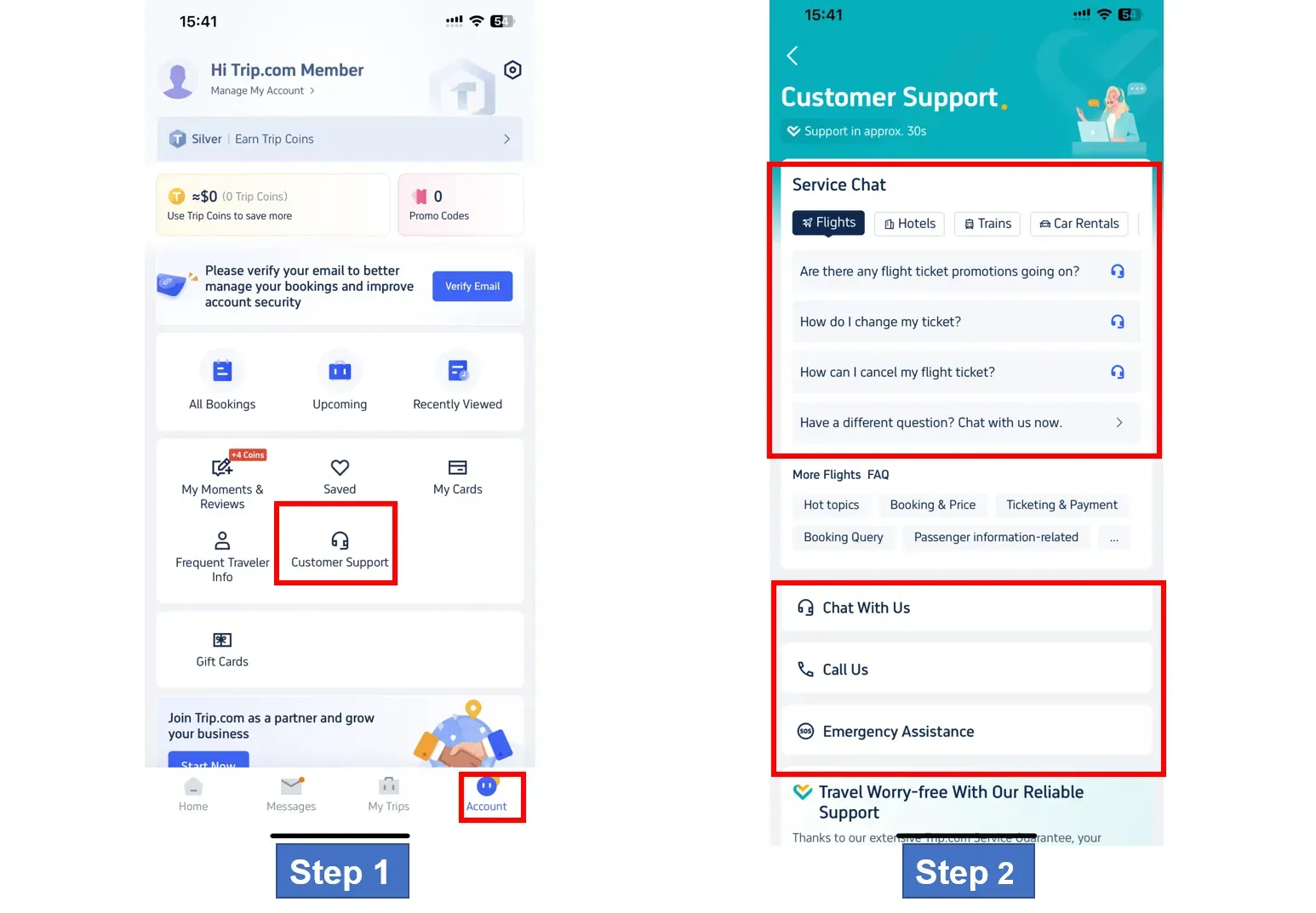
Step 1: Open the Trip.com app to Contact Customer Service

Open the Trip.com app on your phone and sign in to your account. Go to "Account" and tap "Customer Support" for more information.

Step 2: Read All Customer Service Options

Trip.com offers various customer services, including Chat service, Call service, and Emergency assistance. Customers can choose the service they need assistance with.

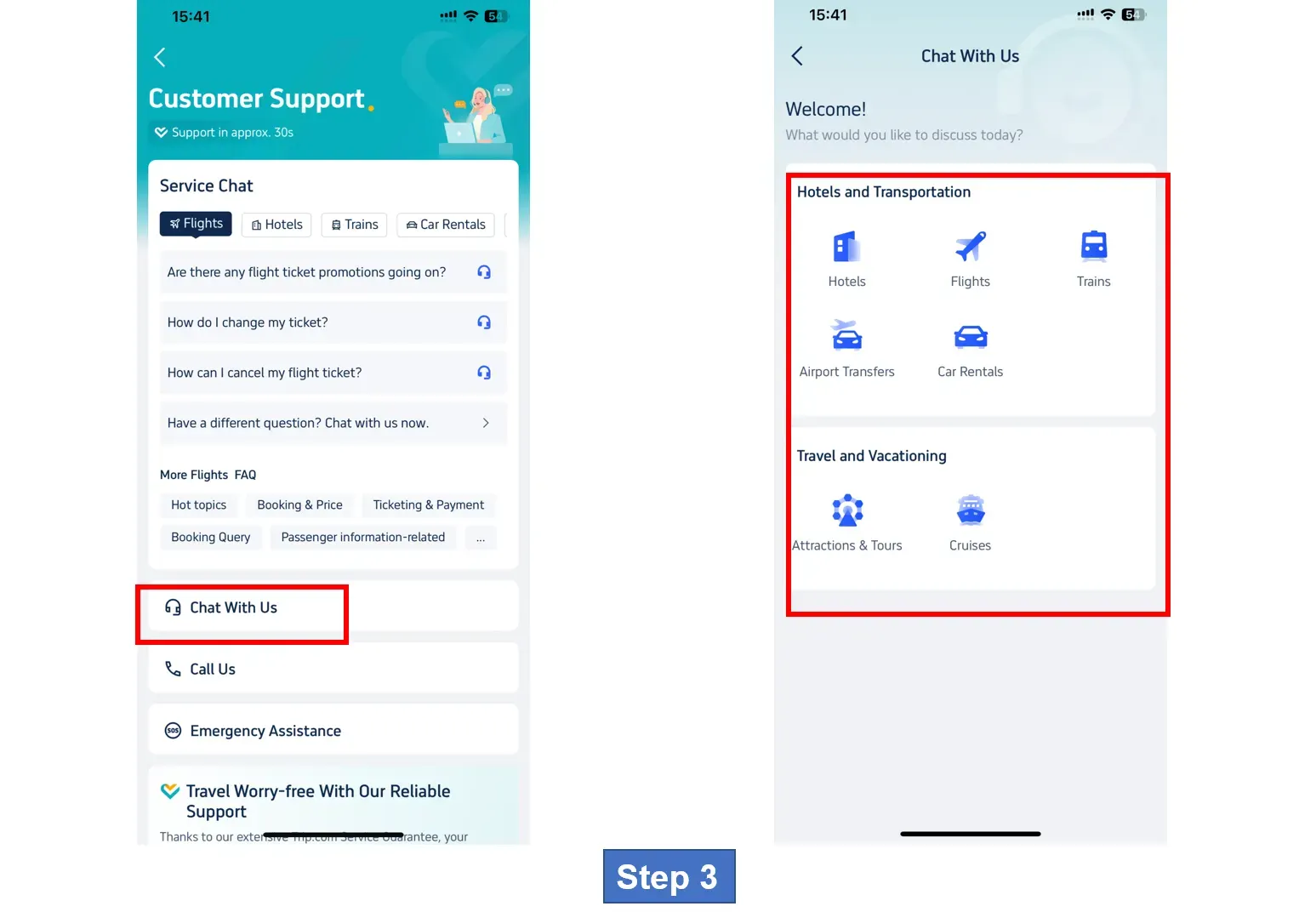
Step 3: Chat With the Customer Service Representatives

Tap on "Chat With Us" to start a textual conversation. You can get help with flights, hotels, transportation, or even get travel tips.

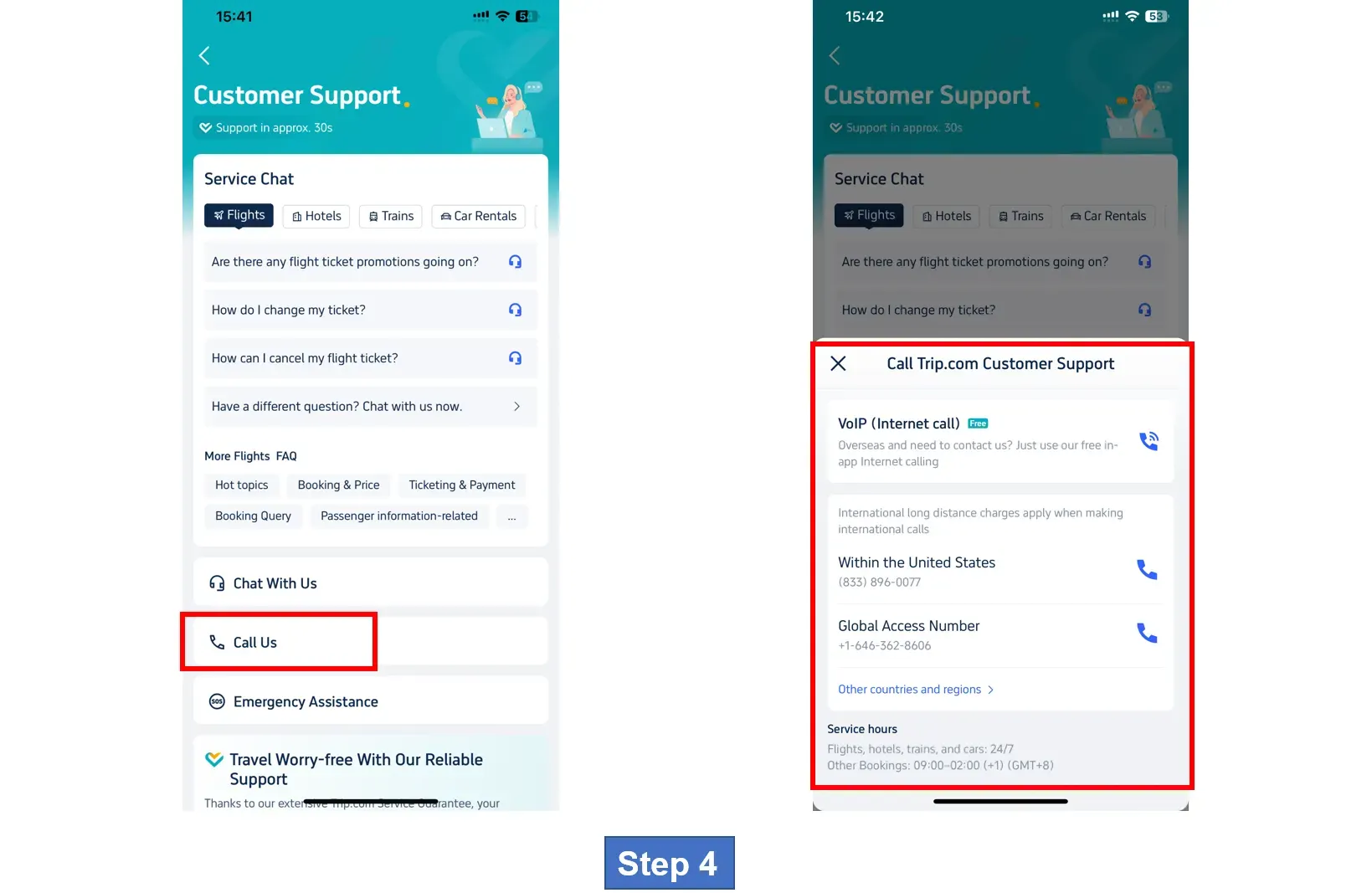
Step 4: Call the Customer Service

You can also have a verbal conversation with the customer support. Tap on "Call Us" to make a call. You can choose between an internet call or a global call depending on what you need.

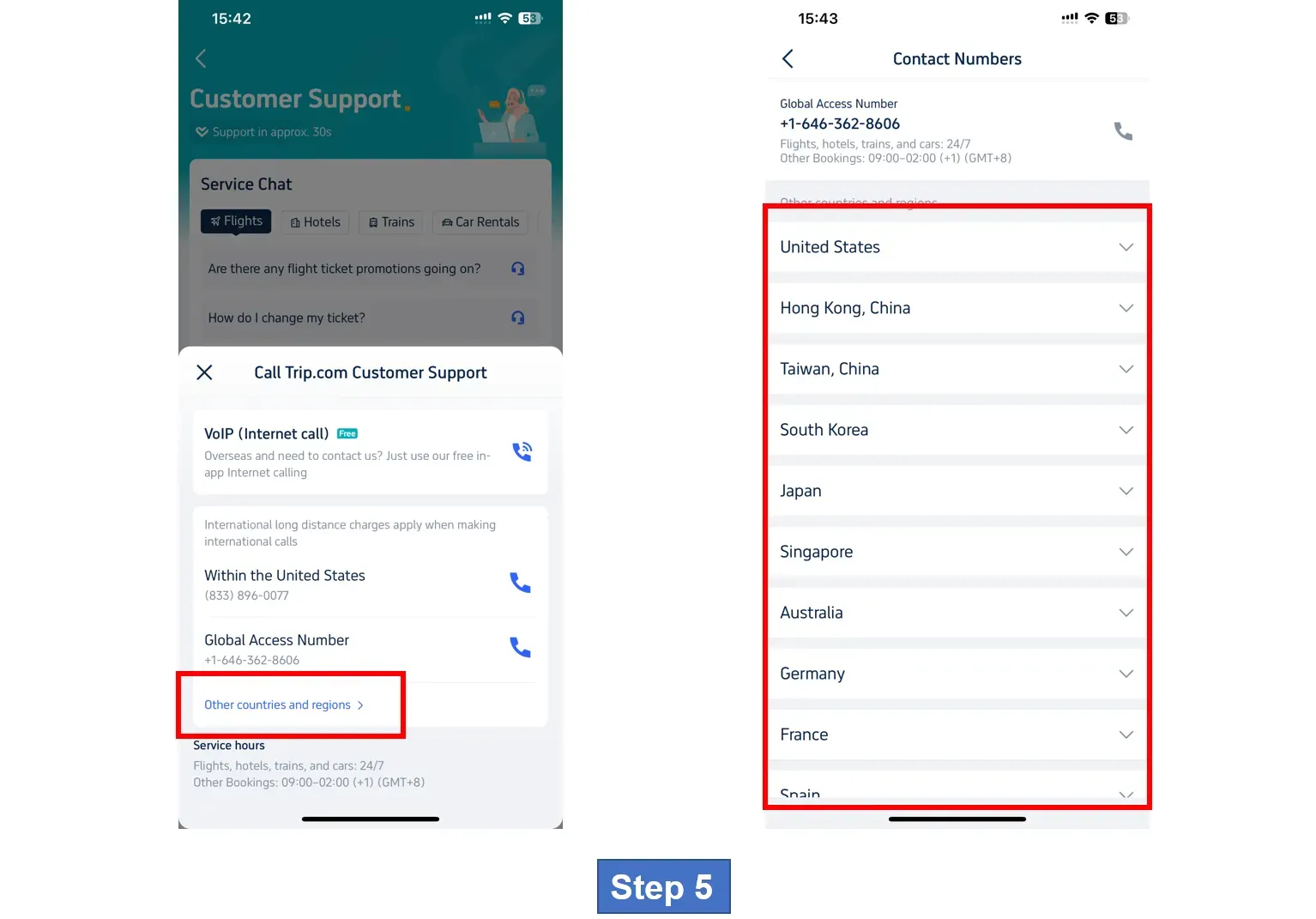
Step 5: Find the Trip.com Customer Service for Other Countries/Regions

Click on “Other countries and regions” to reach out to the teams in the location you desire. You can get the details and contact numbers of many countries in this section. For more details in this regard, check the table below!

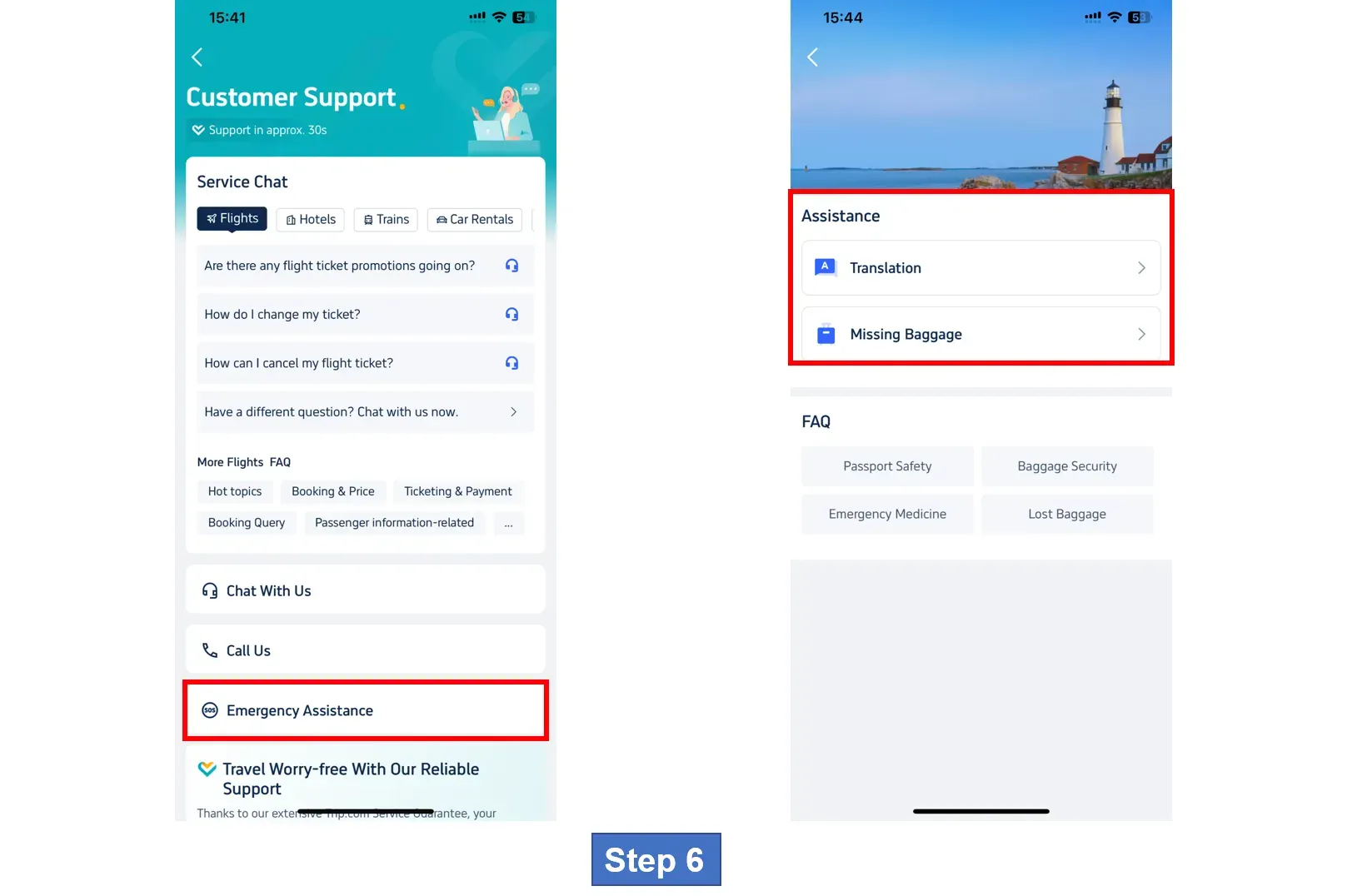
Step 6: Contact Trip.com Customer Support for Emergency Assistance

Need urgent help? Go to the "Emergency Assistance" section. There are options for medical assistance, translation help, emergency medical transfer, and more.

* The screenshots are only for reference.

Trip.com Customer Service Contact Number for Other Countries

See All Attractions
1426 booked
4.6/578 reviews
Global 92 Countries 4G/5G eSIM | Day Pass/Total Package | 1-30 Days | QR Code
SIM card
439498 booked
4.7/513795 reviews
Mainland China | 5G eSIM | Day Pass/Total Package | 24H Billing | 1–30 Days | QR code
SIM card
JPY 66
11779 booked
4.6/5444 reviews
USA/Canada 5G eSIM | Day Pass/Total Data Package | 1-30 Days | 24-Hour Billing | QR Code
SIM card
JPY 39
74710 booked
4.7/53087 reviews
Thailand Dtac 5G eSIM | Local Phone Number | Unlimited Data | 24-Hour Billing | QR Code
SIM card
JPY 763
240658 booked
4.6/56171 reviews
Mainland China/Hong Kong/Macao/Taiwan | 5G eSIM | Day Pass/Total Package | 24H | 1-30 days | QR code
SIM card
JPY 68
113754 booked
4.7/55005 reviews
Thailand | 5G eSIM | Day Pass/Total Package | 24H Billing | 1-30 days | QR code
SIM card
JPY 34
1301 booked
4.3/5106 reviews
Vietnam eSIM | 1-30 Days | Up to 60GB High-Speed Data | Coverage on Leading Network
SIM card
45437 booked
4.5/51574 reviews
Malaysia 5G eSIM | Day Pass/Total Data Package | 1-30 Days | 24-Hour Billing | QR Code
SIM card
JPY 24
Trip.com offers 24/7 call service for 40 countries and regions.
Important Note: Trip.com's customer service team is ready to help you anytime, day or night. You can usually expect to connect with someone in about 30 seconds.
Disclaimer: This article has been provided by an individual contributor or third party platform. If there is any discrepancy regarding the copyright, please contact us directly and we will delete the content immediately.
>
Trip.com Customer Service
aaaa