Trip.com Contact: Find Phone Numbers, Email & Customer Service

Author's Profile Picture
Trip.com Contact: Phone & email

Need to reach Trip.com? Get Trip.com contact info— latest Trip.com phone numbers, Trip.com email, live agent tips!

How to Contact Trip.com? 4 Major Ways Overview

Trip.com mainly has 4 easy ways to reach customer support—phone, chat, hotel email, and emergency help. Pick whichever works best for you.

How to Contact

How to Use It

When It’s Available

Languages Offered

Trip.com Phone

US: Local (833) 896-0077 | Global: +1-646-362-8606 (Check Trip.com phone numbers for latest numbers for more regions)

24/7 for flights/hotels/trains/cars;
9 AM–2 AM (GMT+8) for other bookings

English, Cantonese, Japanese, Korean, Thai (and more)

Trip.com Live Chat

Desktop: Go to Trip.com contact

App: Tap Message → headphone icon

Same as phone hours

Same as phone

Trip.com Email

Send to en_hotelsupport@trip.com for Hotel

Gets back to you in 1–2 days

English

Emergency Help

App: Tap Message → headphone icon → “Emergency Assistance”

Or call the phone numbers above

24/7 for urgent issues (e.g., lost bags, translation)

Same as phone

Trip.com Contact Numbers & Operating Hour

Trip.com Contact Number: United States & Global Access

If you prefer to talk directly to people, Trip.com offers 24/7 phone support for most travel needs. The following are the Trip.com hotline numbers available for use:

Trip.com Contact Number - Within the United States

  • Phone number: (833) 896-0077
  • Hours:
    • Flight, hotel, train and car rental: Available 24 hours a day, 7 days a week (24/7).
    • Other bookings (like tours or attractions): 09:00–02:00 (+1 time zone, which is GMT+8).

Trip.com Contact Number - Global Hotline Number

  • Phone number: +1-646-362-8606
  • Hours: The same as in the United States (flight/hotel/train/bus 24/7; 09:00-02:00 GMT (+1); other bookings +8).

⚠️ Important notice: Telephone numbers may change. For the latest Trip.com contact number, please always check Trip.com official contact number page.

🎁 Book Cheapest Flights Worldwide below | 8% Off Best Hotels | Get fast & reliable eSIM.
to Bangkok
to Manila
to Shanghai
to Tokyo
to Seoul
See All Flights
Los Angeles
LAX
Bangkok
BKK
Mon, Jan 19
Wed, Jan 21
One way
34% off
From 70,983.22INR 47,113.49
Los Angeles
LAX
Bangkok
BKK
Fri, Dec 5
Sat, Dec 6
One way
22% off
From 70,983.22INR 55,056.97
Los Angeles
LAX
Bangkok
BKK
Sun, Dec 7
Tue, Dec 9
One way
21% off
From 70,983.22INR 55,808.03
Los Angeles
LAX
Bangkok
BKK
Fri, Dec 5
Sun, Dec 7
One way
20% off
From 70,983.22INR 56,444.53
Los Angeles
LAX
Bangkok
BKK
Wed, Jan 14
Fri, Jan 16
One way
15% off
From 70,983.22INR 60,403.54
Los Angeles
LAX
Bangkok
BKK
Sun, Dec 7
Tue, Dec 9
One way
13% off
From 70,983.22INR 61,600.15
Los Angeles
LAX
Bangkok
BKK
Mon, Jan 19
Wed, Jan 21
One way
12% off
From 70,983.22INR 62,707.66
Los Angeles
LAX
Bangkok
BKK
Mon, Jan 19
Wed, Jan 21
One way
11% off
From 70,983.22INR 62,834.96

Trip.com Contact Email: What You Need to Know

Not all Trip.com services use email—but if you have a hotel-related question, there’s a dedicated email. Here’s the breakdown:

  • Hotel bookings: You can email Trip.com at en_hotelsupport@trip.com for help with hotel reservations, check-in issues, or hotel cancellations.
  • Flight bookings: Unfortunately, Trip.com does not have an email channel for flights. If you need help with flights (like changes, cancellations, or delays), use the chat or call options instead (we cover those next).

How to Find Trip.com Contact (Computer & Mobile App)

The first step to getting help is knowing where to find Trip.com contact options. It’s easy on both computers and the Trip.com app—here’s how:
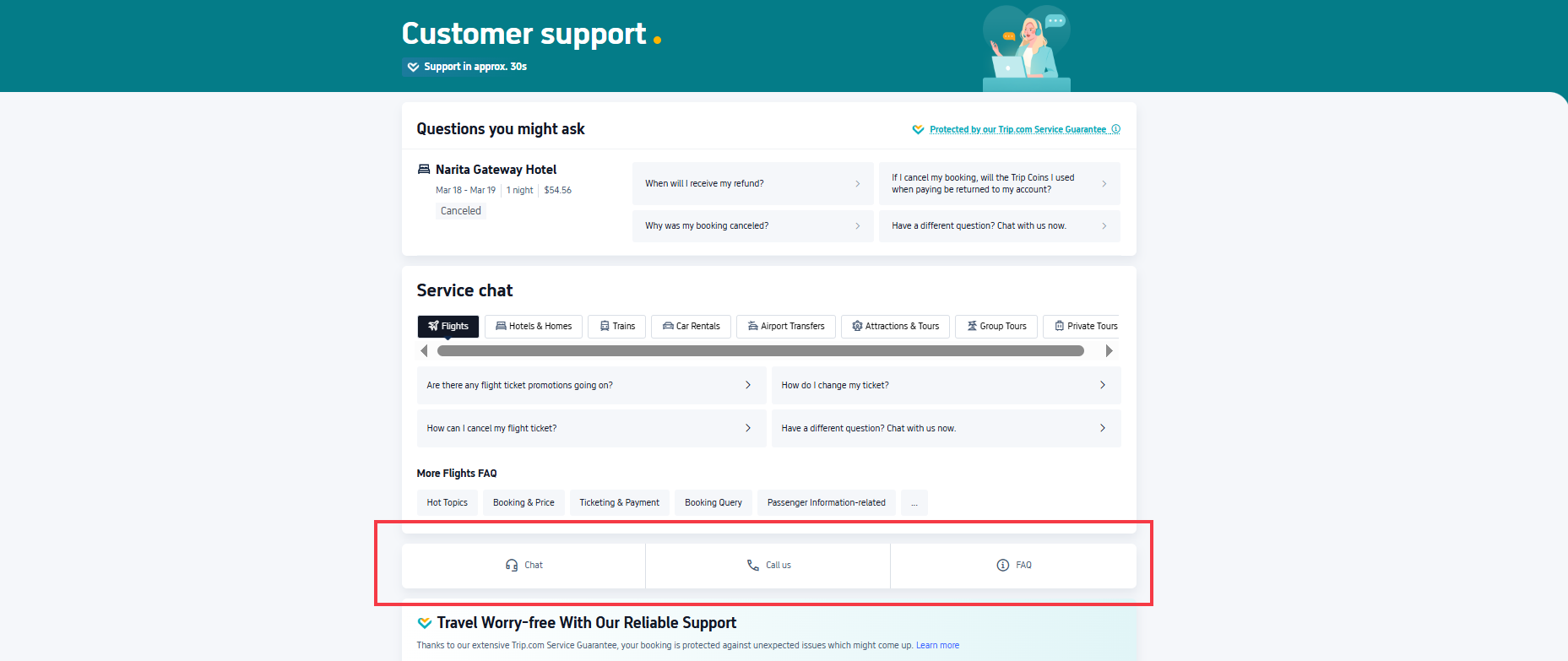
How to Find Trip.com Contact (Computer & Mobile App)

Find Trip.com Contact On a Computer

  1. Visit the Trip.com support page.
  2. Scroll to the middle of the page. You will see two main options:
    • Chat: Send a text message to Trip.com support (good if you prefer typing).
    • Call us: Click this to see Trip.com phone numbers for your IP area (you can also see more other regions' Trip.com phone numbers by clicking Other countries and regions).
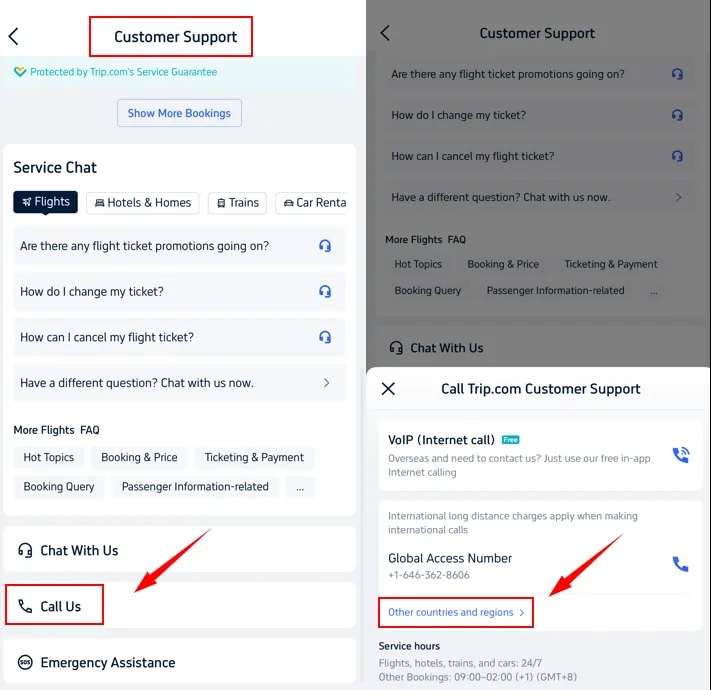
How to Find Trip.com Contact (Computer & Mobile App)

Find Trip.com Contact On Trip.com App

  1. Open the Trip.com app and click on the Messages TAB at the bottom.
  2. Look for the small headphone icon in the upper right corner (this is the customer service icon)—tap it.
  3. From here, you can choose:
    • Chat with us: Send text messages (great for quick questions).
    • Call us: Tap this to see a phone number tailored to your location (you can even use free in-app calls—more on that later!).

Find Trip.com Hotline for Other Regions

If you need to find Trip.com hotline from other countries and regions, click "Other countries and regions" to find other hotline numbers.

🎁 Book Cheapest Flights Worldwide below | 8% Off Best Hotels | Get fast & reliable eSIM.

How to Switch to a Live Agent on Trip.com Live Chat

How to Switch to a Live Agent on Trip.com Live Chat

Sometimes, automated AI chat responses aren’t enough—you need a real person. Here’s how to switch to a live agent on the Trip.com app:

  1. Open the Trip.com app or Trip.com customer support website, go to the Message tab, and tap the headphone icon (customer service).
  2. Start a chat (tap “Chat with us”).
  3. Type “Transfer to an agent” in the chat box and send it.
  4. Next, you’ll be asked to choose a “product line” (e.g., “Flights,” “Hotels,” “Trains”). Pick the one that matches your issue.

Why choose the right product line? If you pick “Hotels” for a flight problem, the agent might need to transfer you—and that could waste time. Choosing the correct category gets you to the right help faster.

Trip.com Emergency Assistance: Translation & Missing Baggage Help

Trip.com Emergency Assistance: Translation & Missing Baggage Help

Trip.com offers emergency support if you run into trouble while traveling. Here are the two main options:

Trip.com Emergency Translation Help

If you’re abroad and need help with language (e.g., a medical emergency or talking to local staff):

  • Trip.com can connect you with a local translator via phone, or help arrange an in-person translator.
  • Cost note: Trip.com doesn’t charge to introduce you to a translator, but you’ll have to pay the translator’s fees upfront.

Trip.com Missing Baggage Help

If your baggage is lost or delayed during an international flight:

  • Trip.com will share contact info for the airline or customs to help you get your baggage back.
  • Rules to know:
    1. Your baggage can’t have items forbidden by the airline or customs.
    2. You’ll need to pay any related fees upfront (Trip.com may ask for a credit card guarantee from you or a family member).
    3. You must share your Trip.com booking info to use this service.
    4. Only use this for real emergencies—don’t request it for minor issues.
🎁 Book Cheapest Flights Worldwide & Trip.com Airport Transfer | 8% Off Best Hotels | Grab New User Coupon for eSIM, Attraction Tickets Below!
See All Attractions
1426 booked
4.6/578 reviews
Global 92 Countries 4G/5G eSIM | Day Pass/Total Package | 1-30 Days | QR Code
SIM card
82778 booked
4.7/53426 reviews
Europe 4G/5G eSIM | DayPass /Total | 500MB/day-total 30GB | 1-30 days | 24-hour billing | QR code
SIM card
INR 9.00
10599 booked
4.5/5371 reviews
USA/Canada 5G eSIM | Day Pass/Total Data Package | 1-30 Days | 24-Hour Billing | QR Code
SIM card
INR 42.00
178184 booked
4.7/56190 reviews
Japan SoftBank 4G/5G eSIM | TikTok & ChatGPT Available | Day Pass | 24-Hour Billing | 1-30 Days | QR Code
SIM card
INR 50.91
213850 booked
4.6/55491 reviews
Mainland China/Hong Kong/Macao/Taiwan | 5G eSIM | Day Pass/Total Package | 24H | 1-30 days | QR code
SIM card
INR 38.46
87476 booked
4.7/53881 reviews
Thailand | 5G eSIM | Day Pass/Total Package | 24H Billing | 1-30 days | QR code
SIM card
INR 21.37
1301 booked
4.3/5106 reviews
Vietnam eSIM | 1-30 Days | Up to 60GB High-Speed Data | Coverage on Leading Network
SIM card
33706 booked
4.6/51207 reviews
Malaysia 5G eSIM | Day Pass/Total Data Package | 1-30 Days | 24-Hour Billing | QR Code
SIM card
INR 13.70

What is Trip.com Customer Service & How it Works?

Trip.com Customer Service: What is it & How it Works?

Looking for contact information usually means you need help, and Trip.com customer service is designed to make this easy. Here's what you should know:

  • 24/7 support: No matter which time zone you are in, you can get help with flights, hotels, trains or cars at any time (day or night).
  • Free in-app calls: If you are abroad, international calls can be quite expensive. Use the VoIP (Internet Phone) option in the Trip.com app - it's free as long as you have Wi-Fi or data.
  • No long waits: Trip.com tries to answer calls and chat messages quickly (30s-1min+ on avg.) - you won't have to wait in line for 10-30+ minutes like on some other travel websites.
  • Booking guarantees: If your flight is cancelled after payment or there are no rooms available at your hotel upon your arrival, Trip.com will assist in resolving this issue (and may compensate you——learn more about Trip.com customer service).
  • Early travel warnings: Trip.com monitors natural disasters, epidemics or political changes. If your trip may be affected, it will issue you a warning.

[8% Off] Global Hotel Recommendations

🎁 Book Cheapest Flights Worldwide & Trip.com Airport Transfer | 8% Off Best Hotels | Get fast & reliable eSIM.
Search Top Global Hotels
See All Hotels

NO.1
9/10908 reviews
TRIBE Living Bangkok Sukhumvit 39 by AccorHotels
Hotel in Bangkok
Sauna
Airport pickup service
NO.2
9.6/103102 reviews
Shanghai Xiangyun Parent Child Hotel
Hotel in Shanghai
Restaurant
24-hour front desk
NO.3
8.9/101326 reviews
KOKO HOTEL Osaka Shinsaibashi
Hotel in Osaka
24-hour front desk
Luggage storage
NO.4
9.7/1079 reviews
The Mulia Bali
Hotel in Bali
Airport pickup service
Restaurant
NO.5
9.5/103846 reviews
J Hotel Shanghai Tower
Hotel in Shanghai
Airport pickup service
Restaurant
NO.6
8.9/10108 reviews
HOSHINOYA Fuji
Hotel in Fujikawaguchiko
Restaurant
24-hour front desk

FAQs about Trip.com Contact

  • What are the exact operating hours for Trip.com customer service?

    Trip.com’s customer service hours vary by service type for US users: Flights, hotels, trains, and car rentals: Available 24 hours a day, 7 days a week (24/7) . Other bookings (e.g., tours, attractions, airport transfers): 09:00–02:00 (+1 time zone, GMT+8) . Emergency assistance (like translation or missing baggage help) is also available 24/7 .
  • Can I get a refund if I have a problem with my booking?

    Yes, but it depends on the issue and booking policy: If the problem is caused by Trip.com (e.g., failed ticket issuance, hotel overbooking, or incorrect booking details), Trip.com offers advance compensation after verifying your claim. This may include full refunds, price difference coverage, or free rebooking . For issues like flight cancellations/delays due to force majeure, Trip.com may waive hotel cancellation fees for flight+hotel packages . Non-refundable bookings (e.g., some hotels or tickets) may still qualify for partial refunds if you cancel due to unforeseen medical issues—submit supporting documents (e.g., hospital records) within 1 week of your request . Always contact customer service immediately and keep invoices/receipts for faster processing .
  • How do I contact Trip.com in an emergency during my trip?

    In emergencies (e.g., medical issues, lost baggage, or language barriers), US users can use these 24/7 options: In-app emergency assistance: Open the Trip.com app → Go to "Message" → Tap the headphone icon → Select "Emergency Assistance" for translation help or missing baggage support . Phone call: Use the US number (833) 896-0077 or global access number +1-646-362-8606 (both 24/7 for urgent issues) . Free VoIP call: In the app’s "Call us" section, choose "VoIP (internet call)" to avoid international charges—works with Wi-Fi/data .
  • What phone numbers should I use for Trip.com customer service?

    Within the US: (833) 896-0077 (24/7 for flights, hotels, trains, cars; 09:00–02:00 GMT+8 for other bookings) . Global access: +1-646-362-8606 (same hours as the US number, works worldwide) . Latest updates: Always check https://us.trip.com/help/ for the most current numbers, as they may change .
  • Does Trip.com customer service support other languages besides English?

    Yes! Trip.com offers 24/7 multilingual support in around 24 languages, including Cantonese, Japanese, Korean, and Thai . When contacting via chat or phone, you can request assistance in your preferred language.
  • How long does it take to get a refund after my claim is approved?

    Once your refund claim is verified, Trip.com typically processes it within 1 working day . The refund will be returned to your original payment method, but bank processing times may take an additional 3–7 days depending on your bank.
  • What should I do if my flight is canceled/delayed, affecting my hotel booking?

    If your flight (booked on Trip.com) is canceled or delayed due to force majeure, contact Trip.com immediately via chat or phone. For flight+hotel packages, Trip.com will let you cancel the hotel booking for free in most cases. They may also help rearrange your hotel stay or cover price differences for rebooking .
  • Can I request a refund for a non-refundable hotel if I can’t travel due to illness?

    Possibly. If you can’t travel due to serious medical issues (e.g., hospitalization, broken bones), submit a cancellation request with medical documents (e.g., doctor’s note) within 1 week. Trip.com will negotiate with the hotel to reduce or waive cancellation fees . Note that approval depends on the hotel’s policy and document verification.
  • Is there a general contact email for Trip.com (not just hotels)?

    No, Trip.com doesn’t have a general contact email. Only hotel questions can be emailed to en_hotelsupport@trip.com. For other issues (flights, trains, tours), use chat or call.
  • How long does it take to connect with a live agent on Trip.com?

    Trip.com tries to connect you to a live agent within 30s (on avg.) to a few minutes, especially if you choose the right product line (e.g., “Flights” for flight issues). During busy times (like holidays), it might take a little longer—but it’s usually faster than most travel sites.
Disclaimer: This article has been provided by an individual contributor or third party platform. If there is any discrepancy regarding the copyright, please contact us directly and we will delete the content immediately.
>>
Trip.com Contact