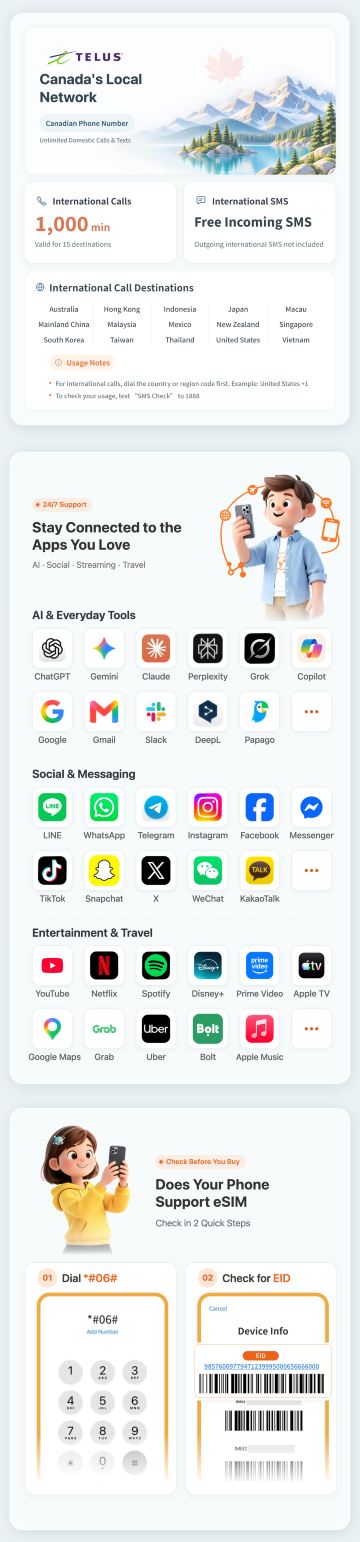
Canada TELUS 5G eSIM | Local IP · Yellowknife Coverage | Unlimited Calls within Canada + 1000 Intl Minutes | 30 Days | QR Code

Canada TELUS 5G eSIM | Local IP · Yellowknife Coverage | Unlimited Calls within Canada + 1000 Intl Minutes | 30 Days | QR Code

4.7/5
Good
(81 reviews)
1K+ booked
Use anytime during validity
Book now for today
Booking confirmation
Non-refundable
From
$20.58
Limited-time sale
5% off
Device info

• Coverage: Canada (Including Yellowknife & Whitehorse)

• Carrier: TELUS (Local IP)

• Network Type: 5G

Product details
Show less
Validity period
Valid for 60 days from the booking date, Valid for 1 use(s) only
What's included
Mobile Data
Calls & SMS
Local Phone Number
Hotspot Sharing Supported
Other telecommunications and value-added service charges not specified above.
How to use
■ Before You Fly
Use One-Tap Installation from your Trip.com order page for the fastest setup.
If unavailable, scan the QR Code in your voucher.
 
• iPhone: Settings > Cellular > Add eSIM
• Android: Settings > Network & Internet > SIMs > Add eSIM
 
■ Upon Arrival
• Turn ON the eSIM
• Select the eSIM for Mobile Data
• Wait for network connection
 
■ Quick Troubleshooting
• Make sure the eSIM is selected for Mobile Data
• Check that the APN shows "sp.telus.com"; set it manually only if needed
• Turn OFF VPN if enabled
• Restart your device and try again
 
Need help? Contact the Activity Provider for 24/7 support.
Change & cancellation policies
Please note that the booking cannot be canceled once it is confirmed
The selected date and time cannot be modified after booking.
Important note

■ Before You Use

• Please ensure your device supports eSIM and is carrier-unlocked.

• The eSIM can be installed in advance. To avoid activating the plan early, connect to a supported network only when you are ready to use it.

• Each eSIM can only be installed once and is linked to the original device. It cannot be transferred to another device or reinstalled if deleted. Please do not delete the eSIM.

• After successful installation, scanning the same QR Code again may display an error message.


■ Activation & Usage

• To avoid unexpected roaming charges, turn OFF Data Roaming on your original SIM card or eSIM.

• To check your data usage, text "SMS Check" to 1888.


■ Additional Information

• Network speed, coverage, and 4G/5G availability may vary depending on location, network conditions, and device compatibility.

• Some apps and services may be unavailable due to regional restrictions or provider-specific policies.

• If you experience any installation, activation, or connection issues, please contact our 24/7 support team through your order page.

FAQ