Does Air Canada Have Free Wi-Fi? Stay Connected on Your Flight


Yes, you can enjoy free Wi-Fi on Air Canada. But only in special cases, such as when you're in business class, a member of Aeroplan, or on selected routes.
Other passengers can purchase Wi-Fi for full internet access. Expect to pay $5 for one hour, or $15 for a full-flight pass.
In this guide, you’ll find out who’s eligible for free Wi-Fi, how to get connected on board, and everything else you need to know before your flight.
Flight info.
Departure
Arrival
Weekly Schedule
-

AC794
Air Canada
10:20 PM
LAX
6:07 AM
YYZ
S M T W T F SSearch -
AC788
Air Canada
1:48 PM
LAX
9:06 PM
YYZ
S - - - T F -Search -
AC782
Air Canada
8:00 AM
LAX
3:47 PM
YYZ
S M T W T F SSearch

Air Canada Wi-Fi Overview
Not everyone needs internet in the air, but for some travelers, like remote workers, it’s essential.
- Free Wi-Fi: Eligible passengers can get free access to Air Canada Wi-Fi.
- Paid Wi-Fi: Don't worry if you're not qualied for free Wi-Fi. You can choose to purchase a Wi-Fi pass.
- Availability by Route: Wi-Fi is available on most North American, Caribbean, and Mexican flights.
👇🏻 Keep reading to find more detailed info about Air Canada free Wi-Fi!
Who Qualifies for Free Wi-Fi on Air Canada?

Air Canada - North America Business Class
In fact, Air Canada offers free Wi-Fi to specific groups of passengers. Check if you fall into one of these categories:
- Aeroplan Members: Members of Air Canada’s loyalty program often get free Wi-Fi.
- Business Class Passengers: If you're flying Business Class, free Wi-Fi is often included as extra benefits.
- Select Promotional Routes: Air Canada has introduced free Wi-Fi on specific North American and “Sun destination” flights (e.g., Mexico and Caribbean).
- Expansion Plans: Free Wi-Fi is gradually being added to more long-haul international flights, expected to reach broader coverage in 2026 (according to Air Canada's official).
😊 Note: Aeroplan members get "Free Messaging" (sponsored by Bell).
How can I become a member of Aeroplan?

Air Canada In-flight Entertainment and Connectivity
Follow these steps to get yourself a member of Aeroplan for free access to Wi-Fi on Air Canada.
- Step1: Visit the Aeroplan website, https://www.aeroplan.com. Click “Join Aeroplan” or “Sign Up.”
- Step 2: Fill out your details, such as name, email, password, and basic contact information.
- Step 3: Confirm your account. You’ll receive an email to verify your membership.
- Step 4: Start earning points. Once your account is active, you can earn Aeroplan points on Air Canada flights, purchases, and partner services.
Tip: Aeroplan members on eligible flights can enjoy benefits like free Wi-Fi, priority boarding, and other benefits depending on your tier.
How to Connect to Air Canada Wi-Fi?
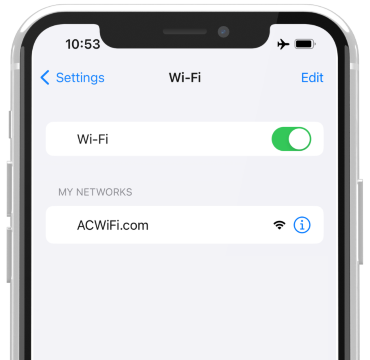
Enable Wi-Fi on your device
Follow these steps to get connected during your flights on Air Canada.
- Step 1: Enable Wi-Fi on your device before takeoff.
- Step 2: Select the “AirCanadaWiFi” network in your device’s Wi-Fi settings.
- Step 3: Open your browser — a login page will automatically appear.
- Step 4: Follow instructions to access the free Wi-Fi (eligibility check) or purchase a plan if needed.
Tips for a smooth connection
- Connect as soon as the aircraft reaches cruising altitude for better stability.
- Restart your device if the network does not appear.
- Try to avoid heavy activities like streaming or large downloads, since it’s slower than the paid plans.
Get Well-Connected!
See all attractions
 34942 booked


Paid Wi-Fi Options on Air Canada
For passengers not eligible for free Wi-Fi, Air Canada provides you paid access, which includes:
- Pricing: Usually hourly, with full-flight passes available.
- Speed: Higher speed than free Wi-Fi, supporting streaming and video calls.
- Access: Available on all Wi-Fi-enabled flights, including long-haul international routes.

Air Canada is certified as a 4-Star Airline | Skytrax
Air Canada in-flight Wi-Fi pricing
| Wi-Fi Pass Type | Approx. Price (USD) | What You Get |
|---|---|---|
1-Hour Pass | ~$4.70 | Internet access for one hour of your flight. |
One-Way / Full-Flight Pass | ~$15.40 | Wi-Fi access for the entire flight. |
All-Day Pass (24-hr) | ~$19 | Unlimited Wi-Fi for 24 hours (good for multiple flights). |
Monthly Plan | ~$48.40 | Unlimited Wi-Fi for a month on connected flights. |
How to purchase Air Canada Wi-Fi packages?
To purchase Air Canada Wi‑Fi, follow these simple steps:
- Step 1: Enable Wi‑Fi on your device once the aircraft reaches cruising altitude.
- Step 2: Connect to the “AirCanadaWiFi” network in your device’s Wi‑Fi settings.
- Step 3: Open your web browser — you’ll be redirected to the Air Canada Wi‑Fi portal.
- Step 4: Choose a Wi‑Fi pass (hourly or full‑flight) and enter your payment details.
- Step 5: Complete the purchase and start using the internet right away.
Air Canada Wi-Fi: Device Support & Speed
Air Canada Wi-Fi works with smartphones, tablets, and laptops. You can switch devices during the flight.
Wi-Fi Speed
- Free Wi-Fi and messaging are sufficient for texting, email, and light browsing.
- Paid Wi-Fi generally supports streaming video, music, and video calls.
- Netflix or other HD streaming might experience buffering, especially during peak usage.
Tip: Download movies or shows to your device before flying if you want guaranteed smooth streaming, even if you plan to purchase a Wi-Fi pass for other tasks.
Does Air Canada have Free Messaging?
Air Canada has partnered with Bell to offer free messaging on select Wi-Fi-enabled flights. This benefit is available primarily for Aeroplan members, even if full Wi-Fi access isn’t included.
✔️ Key points
- Eligible users: Aeroplan members flying on supported aircraft.
- What’s included: Free messaging via apps like WhatsApp, iMessage, and Facebook Messenger.
- Limitations: Only text and small media files — streaming, video calls, or browsing require a paid Wi-Fi pass.
- How to access: Connect to the AirCanadaWiFi network, and your messaging apps should work automatically.
This feature is especially helpful for staying in touch without purchasing a full internet pass, making short communications easy and convenient during your flight.
Pros and Cons of Air Canada Wi-Fi
While convenient, it’s useful to know the limitations:
Pros of using Air Canada Wi-Fi
- Stay connected for work or personal messaging
- Stream content (paid plan)
- Access Air Canada app features for free, even on flights without full Wi-Fi
Cons of using Air Canada Wi-Fi
- Free Wi-Fi has limited bandwidth, mostly for messaging and browsing
- Speeds can vary depending on aircraft and route
- Not all flights offer free Wi-Fi yet
Alternatives When Wi-Fi Isn’t Free
If your flight doesn’t include complimentary Wi-Fi, consider these alternatives to keep your daily work routines or entertainment needs:
- Download content before flying: Movies, music, and podcasts for offline use.
- Prepare work offline: Download documents, spreadsheets, or presentations to work without internet.
- Organize photos and files: Clean up your device, organize photos, or edit offline-ready files.
✔️ Note: On most Air Canada flights, your phone won’t be able to send/receive data via your carrier. You’d need in-flight Wi-Fi to access the internet.
 | ||
Airline name Air Canada | Airline code AC | Airline type Full service carrier (FSC) |
Airline alliance  Star Alliance Star Alliance | ||
Popular Countries Air Canada Flies to: China, Canada and United States | ||
Popular Air Canada Arrival Cities | ||
Popular Air Canada Departure Cities |
Based on Trip.com Historical Data
Wrap It Up
Staying connected on Air Canada flights is easier than ever, but free Wi-Fi isn’t available on every flight or for every passenger.
Before your next flight, check Air Canada’s Wi-Fi availability, know your eligibility, and follow the steps to stay connected. Have a safe flight and never get bored in the air!
Top Hotels in Canada
See All Hotels




FAQs about Air Canada Free Wi-Fi
-
Is Wi-Fi free on all Air Canada flights?
-
Who qualifies for free Wi-Fi on Air Canada?
-
How do I connect to Air Canada Wi-Fi?
-
Can I use my mobile data on an Air Canada flight?
-
What if my Air Canada flight doesn’t have free Wi-Fi?
Disclaimer: This article has been provided by an individual contributor or third party platform. If there is any discrepancy regarding the copyright, please contact us directly and we will delete the content immediately.
Trending Searches
-
Air travel guide
-
Latest flight deals
-
Getting around
-
eSIM/SIM card