eSIM Hong Kong: Best eSIM Plans from Trip.com

By tinafa
July 29, 2025

Visiting Hong Kong for just a day? Skip the SIM card hassle—grab a 1-day eSIM and get online instantly. Here's how to choose the best one and stay connected with ease.
Activate 5G/4G eSIMs in Mainland China, Hong Kong, Macau

Mainland China/Hong Kong/Macau 5G eSIM
- CoverageHong Kong
- Data 500MB/day - Total 50GB
- Validity 1-30 Days
- Price from US$0.38

Mainland China/Hong Kong/Macao/Taiwan | 5G/4G eSIM
- CoverageHong Kong
- Data 500MB/day - Total 50GB
- Validity 1-30 Days
- Price from US$0.46

Mainland China/Hong Kong/Macau 5G eSIM
- CoverageHong Kong
- Data 500MB/day - Total 50GB
- Validity 1-30 Days
- Price from US$0.46
Hong Kong eSIM: What It Is & How It Works
What is a Hong Kong eSIM?
A digital SIM card that is integrated into your device is called an embedded SIM, or eSIM. You can use it to connect to Hong Kong's mobile networks without having to put in a physical SIM card. By scanning a QR code that the service provider has provided, you can activate it.
How does eSIM work in Hong Kong?
The provider emails you a QR code as soon as you buy a plan. Your data plan is immediately activated when you use your smartphone to scan the code. It works with the latest models of iPhones, Samsung Galaxy, Google Pixel, and other devices that support eSIM.
eSIM vs SIM Card vs Pocket WiFi in Hong Kong
Feature | eSIM | SIM Card | Pocket WiFi |
|---|---|---|---|
Setup | Instant via QR code | requires a physical card. | Needs separate device |
Convenience | No physical handling | Must swap SIMs | Carry an extra device |
Internet Speed | Fast and stable | Fast and stable | Varies with device |
✅Get your eSIM now to stay connected in Hong Kong.
Hong Kong Travelers' Top eSIM Plans

Popular Plans for Hong Kong eSIM
The most widely used eSIM programs differ in terms of data amount and length. Some popular choices for business travelers, short-term vacationers, and digital nomads are included below.
Provider | Plan Duration | Data Allowance | Price Range |
|---|---|---|---|
1–30 days | 500MB–30GB | From $18.24 USD | |
Holafly | 5–30 days | Unlimited | From $19 USD |
MobiMatter | 1–15 days | 1GB–20GB | From $4.50 USD |
Airalo | 7–30 days | 1GB–20GB | From $4.50 USD |
Top Hong Kong eSIM Providers

Trip.com eSIM Hong Kong
The most affordable eSIM options for brief visits to Hong Kong may be found on Trip.com. It's an excellent alternative for travelers who require dependable mobile data on a tight budget because of its customizable daily data plans and incredibly affordable prices. There are options with 1 GB or 2 GB of data per day that span 1 to 7 days.
| Plan Duration | Total Data | Price per Day |
|---|---|---|
1 Day | 1GB | $0.58 |
3 Days | 3GB | $1.93 |
5 Days | 5GB | $3.56 |
7 Days | 10GB | $7.20 |
MobiMatter Hong Kong eSIM (3HK)
Three Hong Kong, or 3HK, powers the eSIM plans that MobiMatter provides. Plans feature ample data and voice minutes and all come with a local Hong Kong number (+852). For tourists who also require calling capabilities, these plans are perfect.
Plan Duration | Data | Voice Minutes | Price (USD) |
|---|---|---|---|
7 Days | 1GB | – | $3.99 |
30 Days | 12GB | 2,000 minutes | $15.99 |
30 Days | 20GB | 3,000 minutes | $23.99 |
Nomad eSIM Hong Kong
Nomad offers 4G coverage for data-only eSIM plans via the China Mobile HK and HKT (CSL) networks. Flexible plans can be activated within 60 days of purchase or automatically when connected. Depending on their location, users can switch between networks for a stronger signal.
| Plan Duration | Data Allowance | Price (USD) |
|---|---|---|
7 Days | 1GB | $6.00 |
30 Days | 3GB | $9.00 |
30 Days | 10GB | $18.00 |
Holafly eSIM Hong Kong
Holafly, which uses the Three HK network, provides unlimited data subscriptions for brief visits to Hong Kong. Plans allow up to 500MB of hotspot sharing per day. The service is data-only and does not include a local number or SMS.
Airalo eSIM Hong Kong
Airalo offers dependable worldwide coverage, including several plans for Hong Kong. Airalo's Hong Kong pricing is less appealing for consumers who use a lot of data, even though it is convenient for travelers from other countries.
See all attractions
 13522 booked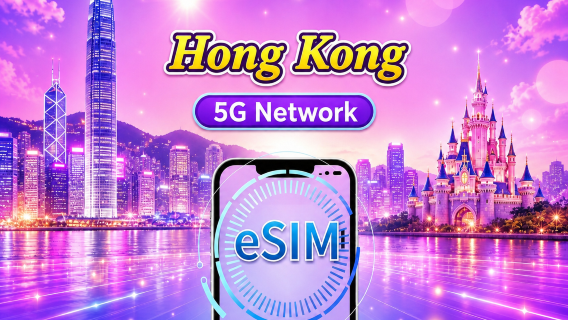


How to Set Up a Hong Kong eSIM in 5 Simple Steps

You are able to easily set up an eSIM before or during your trip to Hong Kong. As soon as you land, make sure your internet connectivity is seamless by following these five steps.
Step 1: Check Your phone Supports eSIM
Make sure your device is eSIM compatible before purchasing a Hong Kong eSIM.
How to Check:
| Device Type | Steps |
|---|---|
iPhone | Go to Settings → General → About Scroll down and look for “Carrier Lock” (should say No SIM restrictions) and EID (Embedded SIM ID) |
Android | Go to Settings → Connections → Mobile Networks → Network Operators |
Step 2: Select Your eSIM Plan for Hong Kong
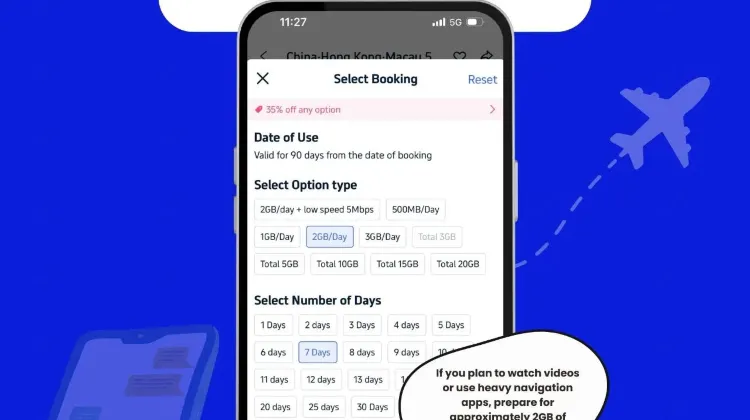
Selecting the appropriate plan based on your travel duration and data requirements comes next after compatibility has been confirmed.
| Trip Duration | Suggested Plan | Data Use |
|---|---|---|
1 Day | 1GB/day | Light use: maps, chat |
3 Days | 3GB total or 1GB/day | Standard travel use |
7 Days | 2GB/day or unlimited | For video, hotspot, or remote work |
Step 3: After making a purchase, obtain your QR code
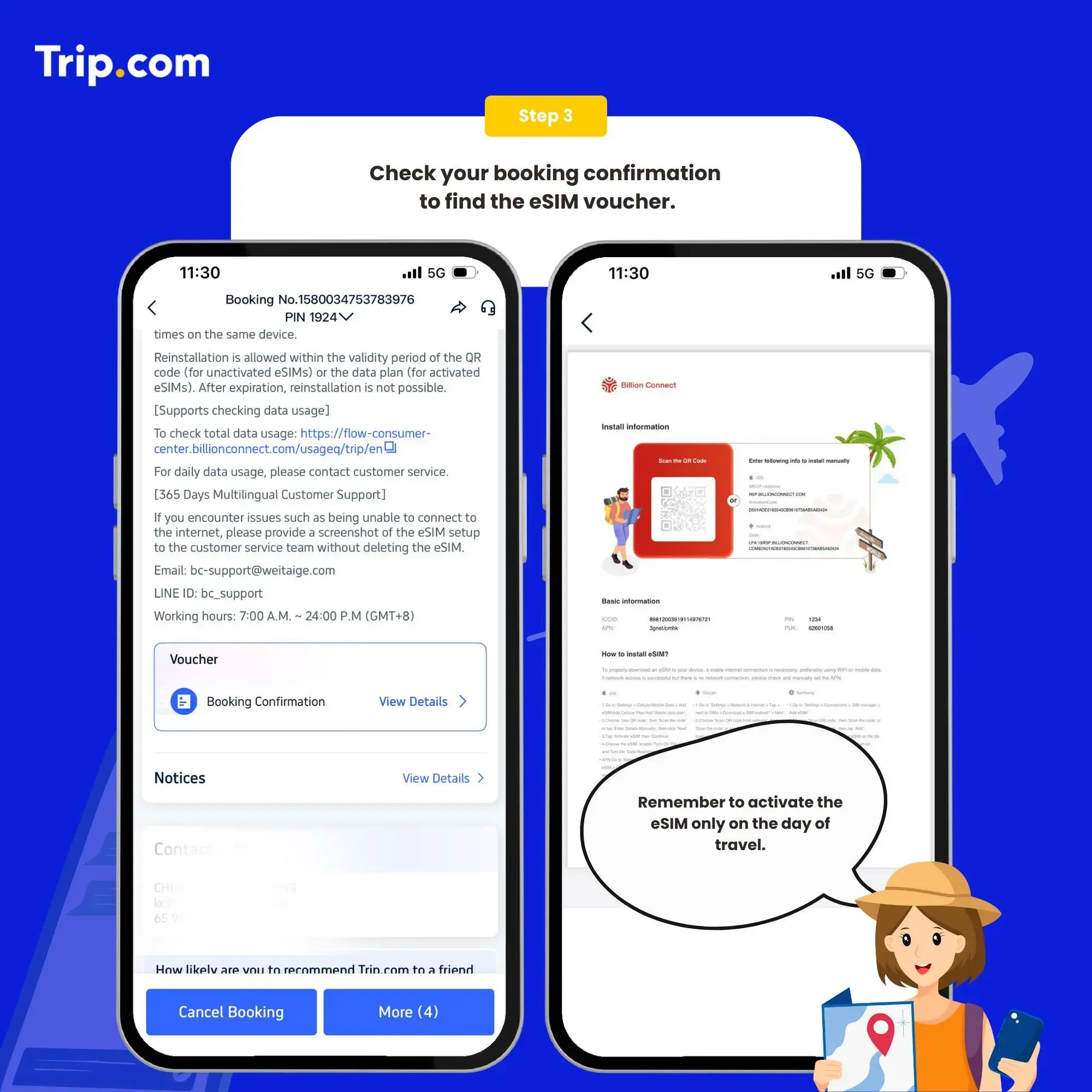
A QR code will be sent to your email by the provider (such as Trip.com) after you have purchased your plan.
Important Information
- When checking out, make sure your email address is accurate. There, you will receive the QR code.
- The booking confirmation page may also have the QR code.
- The QR code must be scanned on the device where you wish to install the eSIM; do not scan it with a separate phone or app.
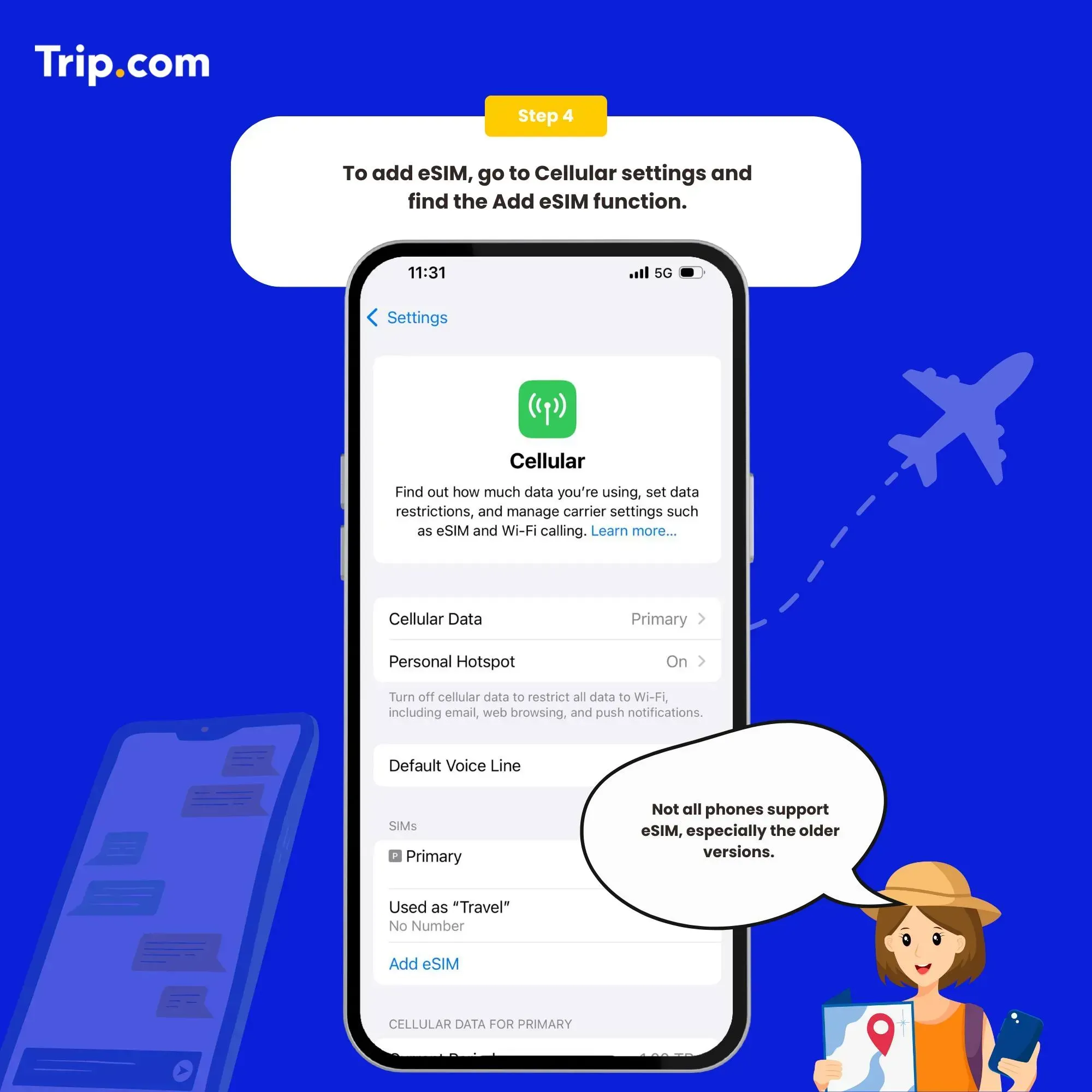
Step 4: Install the eSIM on Your Phone
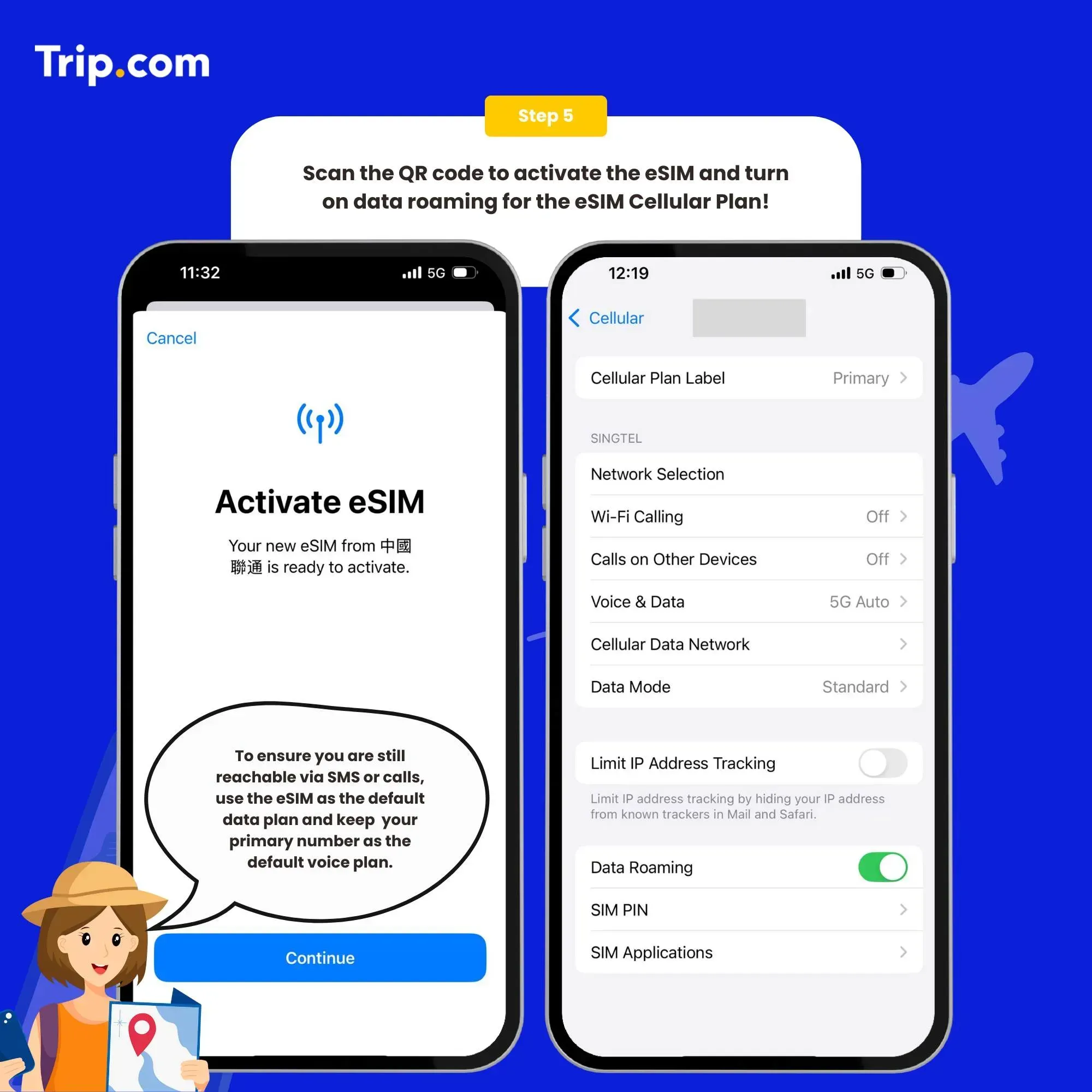
Now, use the QR code you got to install the eSIM. It just takes a couple of minutes.
Installation Steps:
| Device | Instructions |
|---|---|
iPhone | Settings → Mobile Data → Add eSIM → Scan QR code |
Android | Settings → Connections → SIM Card Manager / Mobile Network → Add eSIM → Scan QR code |
Step 5: Enable Hong Kong's Data Roaming and Connect
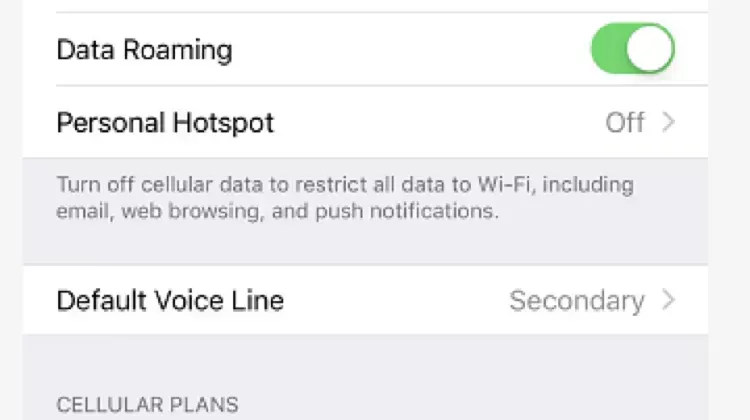
To activate your eSIM connection when you land in Hong Kong, turn on data roaming.
- Navigate to Settings > Data Roaming → ON → Mobile Network.
- To connect, wait a few seconds.
If not linked:
- Turn on and off airplane mode.
- Verify the APN settings again: Navigate to Access Point Names (APN) under Mobile Networks.
How to Pick the Best eSIM for Your Hong Kong Trip
Since Hong Kong is a tech-friendly city and most MTR stations, shopping centers, and cafés offer free WiFi, you probably won't need limitless data. The following advice will help you select the best eSIM plan based on your travel preferences:
| Traveler Type | Recommended Plan | Daily Use |
|---|---|---|
Light User | 1GB/day | Maps, chat apps, quick searches |
Social Media Lover | 2GB/day | Stories, reels, live posts |
Remote Worker/Streamer | 2GB/day or more | Zoom, hotspot, YouTube |
Smart Buys & Reliable Coverage That Makes Travel Easy
With dependable connections and adjustable plan durations, Trip.com provides one of the most affordable eSIM choices available in Hong Kong. However, here's how to get the most out of your purchase:
Travel-Savvy Buying Tips
| Tip | Why It Helps |
|---|---|
Choose a 7-day plan—even for 5–6 days | The daily cost drops to as low as $3.80, often cheaper than shorter plans |
Buy before departure | Avoid high airport prices and get connected right after landing |
Data resets daily at midnight | Great for travelers who plan long days of sightseeing or sharing content |
Where It Works (Spoiler alert: Nearly All Places)
You're covered in most locales, including the less-traveled ones, thanks to Trip.com eSIMs' use of major Hong Kong carriers including CSL and 3HK.
| Area | Signal Strength | Experience |
|---|---|---|
Central / Tsim Sha Tsui | ✅✅✅ | Strong 4G in malls, streets, and tourist hotspots |
MTR lines | ✅✅✅ | Works in most underground sections |
Dragon’s Back trail | ✅✅ | Signal stable for GPS and messages |
Sai Kung / Lantau | ✅✅ | Surprisingly solid even in nature areas |

Mainland China/Hong Kong/Macau 5G eSIM | Dual Network | Day Pass/Total Data Package | 24-Hour Billing | QR Code
4.6/5
21411 reviewsNo trips to mobile phone stores or physical card replacements. The speed is superb, and videos and maps loaded instantly. The service is 10/10, I recommend it to all travelers!

5G/4G eSIM in 8 Asian countries | Multi-network support, supports All AI & TikTok | 500MB/day - 50GB total | 1-30 days | 24-hour billing | QR code
4.6/5
5973 reviewsEasy to install, very clear instructions, good communication in China, Korea, and Japan. Very nice price! Thank you! I recommend it!
Mainland China 5G eSIM | Supports Google Maps / ChatGPT | Daily/Total Data Plans | 24-Hour Billing | 1–365 Days | QR Code
4.6/5
28163 reviewsI connected my eSIM card for another trip to China. Everything was clear, there were no connection issues. Upon arrival in China, I was able to provide the information immediately, without having to run around trying to buy a physical SIM card for exorbitant prices.

Mainland China 5G eSIM | ChatGPT Available | Day Pass/Total Data | 24-Hour Billing | 1-365 Days | QR Code
4.6/5
61998 reviewsThe SIM cards are good, but don't watch TV shows with them; they'll eat up all your GB. It's better to watch them using the shared Wi-Fi in your room.
China eSIM | 1-30 Days | Up to 60GB High-Speed Data | Coverage on Leading Network
4.3/5
119 reviewsthe signal is very good,it is very easy to open and use,the price is relatively better than buying a general store,and the quality of the signal is much better.
The Simplest Method for Activating Your China eSIM Without a QR Code
In China, staying in touch has never been simpler. Trip.com's innovative one-tap eSIM setup eliminates the need for complex stages and QR codes. This is the easiest way to connect to the internet, whether you're traveling to Beijing, Shanghai, or somewhere else.
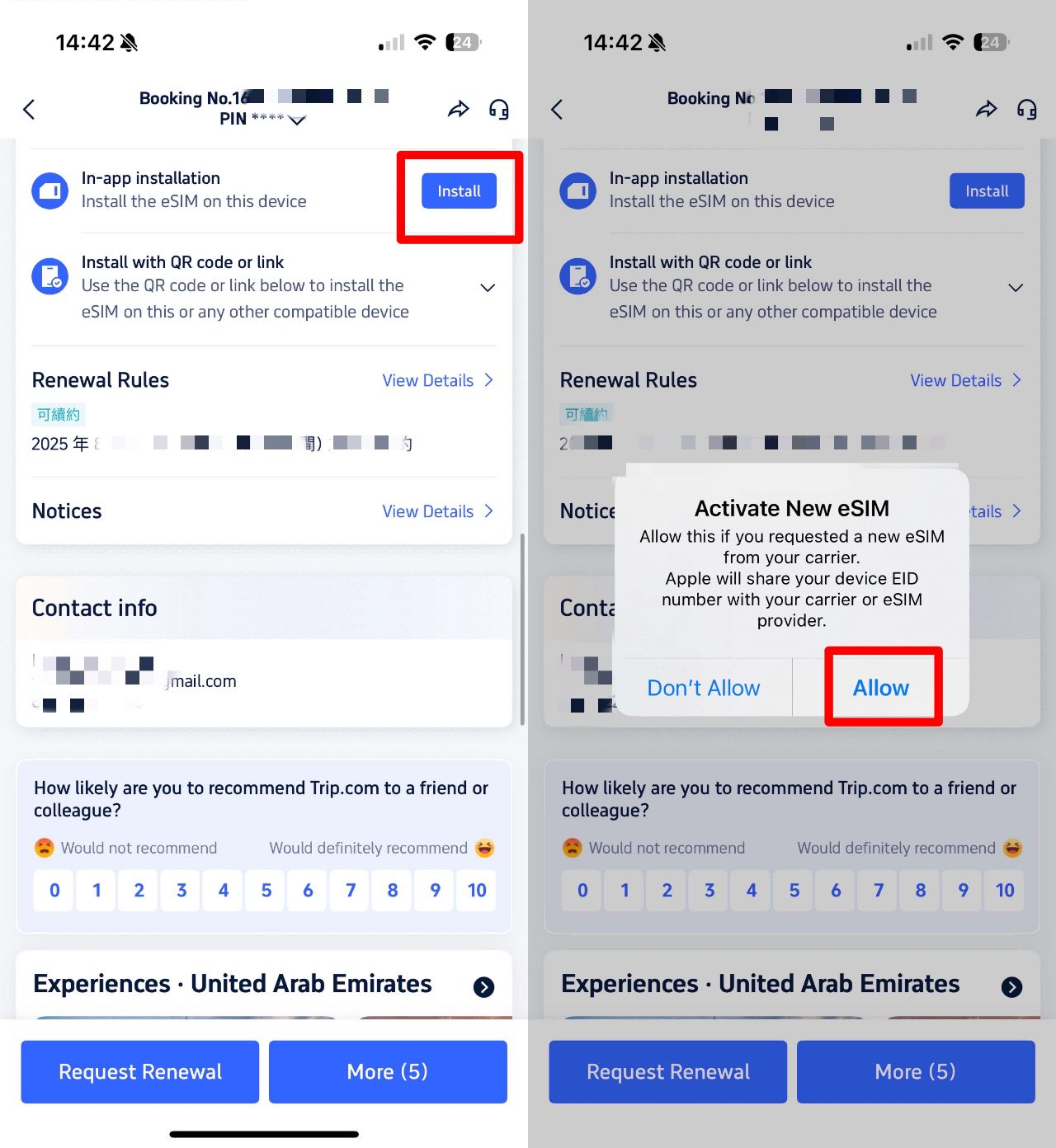
How to Activate Your China eSIM on Trip.com with a Single Tap

You can now install your eSIM straight from your booking screen on Trip.com, eliminating the need to scan a QR code. This is how it operates:
Step: What to Do
- 1️⃣ Book your China eSIM via the Trip.com app
- 2️⃣ Open your booking → Tap “In-App Installation.”
- 3️⃣ Follow the prompt to install instantly
Why This Setup Is a Game Changer for Travelers in China
- No QR Hassles: People often find it difficult to scan QR codes from confirmation emails, particularly when they are traveling alone or without a second device. That is entirely eliminated by this procedure.
- Quick Activation: It only takes a minute or less to install. You can even arrange it prior to your arrival in China.
- The eSIM from Trip.com connects you to networks that allow open internet access, so you don't have to worry about VPNs just to check your Gmail or send a WhatsApp message.
Car Rentals
Car Rental Promo Code - 8% Off
New User Enjoy up to 8% Off
TRIPCAR8
Why Choose Trip.com's Hong Kong eSIM?
There's no need to search for SIM cards at the airport or pay high roaming costs. When you land, Trip.com's eSIM provides you with immediate internet connection and is easy to set up. This
Feature | Trip.com eSIM |
|---|---|
Setup Time | Under 2 minutes |
Installation | QR code or in-app (no second device needed) |
Daily Data Options | 1GB/day or 2GB/day |
Network Coverage | Works across all major areas, including MTR and outlying islands |
Which Plan Is Best for Your Trip?
Trip.com has an eSIM for everyone, whether you're planning a quick eating and shopping trip or seeing temples, night markets, and treks.
Trip Length | Recommended Plan | Daily Data |
|---|---|---|
1-3 Days | 3-Day Plan | 1GB/day |
4-6 Days | 7-Day Plan | 2GB/day |
7+ Days | 10 or 15-Day Plan | 100GB/day |
See All Hotels




China Entry Requirements & Things to Prepare
- 24/240 China Visa-Free Transit: US citizens can stay up to 240 hours in 54 Chinese cities without a China visa when transiting.
- China Plug & Power: China plug uses Type A/C/F (220V). Bring a Type A/C adapter (US plugs sometimes work, but bring a universal adapter for safety).
- Internet Access in China: You need a China VPN for Google/Ins/YT/X, etc. But you can also use China eSIM with built-in access to overseas apps!
Getting Around & Top Destinations in China
- China Metro Guides: Shanghai Metro | Beijing Metro | Guangzhou Metro | HK Metro
- China Airport Guides: Shanghai Airport | Beijing Airport | Guangzhou Airport | HK Airport Express
- China City Maps: Beijing Map | Guangzhou Map | Shanghai Map | HK Map
- Top Destinations in China: Shanghai Attractions (Disneyland, Bund) | Beijing Attractions (Forbidden City, Great Wall) | HK Attractions (HK Disneyland)
Must-Have Apps in China
- China Map App: I love to use Gaode Map (English supported) or Baidu Map (limited English) for real-time transit and traffic. Or you can still use Google Maps in China, but some data may be outdated.
- China Transport App: Use DiDi (China's Uber) for English address input and cashless payment. I recommend to use the DiDi mini-program in Alipay for more convenience.
- China Payment App: Use Alipay or WeChat Pay (link foreign cards before arrival).
- China Booking App: Trip.com for high-speed trains (China HSR Guide), China hotels/flights. Use Trip.com promo codes for USA users.
FAQs: Hong Kong eSIM
-
What’s the best 1-day eSIM plan for Hong Kong?
-
Can I use a Hong Kong eSIM instantly after purchase?
-
Does the Hong Kong eSIM support calls or SMS?
Disclaimer: This article has been provided by an individual contributor or third party platform. If there is any discrepancy regarding the copyright, please contact us directly and we will delete the content immediately.
Trending Researches
-
eSIM/SIM card
-
Hot deals
-
Popular Cities
-
Latest flight deals
-
Popular attractions
- Flights from Macau to Guiyang
- Flights from Guangzhou to Guiyang
- Cheap flights from Seoul to Guiyang
- Return flights from Ta Khmau to Guiyang
- Flights from Jinan to Guiyang
- Cheap flights from Shanghai to Guiyang
- Return flights from Singapore to Guiyang
- Cheap flights from Shenzhen to Guiyang
- Cheap flights from Xiamen to Guiyang
- Cheap flights from Los Angeles to Guiyang
- Flights from Bangkok to Guiyang
- Flights from Beijing to Guiyang
- Flights from Lijiang to Guiyang
- Return flights from Chengdu to Guiyang
- Flights from Xi'an to Guiyang
- Hotels in Shanghai
- Hotels in Guangzhou
- Hotels in Beijing
- Hotels in Bangkok
- Hotels in Shenzhen
- Hotels in Tokyo
- Hotels in Hong Kong
- Hotels in Chongqing
- Hotels in Seoul
- Hotels in Las Vegas
- Hotels in Chengdu
- Hotels in Zhangjiajie
- Hotels in Kuala Lumpur
- Hotels in Ho Chi Minh City
- Hotels in Taipei
- Hotels in Hangzhou
- Hotels in Singapore
- Hotels in New York
- Hotels in Xi'an
- Hotels in Osaka
- SHIBUYA SKY Ticket
- Shanghai Disneyland Tickets
- Universal Studios Hollywood Tickets
- Universal Studios Hollywood Early Entry
- Shanghai Tower Tickets
- Sphere Tickets
- Universal Studios Japan Tickets
- Universal Studios Singapore
- Beijing studio minisite
- Shanghai Disneyland Early Entry
- georgia aquarium tickets
- Great Wall of China
- Edge New York Tickets
- Chengdu Panda
- Hong Kong Disneyland