How to Enter Passenger Name Correctly: Rules, Tips & Special Cases

By Bethy
August 12, 2026

A single misspelled letter, swapped first and last name, or omitted character can lead to check-in delays, extra fees, or even being denied boarding entirely. This guide walks you through exactly how to enter passenger name on flight bookings, handle special naming scenarios.
to Bangkok
to Manila
to Kuala Lumpur
to Singapore
See all flights


Why Getting Your Passenger Name Right Matters
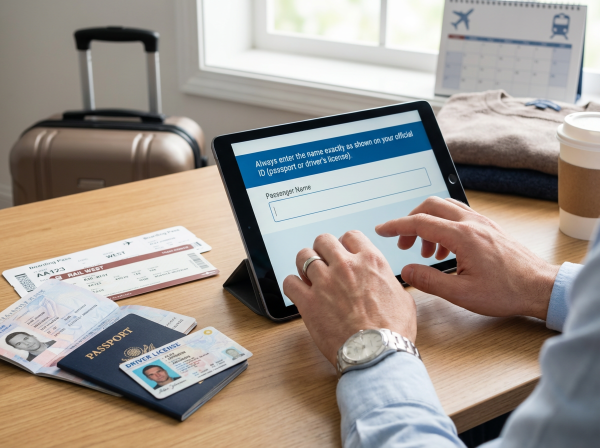
When you book a flight, your ticket forms a legal transport contract between you and the airline. Security systems—such as TSA Secure Flight in the United States or international border agency networks—automatically cross-check passenger manifests against government databases.
If your name on the booking does not match your official travel document:
- Check-In Delays: Automated kiosks and mobile check-in will fail, forcing you into long airport desk queues.
- Denied Boarding: Security agents or airline staff can refuse to let you clear security or board the plane.
- Costly Corrections: Most airlines charge administration fees to alter name details after a ticket is issued.
- Non-Transferability: Airlines forbid transferring tickets to another person. If a name entry error looks like a full name change, you may be forced to cancel the ticket and rebook at current walk-up fares.
The Golden Rule: How to Enter Passenger Name on a Flight Ticket
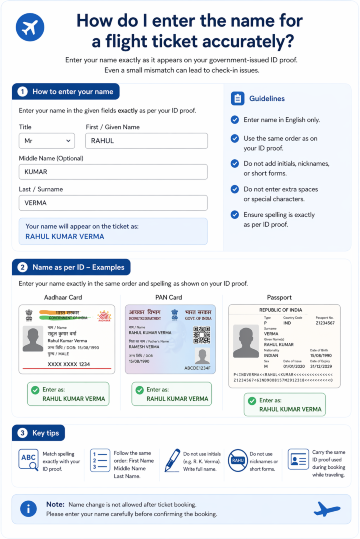
Always enter your name exactly as it appears on the machine-readable zone (MRZ) or official details page of your passport or government ID.
Document Field | Passport / Government ID Value | Airline Booking Field | Correct Entry Format |
Surname / Family Name | SMITH | Last Name | Smith |
Given Names | JOHN ALEXANDER | First Name | John Alexander (or First: John / Middle: Alexander) |
First Name vs. Last Name: Understanding the Fields
Booking platforms divide passenger details into primary fields. For travelers from cultures with non-Western naming order conventions, keeping these fields straight is crucial.
- First Name (Given Name): The personal name given to you at birth or legally chosen. On international passports, this is often listed under "Given Names."
- Last Name (Family Name / Surname): The ancestral or family name shared with your family.
Important Note on Name Order: If your passport lists your surname first (e.g., ZHANG Wei), do not reverse the order on your flight booking just because the field asks for "First Name" first. Enter Wei in the First Name field and Zhang in the Last Name field.
Is Your Full Name Required on a Flight Ticket?
- Domestic Flights: TSA Secure Flight rules require your full legal name, date of birth, and gender. While many domestic automated systems can match a ticket with just a First and Last name, including your full legal name eliminates security flag risks.
- International Flights: You must enter your full legal name exactly as shown on your passport. Missing given names can trigger border control flags or API (Advance Passenger Information) rejections.
How to Enter Passenger Name When Booking a Flight
AIGC image, Only for reference
Using standard booking workflows (such as the Trip.com booking flow), follow these steps to ensure accuracy:
- Open Your Travel Document: Keep your passport or government photo ID next to you. Do not rely on memory.
- Locate the Passenger Details Section: Navigate to the guest/passenger information step after selecting your flights.
- Select Title: Choose Mr., Mrs., Ms., or Dr. from the dropdown menu if prompted.
- Fill First & Middle Names: Type your given name(s) into the First Name field. If a separate Middle Name field exists, put your middle name there; otherwise, add it directly after your first name in the First Name box.
- Fill Last Name: Enter your surname/family name into the Last Name field.
- Verify Before Payment: Carefully double-check for typos, transposed letters, or accidental spaces before hitting submit.
Special Cases: How to Handle Unusual Passenger Name Situations
Passenger Has a Middle Name
- Separate Middle Name Field: Enter your middle name into this dedicated box.
- No Middle Name Field: Enter your middle name in the First Name box, directly after your first name separated by a space (e.g., First Name:
John Alexander).
Passenger Has Two Last Names (Double-Barreled Surname)
If you have two surnames (e.g., Garcia Rodriguez), enter both into the Last Name field separated by a space (e.g., Last Name: Garcia Rodriguez). If the system rejects spaces, run them together (e.g., Garciarodriguez).
Passenger Has Only One Name (Single Name / Mononym)
If your legal document displays only a single name (e.g., Kornel):
- Enter your single name in both the First Name and Last Name fields (e.g., First:
Kornel, Last:Kornel), or - Check specific airline guidelines—some require entering a dot (
.) orFNUin the First Name field and your legal name in the Last Name field.
Passenger Has No Last Name on Their Travel Document
If your passport shows only a given name with the surname area blank:
- Use
LNU(Last Name Unavailable) in the Last Name field, or - Enter your given name in the Last Name field and
FNU(First Name Unavailable) in the First Name field, depending on the booking system requirements.
Last Name Is Only One Letter
Airline Global Distribution Systems (GDS) usually mandate a minimum of two characters for last names. If your surname is a single letter (e.g., O):
- Repeat the letter twice (e.g.,
OO), or - Contact the airline or booking platform helpdesk directly to process the reservation manually.
Name Contains a Hyphen or Special Characters
Airline computer systems use legacy character encoding that cannot process special characters, accents, or punctuation (e.g., -, ', ñ, ü, é).
- Hyphens & Apostrophes: Omit them or replace them with a space (e.g., Smith-Jones becomes
Smith JonesorSmithjones; O'Connor becomesOconnor). - Accents/Diacritics: Convert them to standard English alphabet letters (e.g., Müller becomes
MuellerorMuller, Peña becomesPena).
Name Is Too Long (Exceeds Character Limit)
Most booking engines limit total name strings to 46–50 characters. If your name exceeds this limit:
- Truncate middle names or shorten them to initials.
- Ensure your primary First Name and full Last Name remain intact.
Name Includes a Suffix (Jr., Sr., III, etc.)
Suffixes are generally not required on flight tickets. If you wish to include it, append it to the end of the Last Name field (e.g., Last Name: Smith Jr). Never place a suffix in the First Name field.
Booking a Flight for an Infant or Child
- Lap Infant (Under 2 years): Add the infant details under the adult passenger's booking screen. The name must strictly match the baby's passport or birth certificate.
- Infant with Own Seat / Child: Book them as a standard passenger type and enter their full legal name exactly as shown on their ID.
Title Fields: Should You Enter Mr., Mrs., or Dr.?
Titles (Mr., Mrs., Ms., Miss, Dr.) should be selected via dropdown menus where available. Do not type your title into the First Name or Last Name text boxes unless specifically instructed, as this can cause systems to read your name incorrectly (e.g., reading Mr John Smith as first name Mrjohn).
See all attractions
 2735 booked






Name Corrections and Changes After Booking
Errors happen. If you discover a mistake after receiving your booking confirmation, act immediately.
What Counts as a Minor Name Correction vs. a Full Name Change?
Correction Type | Description | Permitted? | Typical Process |
Minor Correction | Typo fixes (up to 3 letters), inverted first/last names, adding a missing middle name, or adjusting for marriage (with marriage certificate). | Yes | Contact booking provider or airline. Small admin fee or free within 24 hours of booking. |
Full Name Change | Replacing the ticket holder with a completely different person. | No | Strictly prohibited by standard airline rules. Requires ticket cancellation and rebooking. |
Frequent Flyer Programs and Loyalty Account Name Rules

Always ensure that the passenger name entered during booking matches your Frequent Flyer / Loyalty account profile character-for-character. If there is a name discrepancy between your ticket and your loyalty account:
- Mileage points/miles will fail to credit automatically.
- Priority status benefits (lounge access, priority boarding, extra baggage) may be denied at check-in.
How to Enter Passenger Name on Trip.com
When booking through Trip.com, the passenger detail entry page simplifies edge cases:
- English Name Input: Enter all names using standard Latin characters (A-Z).
- First & Middle Names: Enter your given name followed by your middle name in the "Given Name(s)" field.
- Last Name: Enter your family name in the "Surname / Last Name" field.
- Special Character Auto-Clean: Trip.com's system automatically strips standard unsupported accents and hyphens to match airline GDS standards, but it is best practice to enter clean plain text directly.
- Instant Review Window: Review the passenger summary modal before payment—Trip.com highlights potential format mismatches prior to ticket issuance.
Passenger Name Entry Rules at a Glance
- Golden Rule: Match your travel ID or passport exactly.
- Middle Names: Place in the Middle Name field or append to the First Name field.
- Hyphens / Spaces: Remove hyphens or replace with spaces; drop apostrophes and special accents.
- Two Surnames: Type both into the Last Name box with a space.
- Mononyms / Missing Names: Use
FNU(First Name Unavailable) orLNU(Last Name Unavailable) according to specific airline prompts. - Suffixes: Omit, or place at the end of the Last Name field.
- Post-Booking Typos: Request a minor name correction immediately—do not wait until reaching the airport.
How to Enter Passenger Names for Train Bookings

Rail operators (such as Eurostar, Amtrak, or China Railway) enforce name-matching rules similar to airlines, especially for international routes or e-tickets linked to official IDs.
- Match Your ID Exactly: Enter your name precisely as it appears on the passport or government ID you will present during ticket inspection.
- First Name & Last Name: Place your given name in the First Name box and your family name in the Last Name box. If there is no dedicated middle name field, append your middle name to the First Name field or omit it if character limits apply.
- Special Characters & Hyphens: Standard English characters (A–Z) are preferred. Replace accents or diacritics with plain letters (e.g., Müller becomes Muller), and enter hyphens as spaces or combined words.
- Single Name / Mononyms: If your ID shows only one name, enter it in the Last Name field and use a period (
.) or repeat the name in the First Name field, depending on the rail platform's prompts.
🔥[Discount] Worldwide Hotel Recommendations
Grab an extra discounts on worldwide hotels on Trip.com.
Search Top Global Hotels
See All Hotels







FAQs about How to Enter Passenger Name
-
How do I enter my first name and last name on a flight ticket?
-
Is your full name required on a flight ticket, or just your first and last name?
-
Does the passenger name on a flight ticket matter?
-
How do I fill in my name correctly when booking an international flight?
-
What should I do if I make a spelling mistake in my passenger name after booking?
-
What does 'FNU' mean in airline passenger name fields?
-
Can I use hyphens or special characters in my passenger name when booking a flight?
Disclaimer: This article has been provided by an individual contributor or third party platform. If there is any discrepancy regarding the copyright, please contact us directly and we will delete the content immediately.
Trending Searches
-
Air travel guide
-
Latest flight deals
-
Getting around
-
eSIM/SIM card