
Baidu Maps English Guide: Use China's Top Map App

Author's Profile Picture
Baidu Map

​What is Baidu Map App?​

What is Baidu Map App

​As the software that can best replace google Maps in China, Baidu Maps has global geographic information service features, including intelligent positioning, POI search, route planning, navigation, traffic conditions, real-time public transportation, etc.

Baidu Maps now has had a global POI coverage of 340 million and a road coverage mileage of over 70 million kilometers. Meanwhile, Baidu Maps is a map service provider in the industry with rich panoramic data. The panoramic views of streets have covered 95% of cities in China, and the number of panoramic photos has exceeded 2.2 billion.

Tokyo to Shanghai
Hongkong to Shanghai
Hongkong to Beijing
See All Flights
Tokyo
NRT
Shanghai
PVG
Thu, Dec 11
Fri, Dec 12
One way
14% off
From 327.01NZD 280.78
Tokyo
NRT
Shanghai
PVG
Sat, Dec 13
Sat, Dec 13
One way
12% off
From 327.01NZD 287.39
Tokyo
NRT
Shanghai
PVG
Thu, Dec 11
Fri, Dec 12
One way
11% off
From 327.01NZD 290.08
Tokyo
NRT
Shanghai
PVG
Mon, Jan 12
Tue, Jan 13
One way
11% off
From 327.01NZD 291.55
Tokyo
NRT
Shanghai
PVG
Wed, Dec 10
Wed, Dec 10
One way
11% off
From 327.01NZD 292.28
Tokyo
NRT
Shanghai
PVG
Fri, Dec 12
Fri, Dec 12
One way
11% off
From 327.01NZD 292.28
Tokyo
NRT
Shanghai
PVG
Sat, Dec 13
Sat, Dec 13
One way
9% off
From 327.01NZD 296.20
Tokyo
NRT
Shanghai
PVG
Fri, Dec 12
Fri, Dec 12
One way
9% off
From 327.01NZD 296.20

China Navigation Apps Compared: Baidu vs. Amap

Amap or Baidu Map are commonly used Map tools by Chinese people. They are used for navigation and route planning when walking, cycling, taking buses or subways, and can also set arrival reminders. They are similar to Google Map, but in China, Amap and Baidu Map are more accurate and don't need vpn.

When to Use Which​

​Scenario​

​Recommended App​

​Key Reason​

Public Transit Commute

Amap

Real-time bus tracking + payment integration

Driving Commute

Baidu

Smart driving-restriction handling

Long-Distance Drives

Amap

Accurate ETAs + service area data

Self-Guided Tourism

Amap

Detailed digital guide maps

Guided Group Tours

Baidu

AI auto-narration + optimized routes

Checking Destination Layout

Baidu

Only reliable street view

Car Infotainment Ecosystem

Amap

Seamless phone-car destination sync

​How to Install Baidu Map App Outside China (iOS & Android)​

For iOS Users (iPhone/iPad)​

  1. ​Sign Out of Your Current Apple ID​
  2. ​Create a NEW Apple ID for China Region​​:
    • Go to Apple ID page: appleid.apple.com.
    • ​Country/Region​​: Select ​​China Mainland (中国大陆)​​.
    • ​Phone​​: Use a ​​non-VoIP number​​ (your own number works).
    • ​Payment​​: Select ​​None​​.
  3. ​Switch to China App Store​​:
    • Open ​​App Store → Profile Icon → Sign In​​ with new China ID.
    • Search: ​​"百度地图"​​ (Baidu Ditu) → Install.
  4. ​Sign Back into Your Original Apple ID​​:
    After install, log back into your primary Apple ID. (Your Baidu Maps will remain installed).→ ​​Verify​​: Open app, accept permissions. Skip login for now.

For Android Users​

  1. ​Enable "Unknown Sources"​​:
    Settings → Security → Install unknown apps → Enable for your browser (Chrome/Safari/Firefox).
  2. ​Download Official APK​​:
    • ​Only use Baidu’s official site​​: map.baidu.com
    • Tap ​​"下载移动端" (Download Mobile App)​​ → Get latest ​​Android APK​​.
  3. ​Install & Launch​​:
    • Open downloaded APK → Install → Open App.
    • Grant location/camera/storage permissions.→ ​​Verify​​: Basic map should load without login.

🎁 Search Cheapest flights to China & book the best China hotels! Get fast data with China eSIM.

​Baidu Map English Guide: Setup & Basic Navigation​

​Baidu Map English Guide: Setup & Basic Navigation​

Essential Steps for Foreign Users

​Account Setup (Without Chinese Phone Number)​

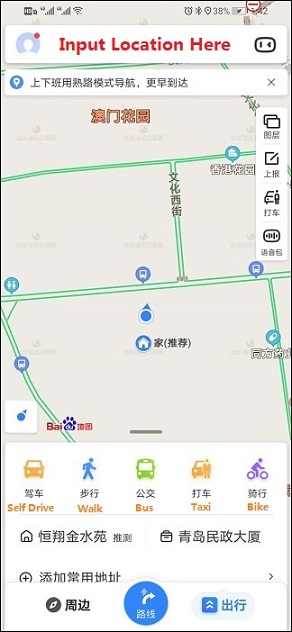
  1. ​Open Baidu Maps​​ (百度地图, Bǎidù Dìtú)
    ▶️ Tap "我的" → ​​"登录/注册"​​ (Login/Register).
  2. ​Select Registration Method​​:
    • ​邮箱注册​​ (​​Email Registration​​) → Enter international email.
    • ​手机号登录​​ (Phone Login​​) → ​​Use foreign number​​ (+[code]XXXXXXXX).
  3. ​Verify Account​​:
    • Email: Check inbox for 6-digit code → Enter at ​​验证码​​ (Verification Code).
    • Phone: SMS code → Enter same field.

Tip: Skip registration if only using basic maps (no route saving).

​Essential Settings​

  1. ​Enable Location Access​​:
    • iOS: Settings → Privacy → Location Services → Baidu Maps → "While Using".
    • Android: App Info → Permissions → Allow Location.
  2. ​Download Offline Maps​​:
    ▶️ Tap "我的" → ​​"离线地图"​​ → ​​"下载地图"​​ → Select city.
  3. ​Translate Screen​​:
    • iOS: Open Camera → Point at screen → Tap "Scan" icon → Select "Translate".
    • Android: ​​Google Lens​​ → Snap Baidu Maps screen → Auto-translate.

​Basic Navigation​

  1. ​Search Destination​​:
    ▶️ Tap ​​"搜索地点"​​ (Search Place) → Enter:
    • ​English names​​: "Beijing Railway Station"
    • ​Pinyin​​: "Tian an men (天安门)
    • ​Landmarks​​: "The Great Wall"
  2. ​Start Navigation​​:
    After search → Tap ​​"去这里"​​ (Go Here) → Choose:
    • ​驾车​​ (​​Drive​​) → Displays tolls/congestion.
    • ​公交​​ (Bus/Subway​​) → Shows transfers/fares.
    • ​步行​​ (Walk​​) → For short distances.
  3. ​Follow Voice Guidance​​:
    ▶️ Default is Chinese → Tap ​​"设置"​​ (Settings) → ​​"导航设置"​​ (Navigation Settings) →​​"语音设置"​​ (Voice Settings) → ​​Choose English voice pack​​ (Limited accents).

✅Need internet to use map apps in China? I've found the best data plans at cheap prices - no hidden fees, just fast & reliable data!

See All Attractions
384349 booked
4.7/511533 reviews
Mainland China | 5G/4G eSIM | Day Pass/Total Package | Support Tiktok & ChatGPT | 24H Billing | 1-365 days | QR code
SIM card
NZD 0.72
252839 booked
4.7/510084 reviews
Mainland China/Hong Kong/Macau 5G eSIM | Daily Package/Total Data Package | 24-Hour Billing | 1-30 Days | QR Code
SIM card
NZD 0.74
213850 booked
4.6/55490 reviews
Mainland China/Hong Kong/Macao/Taiwan | 5G eSIM | Day Pass/Total Package | 24H | 1-30 days | QR code
SIM card
NZD 0.74
3555 booked
4.4/5303 reviews
China 4G/5G eSIM 1-30 days High-speed data daily package/data package Number of days optional (natural days) QR code
SIM card
3524 booked
4.5/5166 reviews
[China Mainland] eSIM | SIM to China | 8GB 8days 4G high speed
SIM card
NZD 16.19
30608 booked
4.6/51676 reviews
Asia 8 countries 4G/5G eSIM | DayPass/Total | 1-30 days | QR code
SIM card
NZD 0.22

​How to Use Baidu Map in English?

How to Use Baidu Maps for Foreigners

(Source from Baidu)

How to Find a Place

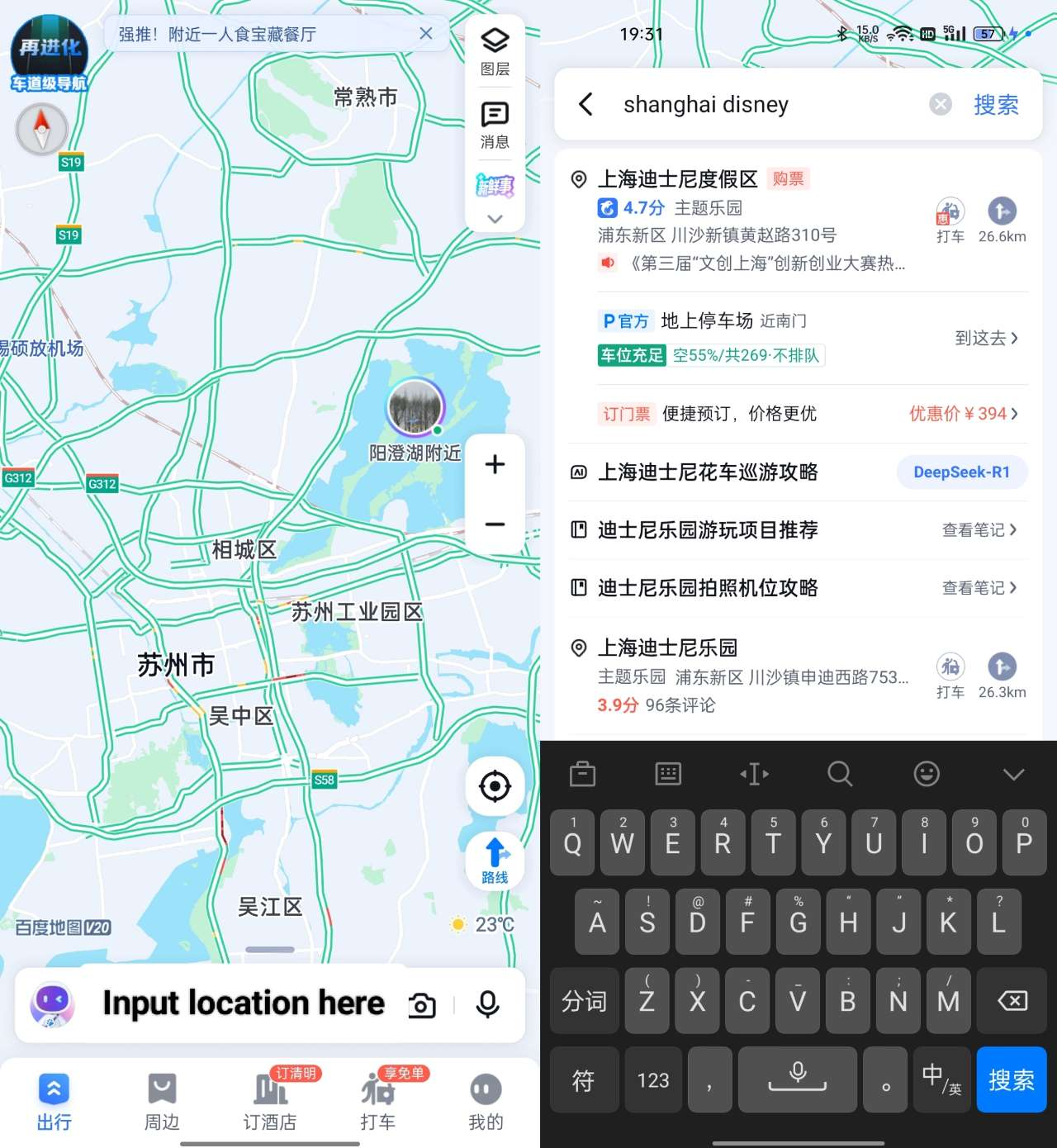
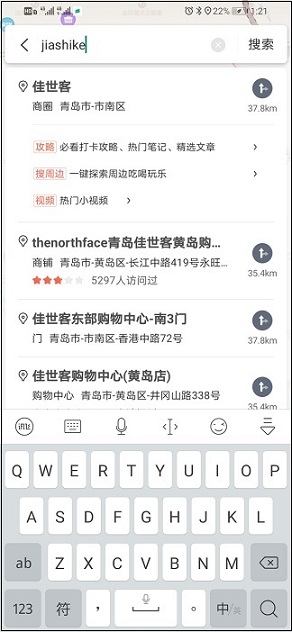
  1. Enter the place you want to go in the search bar. It is recommended to enter in Chinese or pinyin
  2. Select the option that best matches your destination in the search results

How to Navigate

  1. After completing the first step (find a place), click the button on the right, and there will be different ways to arrive
  2. Choose the mode you need among driving, walking or taking public transportation, and follow the directions to get there

How to Use Public Transport

Search for the target location. After determining the location, select the public transportation mode you need:

  • ​Subway: Look for ​(Exit) + numbers.
  • ​Bus schedules: Tap ​公交 → Check First bus and ​Last bus.

How to Save a Place

How to Use Baidu Maps for Foreigners

How to Use Baidu Maps for Foreigners

How to Use Baidu Maps for Foreigners

(Source from Baidu)

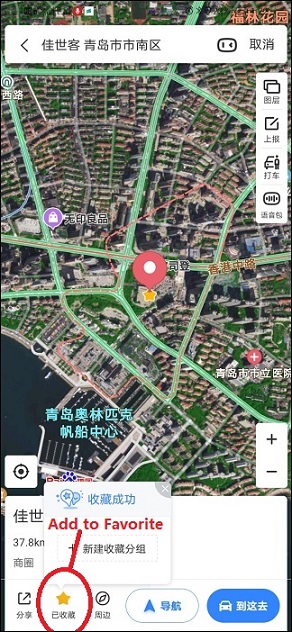
  1. First, search for the address you need to save
  2. Select this address and click the star at the lower left corner to ensure successful saving
  3. Click "Collect → Location", "long-press the Chinese name", and you can rename the location you have saved.

​Using Baidu Maps Without a Chinese Phone Number​

You can still use the baidu map app with an international mobile phone number without a Chinese mobile phone number, but you may be restricted in functions such as hailing a taxi, sharing locations, and replying to comments.

​Feature​

​Access​

Map Navigation

Yes (driving/walking)

Public Transit Routes

Yes

Location Sharing

Unavailable

Ride-Hailing (Didi)

Blocked

Offline Maps

Yes

Reviews/Payments

No access

​Is Baidu Map Safe & Secure for Foreign Visitors?​

When Baidu Maps Is Safe to Use​

  • Basic navigation (walking/driving/subway).
  • Finding ATMs, restaurants, hotels in tourist zones.
  • Offline map access (no data tracking).

When to Avoid It​

  • Ride-hailing (use Didi International/street taxis instead).
  • Accessing sensitive/political locations.
  • If requiring strict GDPR-level data privacy.

Top China's Hotel Recommendation

 ​Register FREE on Trip.com & save ​​up to 8% instantly​​ on hotels. Book before they're gone! ✅

Shanghai Hotel
Hong Kong Hotel
Beijing Hotel
See All Hotels
NO.1
9.6/102759 reviews
Nostalgia S Hotel (Shanghai Railway Station Suzhou River)
Hotel in Shanghai
Restaurant
Gym
NO.2
9.1/107377 reviews
Amara Shanghai
Hotel in Shanghai
Airport pickup service
Restaurant
NO.3
9.3/106951 reviews
Shanghai Disneyland Hotel
Hotel in Shanghai
Restaurant
Gym

Exclusive China Train Coupon

​New to Trip.com?​​ Book China trains instantly & claim ​​3% OFF​​ instantly! Limited-time welcome offer ✨

FAQ about Baidu Map App

  • Does Baidu Maps have an English option?

    Baidu Maps doesn't have a full English version, which can make it a bit challenging for Malaysians who don't read Chinese. But don't worry—with the help of translation tools and a bit of practice, you can still use the app to find your way around.
  • Does Baidu have an English version?

    No, Baidu does not have a fully functional English version. While users can search Baidu using English keywords, the search engine itself and its interface are primarily designed for Chinese users and are in Chinese. There is no option to change the display language to English.
  • Is there a Chinese map in English?

    Amap, a leading Chinese digital map provider, has launched the first English-language version of its popular navigation app, aiming to facilitate travel for the growing number of international tourists visiting China.
Disclaimer: This article has been provided by an individual contributor or third party platform. If there is any discrepancy regarding the copyright, please contact us directly and we will delete the content immediately.
>>
Baidu Map