How to Do Trip.com Baggage Add-on? A Complete Guide

What if the ticket you purchased doesn’t include checked baggage, or your baggage allowance isn’t enough?
Don’t worry—Trip.com’s baggage add-on service makes it easy. Follow the simple steps below to pre-purchase extra baggage and avoid the hefty excess baggage fees at the airport. Let’s keep reading to learn how to do it.
to Shanghai
to Bangkok
to Tokyo
See all flights


Can I Purchase Extra Baggage through Trip.com?
Yes, when you buy your ticket on Trip.com, you can add extra baggage. This is especially useful since most budget airline tickets don’t include checked baggage.
Travelers can purchase the baggage allowance they need, but keep in mind that the number of kilograms you can buy and the types of baggage (carry-on or checked) depend on each airline’s policy.
This also includes whether extra baggage can be changed, adjusted, or canceled. So before you add baggage, be sure to read the baggage policy carefully.
How Do I Purchase Extra baggage on Trip.com?
Step 1: Go to the Trip.com Flights page, enter your departure city, destination, travel dates, cabin class, and other details, search for flights, and click the one you want to take.
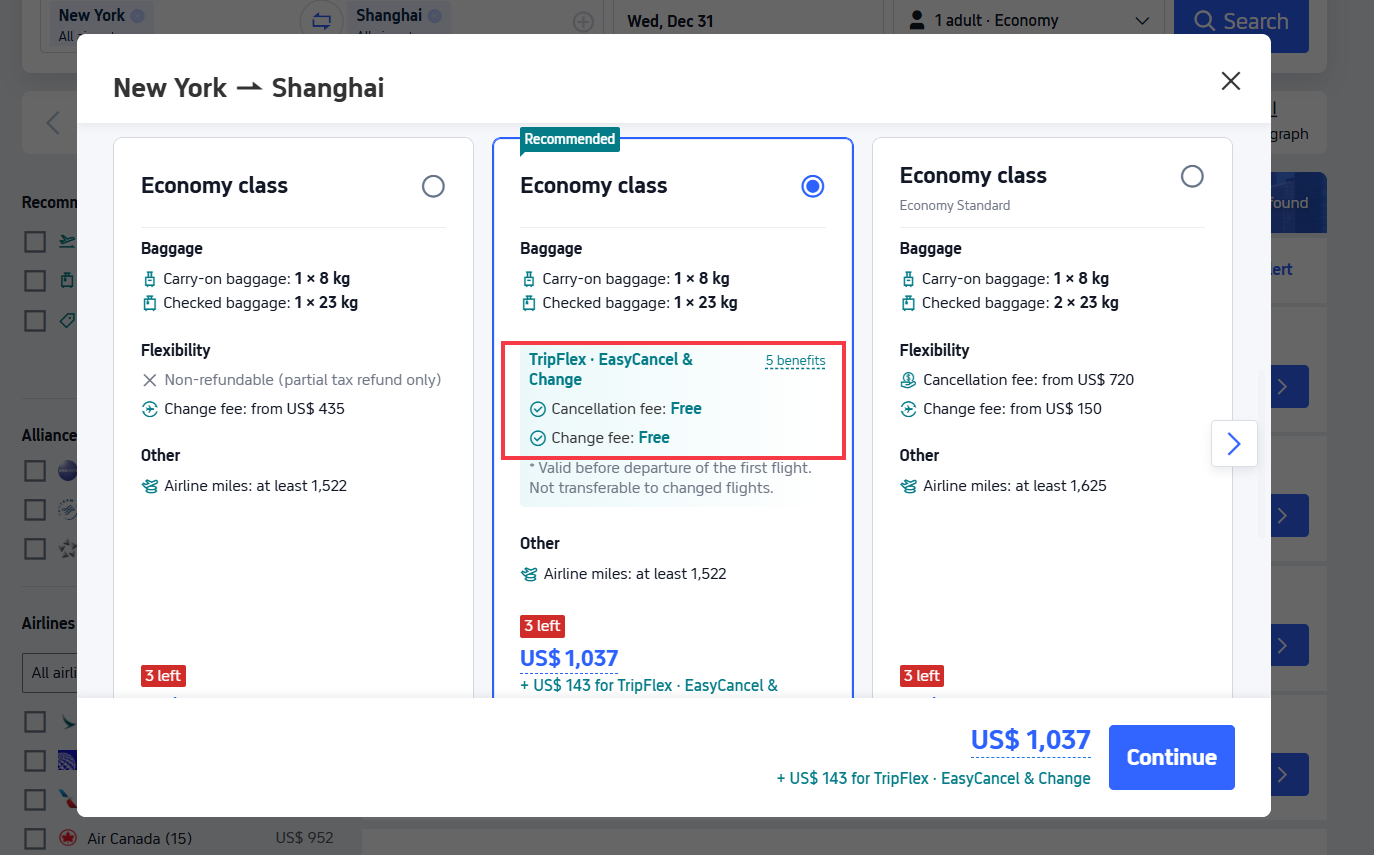
Step 2: Choose your flight price. If you’re worried your plans might change, prioritize selecting the “TripFlex · EasyCancel & Change” to avoid paying steep refund/change fees if you need to adjust your itinerary.
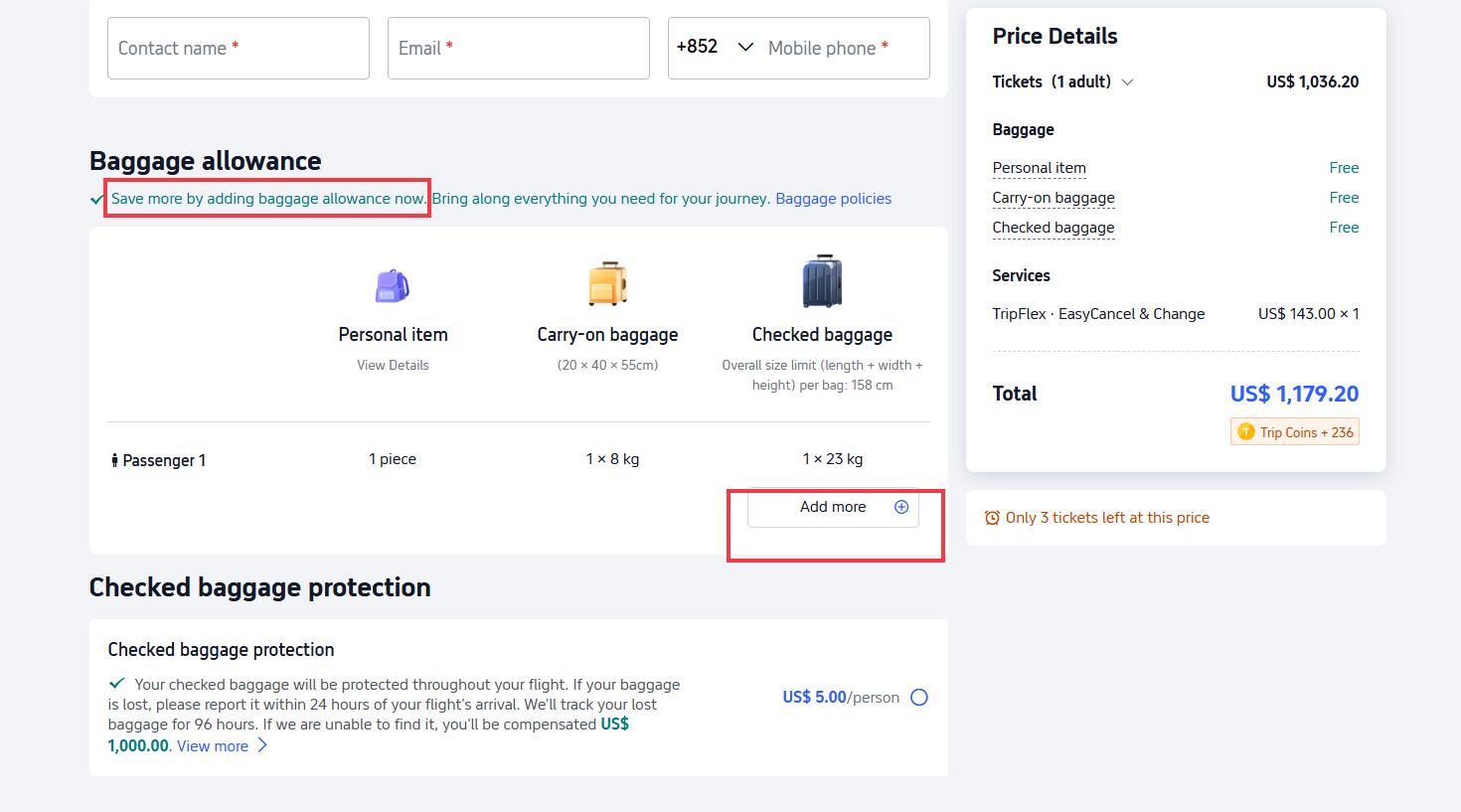
Step 3: Make sure your flight details are correct and enter the passenger information. Once you’re done, choose whether to add extra baggage; if needed, select the appropriate baggage weight in kilograms, then click “Continue.”
Step 4: Decide whether you need any other services, such as seat selection, in-flight meals, AirHelp Plus, Flexible Travel, etc., and then click "Proceed to Payment" based on your personal needs.
Step 5: Pay within the allotted time, and once the system shows your ticket has been issued, that means you’ve successfully purchased your airline ticket and any baggage add-ons.
In addition to the weight limit (usually listed in kilograms), be sure to check your suitcase’s dimensions—the length, width, and height.
Generally, the total of all three sides for each checked bag must not exceed 158 cm. Also confirm whether the measurements include the suitcase’s wheels, handles, and other accessories.
Can I Purchase Additional Baggage after Booking My Flight?
Yes—if you booked a Trip.com flight and your ticket has been issued, you can still purchase extra baggage.
Just keep in mind that some airlines’ baggage policies don’t allow adding baggage after you’ve bought your ticket, so be sure to follow the rules stated on your ticket!
- Step 1: Go to "Upcoming" and select the flight booking you want to add extra baggage to.
- Step 2: On the flight details page, select "Baggage Details" to view this flight's baggage allowance.
- Step 3: Select Add, choose the number of baggage kilograms you want to purchase, then click “Pay Now”.
- Step 4: Make your payment within the specified timeframe, and once you receive the email confirming your additional baggage purchase, it means your baggage add-on was successful.
Transfer in China
Transfer in Thailand
Transfer in Japan
See all attractions
 270151 booked
![[Official ticket] Limited-time offer from 30% off | Hong Kong airport express e-ticket | Enter with QR code](https://ak-d.tripcdn.com/images/0353z12000sziqo298E45_C_568_320.jpg)

![[Guangdong-Hong Kong-Macau Transfer Service] Cross-border private charter transfer with Hong Kong dual-plate vehicles for Shenzhen/Guangzhou/Hong Kong/Macau/Zhuhai and other locations](https://ak-d.tripcdn.com/images/0352d12000rdc3z2e454E_C_568_320.jpg)


![Skyliner Keisei railway ticket (Tokyo airport express: Narita International Airport-Ueno/Nippori) [optional+Tokyo subway discount package]](https://ak-d.tripcdn.com/images//0580f12000qjpzexo5F36_C_568_320.jpg)
![JR HARUKA Kansai Airport limited express ticket (physical ticket [requires redemption])](https://ak-d.tripcdn.com/images//0585812000mz4mpxs2716_C_568_320.jpg)

More Baggage Guide for Your Next Flight
Book Your Stay for 8% OFF
Check Out Top Hotel Picks
Hotels in Shanghai
Hotels in Bangkok
Hotels in Tokyo
See All Hotels










FAQs about Trip.com Baggage Add-on
-
What is a baggage add-on on Trip.com?
-
When can I add extra baggage?
-
How do I add baggage after booking?
-
Will adding baggage always work?
-
Are baggage add-ons cheaper online?
Disclaimer: This article has been provided by an individual contributor or third party platform. If there is any discrepancy regarding the copyright, please contact us directly and we will delete the content immediately.
Popular Picks
-
Air travel guide
-
Latest flight deals
-
Getting around
-
eSIM/SIM card