

How to Secure Best Seats

Author's Profile Picture
Seat Selection
to Bangkok
to Manila
to Kuala Lumpur
to Singapore
See All Flights
Los Angeles
LAX
Bangkok
BKK
Tue, Jan 20
Thu, Jan 22
One way
22% off
From 1,399.63NZD 1,097.88
San Francisco
SFO
Bangkok
BKK
Mon, Jan 26
Wed, Jan 28
One way
19% off
From 1,399.63NZD 1,139.90
Los Angeles
LAX
Bangkok
BKK
Wed, Jan 21
Sat, Jan 24
One way
18% off
From 1,399.63NZD 1,141.86
San Francisco
SFO
Bangkok
BKK
Tue, Jan 27
Thu, Jan 29
One way
18% off
From 1,399.63NZD 1,152.61
Los Angeles
LAX
Bangkok
BKK
Wed, Jan 14
Fri, Jan 16
One way
17% off
From 1,399.63NZD 1,160.19
San Francisco
SFO
Bangkok
BKK
Thu, Jan 22
Sat, Jan 24
One way
16% off
From 1,399.63NZD 1,172.65
Los Angeles
LAX
Bangkok
BKK
Mon, Jan 19
Wed, Jan 21
One way
15% off
From 1,399.63NZD 1,183.40
Los Angeles
LAX
Bangkok
BKK
Fri, Jan 16
Sun, Jan 18
One way
15% off
From 1,399.63NZD 1,190.73

Are you planning to go on your next trip on a plane? Don’t leave your seat selection to chance!
This Trip.com guide has tips to help you pick the perfect seat and understand why you can’t book sometimes. Learn how to make your flights fun and memorable!

Steps of Selecting Flight Seat on Trip.com

Step 1: Enter the Trip.com Website/App to Purchase the Flight Ticket

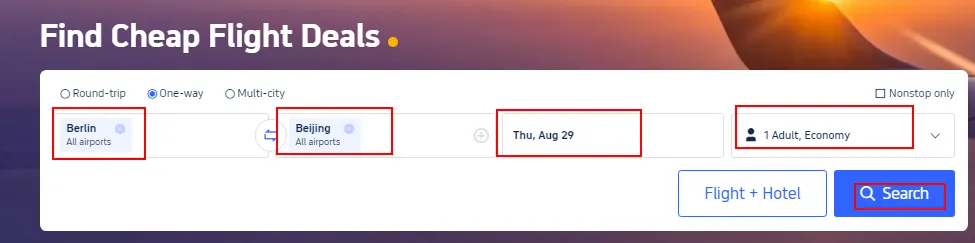
Go to your Trip.com flight page and enter your departure and arrival cities. Also, enter your departure date, then click "Search" to view available flights.
Find Cheap Fligh Deals

Step 2: Select Your Desired Flight

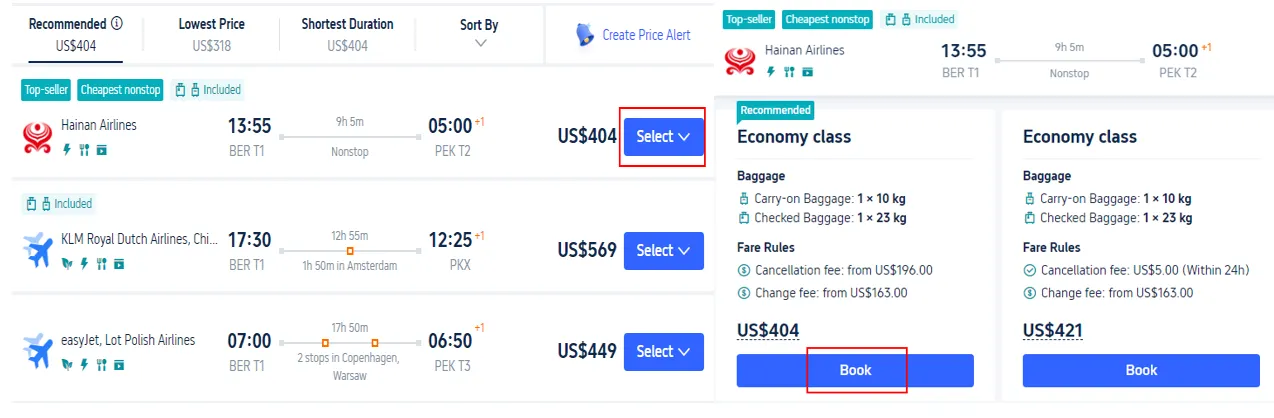
Choose your desired flight from the search results. Tap 'Select' then 'Book' to start your reservation.
Select and Book

Step 3: Fill in Traveler Information to Choose Your Seat

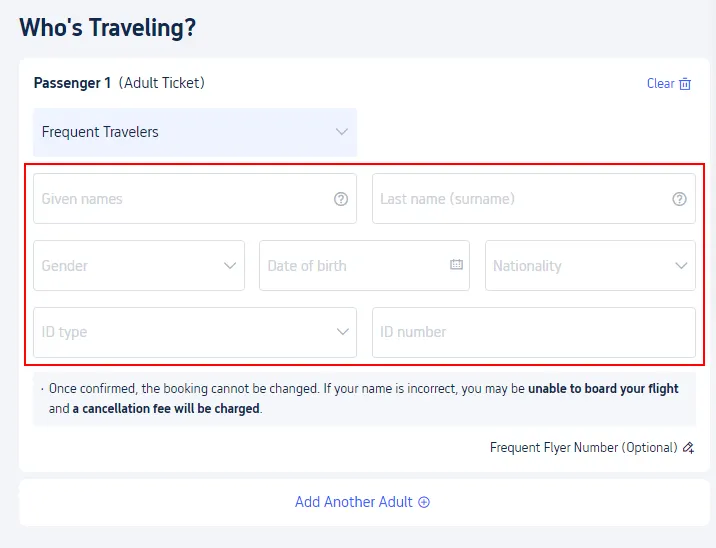
Enter your name, gender, nationality, and passport number. Tap 'Next' to proceed to seat selection.
Who's travelling

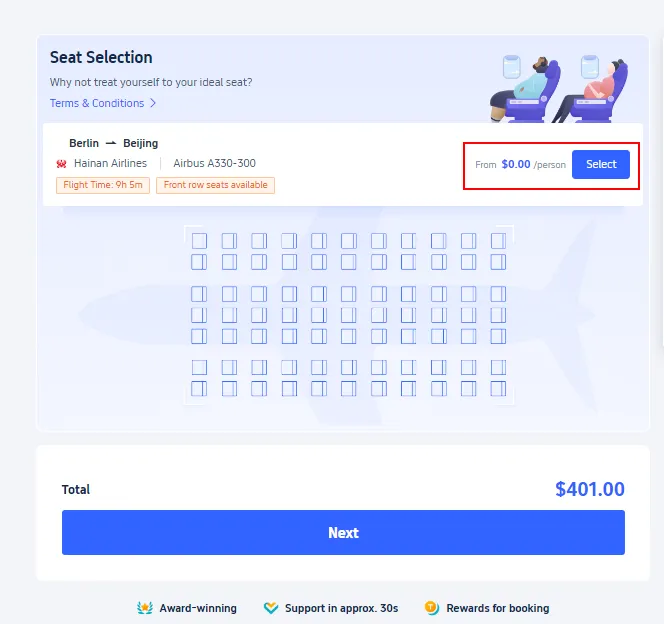
Step 4: Proceed to Trip.com Seat Selection Page

Click “Select” to confirm your preferred seat.

z

Select

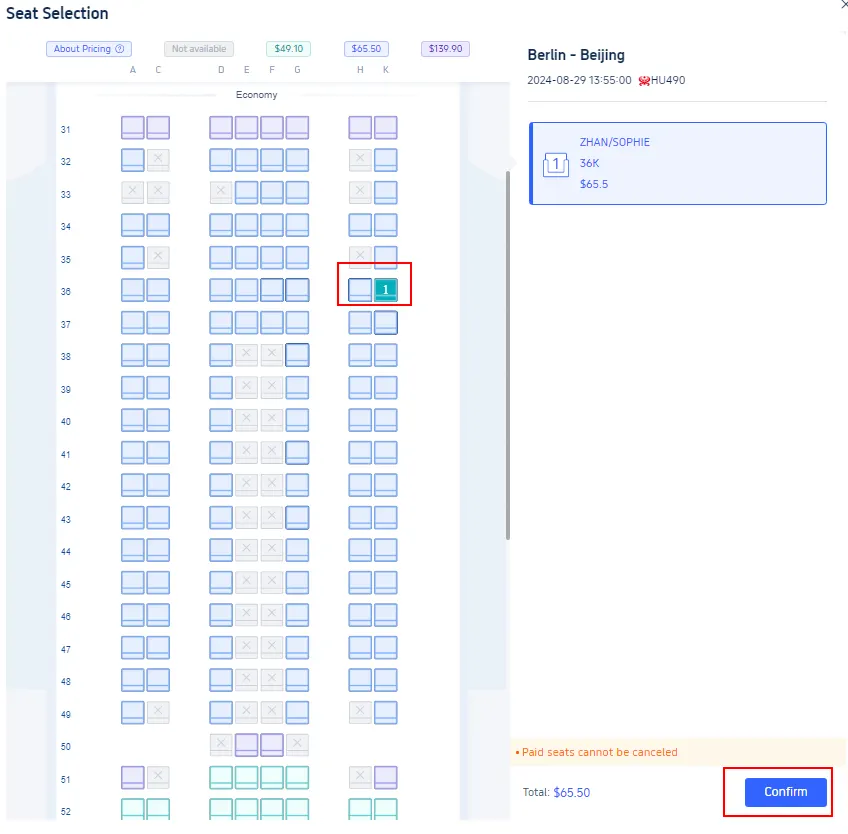
Step 5: Complete the Trip.com Seat Selection

Select your preferred seat from the available options and tap 'Confirm' to finalize your choice.
Confirm

Why Unable to Select Seats on Trip.com?

Unale to select seats
Several factors can affect your ability to select a flight seat on Trip.com. Here are some possible explanations:

Reasons

Detail

Airline Policy

Some airlines restrict seat selection for bookings made through third-party platforms like Trip.com. You may be able to choose your seat if you book directly on the airline's website

Booking Time

In some cases, seat selection becomes available only after your booking is confirmed and processed by the airline.

Seat Type

Airlines typically don't offer free seat selection with basic economy or comparable restricted fares.

Seat Availability

On full flights, pre-selecting seats may not be possible. Your seat may be assigned at the airport during check-in.

Group Bookings

If you are booking for a group,

please note that some reservation systems require the details of all passengers.

Cancel Flight Seat Selection on Trip.com

Cancel Seat Selection

It's quite easy to cancel a flight seat selection on Trip.com with only a few steps:

  • Step 1: Log in to your Trip.com account and find the booking you want to change or cancel.
  • Step 2: Select "Seat Selection" > "Cancel Seat Selection" to enter the detail page.
  • Step 3: On this page, select the seat you wish to cancel, confirm your selection, and submit the request.

Begin Your Journey with Trip.com!

See All Attractions
1426 booked
4.6/578 reviews
Global 92 Countries 4G/5G eSIM | Day Pass/Total Package | 1-30 Days | QR Code
SIM card
392537 booked
4.7/511836 reviews
Mainland China | 5G/4G eSIM | Supports TikTok & ChatGPT (Partial Only) | Day Pass/Total Package | 24H Billing | 1–30 Days | QR code
SIM card
NZD 0.38
10687 booked
4.5/5378 reviews
USA/Canada 5G eSIM | Day Pass/Total Data Package | 1-30 Days | 24-Hour Billing | QR Code
SIM card
NZD 0.81
64063 booked
4.7/52771 reviews
Thailand Dtac Truemove 5G eSIM | Total Data Package/Unlimited Data | 3-15 Days | 24-Hour Billing | QR Code
SIM card
NZD 2.42
219238 booked
4.6/55591 reviews
Mainland China/Hong Kong/Macao/Taiwan | 5G eSIM | Day Pass/Total Package | 24H | 1-30 days | QR code
SIM card
NZD 0.39
90154 booked
4.7/54012 reviews
Thailand | 5G eSIM | Day Pass/Total Package | 24H Billing | 1-30 days | QR code
SIM card
NZD 0.41
1301 booked
4.3/5106 reviews
Vietnam eSIM | 1-30 Days | Up to 60GB High-Speed Data | Coverage on Leading Network
SIM card
35571 booked
4.6/51280 reviews
Malaysia 5G eSIM | Day Pass/Total Data Package | 1-30 Days | 24-Hour Billing | QR Code
SIM card
NZD 0.26

Trip.com is a global online travel agency offering 24/7 multilingual customer support. Easily book flights, hotels, and activities. Platinum & Diamond members enjoy benefits like free airport lounge access, bonus Trip Coins, hotel discounts, and reduced train refund fees.

Trip.com Loyalty Program

Trip.com membership

Here are the available perks and rewards of each membership tier:

Rewards & Perks

Silver

Gold

Platinum

Diamond

Diamond+

Trip Coins Bonus

Base Rate

+10%

+30%

+40%

+50%

Hotel Deals

Up to

5%

off

Up to

10%

off

Up to

15%

off

Up to

20%

off

Up to

20%

off

No Refund Fees for Trains

-

1 waiver

per year

2 waivers

per year

4 waivers

per year

8 waivers

per year

Airport VIP Lounge Access

-

-

1 visit

per year

2 visits

per year

3 visits

per year

Free Global eSIM Data Package

-

-

1GB/3 Days

,

2 times

a year

3GB/5 Days

,

2 times

a year

3GB/5 Days

,

2 times

a year

Airport Transfer Upgrades

-

-

-

Standard car>Medium car *2

Standard car>Medium car *2Medium van>Premium van *2

Free Attraction Tickets

-

-

-

-

1 ticket

per year

VIP Support

-

-

-

-

Priority Support

for chats & calls

One-Stop VIP Service

Disclaimer: This article has been provided by an individual contributor or third party platform. If there is any discrepancy regarding the copyright, please contact us directly and we will delete the content immediately.
>
Trip.com Seat Selection