Best China eSIM: High-Speed 4G VPN eSIM

China eSIM can help you connect to the internet freely in China and other countries without a physical card. Here, Trip.com will help you choose an eSIM with its benefits in an easy-to-understand way for beginners. Let's explore now!
to Beijing
to Shanghai
to Bangkok
See all flights


Popular China eSIM Plans
Mainland China eSIM
- CoverageMainland China
- Data0.5-50GB
- Validity1-30 Days
- Pricefrom US$0.44

China 5G eSIM
- CoverageMainland China/HK/Macau
- Data0.5-50GB
- Validity1-30 Days
- Pricefrom US$0.46
China 5G/4G eSIM
- CoverageMainland/HK/Macau/TW
- DataTotal: 3-20G; Daily: 0.5-100G
- Validity1 to 30 Days
- Pricefrom US$0.46

Shanghai Disney Resort
4.7/5
45057 reviewsI highly recommend getting a fast pass. We visited in March on a weekday, and the lines were no more than 80 minutes long, but usually the lines are much longer. If you don't want to wait, pay for fast passes and relax. Also, the tulips and cherry blossoms were in full bloom in the park at the end of March.



Badaling Great Wall
4.7/5
12074 reviewsThis is the most unforgettable experience. There is a northern slope - it is more difficult, but with steeper landscapes, and a southern slope. I was on the northern one.

Canton Tower
4.6/5
9007 reviewsIt's definitely worth a visit, whether it's the sunset view or the dazzling night view, or the Ferris wheel on the tower.

Three Natural Bridges
4.6/5
4002 reviewsWe were picked up from the hotel and driven to the destination. The car was comfortable. The driver was very polite. The main attraction was mind-blowing 🤯 incredibly beautiful 😍 We saw mountains, waterfalls, beautiful rivers, and lots of greenery. The route itself isn't easy. It consists of endless climbs and descents down stairs, so be prepared. The final point of the three natural bridges was challenging; there you'll have to climb an 800-meter steep staircase. Then we were taken by bus to the gorge. It's a bit easier there, but there's water on the steps everywhere, so watch your step and be careful. But it's truly beautiful 😍 I recommend it to everyone; you won't regret it!
How to Set Up Trip.com China eSIM?
Check out these applicable models in case that you can't use eSIM on your phone!

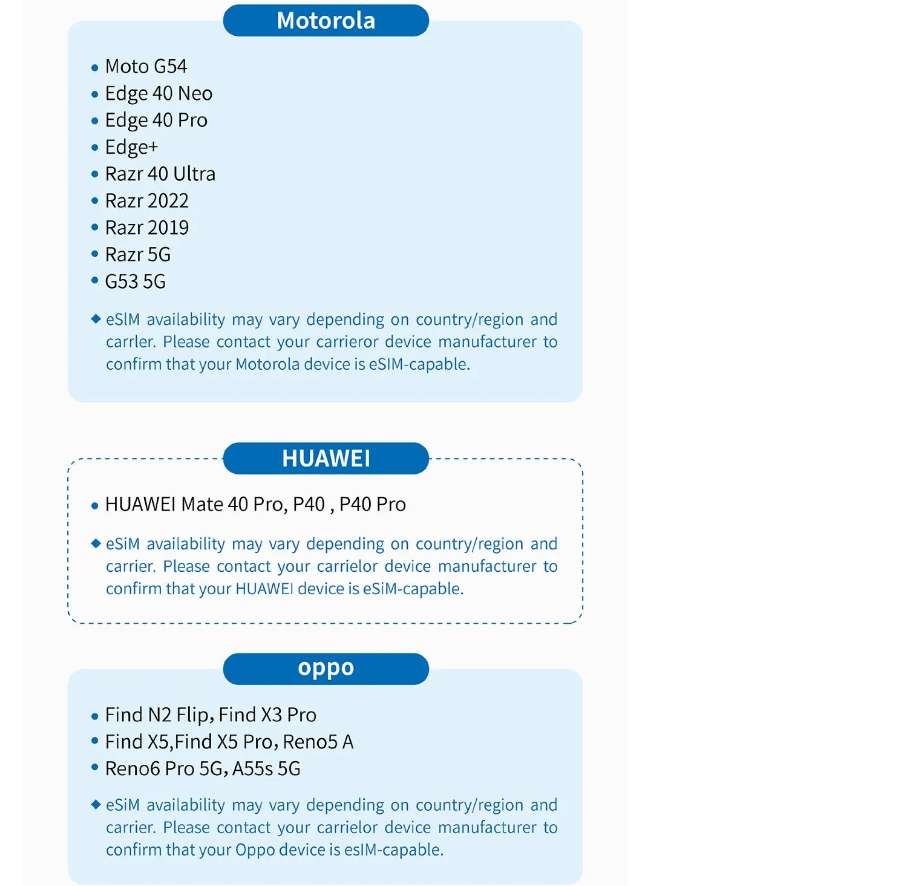
Check if your phone is available for eSIM~

Steps of Setting Up China eSIM
- Check the QR code displayed in the eSIM activation email
- Go to "Settings" on your smartphone's home screen.
- Select "Mobile Date" (iOS) or "SIM Card Management" (Android).
- Add a mobile data plan (iOS) or tap "SIM Card Management" (Android) and agree to install Mobile Data (iOS) or SIM Card Management (Android).
- Then scan the QR code displayed in the activation email to complete the installation.
How to Use China eSIM?
- After installation, turn off the traditional SIM card.
- When using Mobile Data (iOS) or SIM Card Management (Android), the LTE icon will be displayed in the upper right corner.
- Enable data roaming to facilitate communication.
- If you're still not connected to the network after performing the above steps, try toggling airplane mode on and off or restarting your phone.
How to Deactivate eSIM?
- Tap "Mobile Data" (iOS) or "SIM Card Management" (Android).
- Switch it to "Off" (the same procedure applies for activation).
See all attractions
 1968213 booked
eSIM vs. SIM card
Here are some aspects of difference if you're considering eSIM but have never tried it before:
Aspects | SIM Card | eSIM |
Form | Physical Card | Embedded (electronic) |
Hassle of replacement | The card needs to be physically replaced | Only settings on the device |
Compatible devices Carrier change | Requires a SIM slot | Only devices that support eSIM |
Carrier change | Need to purchase and insert a new SIM card | Can be changed in the settings screen |
Size & Shape | Different sizes, such as micro SIM and nano SIM | Physical size and shape don't matter |
See All Hotels







China eSIM Users' Review


Asia 4G/5G eSIM | Daily Plan / Total Data | 1-30 Days | 24-Hour Billing | QR Code
4.5/5
2690 reviewsIf you want to experience the next generation of travel internet access at the lowest cost, this is an excellent entry-level option! For just a few dollars, you can easily get a lightweight eSIM plan with 500MB per day, making it extremely affordable and stress-free.
For those new to eSIMs, this kind of plan is the perfect testing ground. You don't need to frantically change your physical SIM card before traveling abroad, nor do you need to worry about losing your original domestic mobile number chip. Simply scan a QR code before departure or upon arrival to complete the setup instantly. Once you arrive at your destination, you'll seamlessly connect to the mobile network and immediately be able to check maps, call a taxi, or let friends and family know you've arrived safely.
While the 500MB of data is limited, it's more than enough for a short transition period after landing when you need to process instant information. It's ideal for short trips, layovers, or simply testing whether your phone model supports eSIM functionality. For less than the price of a bubble tea, you can enjoy the ultimate convenience and peace of mind brought by technology. I highly recommend that you experience this new trend of smart internet access that requires no SIM card and saves you a lot of time!

Mainland China/Hong Kong/Macau 5G eSIM | Dual Network | Day Pass/Total Data Package | 24-Hour Billing | QR Code
4.6/5
21444 reviewsI had a really hard time choosing which esim to use, but went with my friends' recommendation as they recently went to China. Look no further! The esim worked very well for what I needed. I got 30gb over 15 days. I couldn't get connected to any of my hotel wifi until my last 3 days and I had 2 gigs of data leftover even though I scrolled a lot (including vids) and even a but if photo/video backups. The only spotty service I had was in Huangshan but it's fairly rural, although it did not seem like the locals who are on the same cell company had issues. Otherwise in the 3 big cities I went to, including HK, it was great.

5G/4G eSIM in 8 Asian countries | Multi-network support, supports All AI & TikTok | 500MB/day - 50GB total | 1-30 days | 24-hour billing | QR code
4.6/5
6029 reviewsI've been buying this SIM card for a while now. It's convenient because it works in multiple countries and has fast 5G (though it drains my phone's battery faster, which is critical when traveling, so I manually switch to LTE). All services work, including in China (AI, social media, banking).
Mainland China 5G eSIM | Supports Google Maps / ChatGPT | Daily/Total Data Plans | 24-Hour Billing | 1–365 Days | QR Code
4.6/5
28303 reviewsThis worked really great for the whole stay. Price absolutely unbeatable. And no restrictions with western services like WhatsApp etc.
Mainland China/Hong Kong/Macau/Taiwan 5G/4G eSIM | Supports Google Maps / ChatGPT | Daily/Total Data Plans | 24-Hour Billing | 1–30 Days | QR Code
4.5/5
10369 reviewsEnough for everything!!! We made calls via instant messaging, used maps, watched videos, etc., everything was great. There were no difficulties with installation.
Book a bullet train in China! Enjoy the fast speed and comforting scenery along the journey~ 🚄
Benefits of Using China eSIM

Can be used immediately upon arrival in China
One of the major benefits of eSIM is that you can smoothly access the internet from the moment you arrive, allowing you to start your travel in China without any worries!
No risk of loss or damage
Conventional SIM cards are small and require careful handling. Especially when replacing them during your trip, the risk of loss or damage increases. eSIM does not have a physical shape, so there's no need to worry about loss or damage.
Dual SIM is possible
By utilizing eSIM, you can use dual SIM. Dual SIM allows you to use two networks on one phone. It makes you switch networks more flexibly when visiting multiple countries.
Tips for Trip.com China eSIM
- Renew order activation: Renewal orders are automatically activated; no need to reinstall. No speed reduction package: Automatically renew data after the first order package is used up. Speed reduction package: Speed reduction after the first order package is used up, and the package will be automatically renewed when it expires. When changing mobile phones to use eSIM, please do not place a renewal order, as renewal orders do not support changing mobile phones.
- Set up eSIM: Please install and activate the eSIM after you arrive at your destination and connect to the Internet. If you install it in advance in a country other than your destination, the eSIM will become invalid, or the usage time will be calculated in advance.
- Enable data roaming: Make sure the Data Roaming option is enabled for your eSIM.
- Do not remove the eSIM after installation: Each QR code can only be installed once; we cannot help you if the eSIM has been removed from the device.
- Tips for Choosing eSIM: The first point to consider when choosing eSIM is the price. Expenses during a trip to China include transportation, accommodation, meals, etc., so you would want to minimize the cost of communication. However, if you only pursue cheapness, there may be problems with communication speed, data capacity, and support system. Check the services provided and choose a plan with good cost performance.
Want a car ride in China? Check out new users' coupon for car rentals in China up to 8% OFF! 🚗
Car Rentals
Car Rental Promo Code - 8% Off
New User Enjoy up to 8% Off
TRIPCAR8
FAQs about China eSIM
-
How can I switch to eSIM?
-
What if I can't scan the QR code during eSIM installation?
-
Can I download the eSIM profile on a different device?
Disclaimer: This article has been provided by an individual contributor or third party platform. If there is any discrepancy regarding the copyright, please contact us directly and we will delete the content immediately.
Trending Searches
-
eSIM/SIM card
-
Popular Cities
-
Latest flight deals
-
Popular attractions
- Hotels in Shanghai
- Hotels in Guangzhou
- Hotels in Beijing
- Hotels in Bangkok
- Hotels in Shenzhen
- Hotels in Tokyo
- Hotels in Hong Kong
- Hotels in Chongqing
- Hotels in Seoul
- Hotels in Chengdu
- Hotels in Las Vegas
- Hotels in Zhangjiajie
- Hotels in Kuala Lumpur
- Hotels in Ho Chi Minh City
- Hotels in Taipei
- Hotels in Hangzhou
- Hotels in Singapore
- Hotels in New York
- Hotels in Xi'an
- Hotels in Osaka
- SHIBUYA SKY Ticket
- Shanghai Disneyland Tickets
- Universal Studios Hollywood Tickets
- Universal Studios Hollywood Early Entry
- Shanghai Tower Tickets
- Sphere Tickets
- Universal Studios Japan Tickets
- Beijing studio minisite
- Universal Studios Singapore
- Shanghai Disneyland Early Entry
- georgia aquarium tickets
- Great Wall of China
- Edge New York Tickets
- Chengdu Panda
- Hong Kong Disneyland