Trip.com Phone Number: The Easy Way to Connect

By Trip.com
April 25, 2026

Traveling is fun but requires a lot of planning. Don’t let sudden changes take a toll on your mind. Believe it or not, it is quite easy to cancel or modify your bookings or simply ask about the things causing trouble.
This is especially true when traveling with Trip.com. You only need to dial in and ask the team about things bothering you. This article will provide a complete guide to finding Trip.com phone number and connecting with a few taps. Stay with us till the end!
To Shanghai
To Bangkok
To Tokyo
See all flights


Perks Offered by Trip.com Call Service
- Personalized Customer Service: Trip.com lets you talk to its representatives on the phone in real time. They can help you with any questions or problems you have.
- 24/7 Availability: Trip.com's customer service team is available around the clock. You can call them anytime, day or night, to speak to a representative.
- Multilingual Support: Trip.com's customer service team can help you in 40 different languages. It doesn't matter where you are from, you will be able to talk to someone who understands you.
Trip.com Phone Number
Trip.com provides 24/7 phone support for customers in 40 countries and regions. For specific contact information, click the button below!
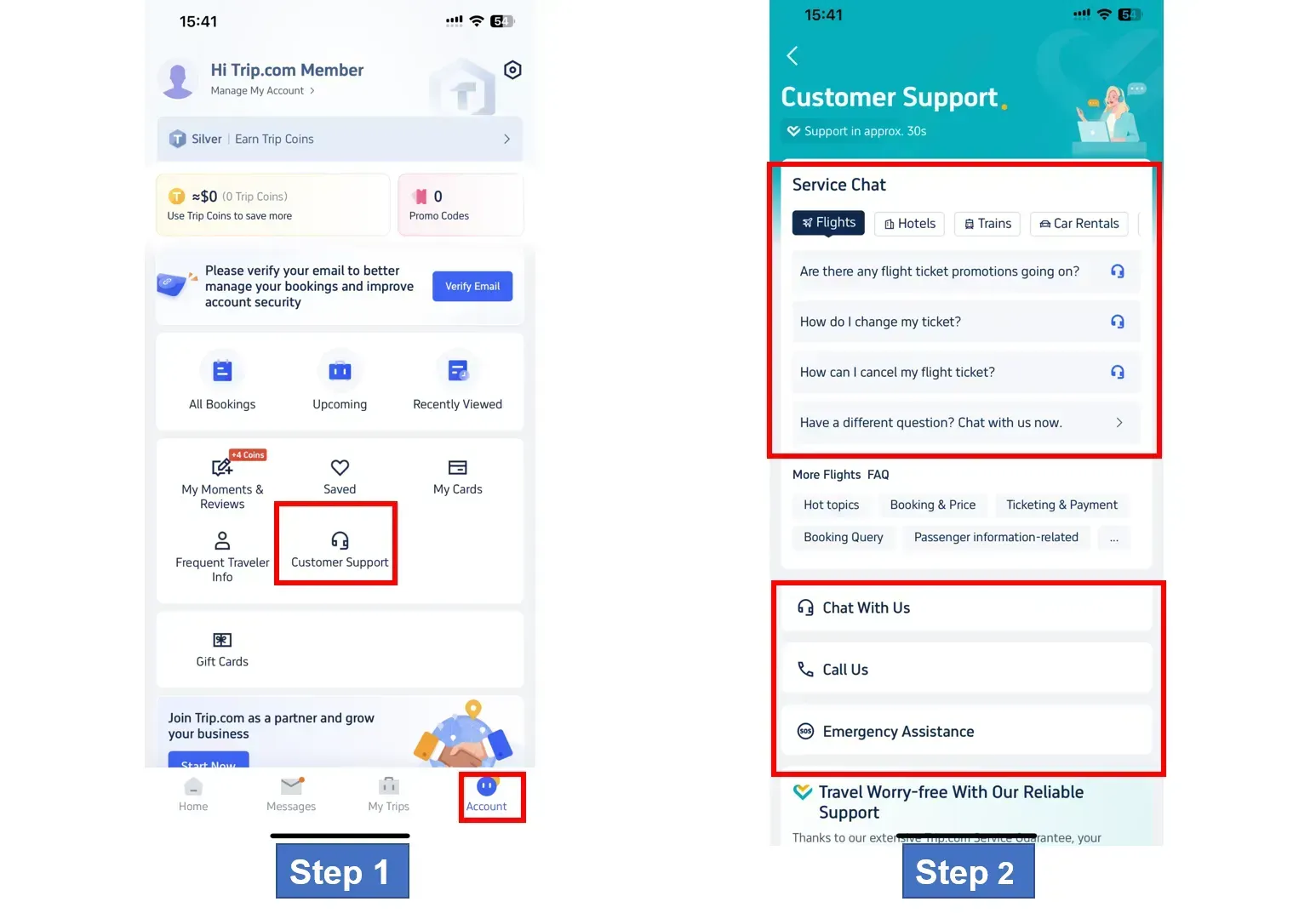
Step 1: Open the Trip.com App to Find its Phone Number
Open the Trip.com app on your phone and sign in. Tap on "Account", then find and tap the "Customer Support" button for more information.
Step 2: Tap on the Trip.com Customer Service Page
Trip.com has several ways to get help, including chat, phone, and emergency assistance. Choose the one that works best for you.
Get Well-Connected!
See all attractions
 440424 booked


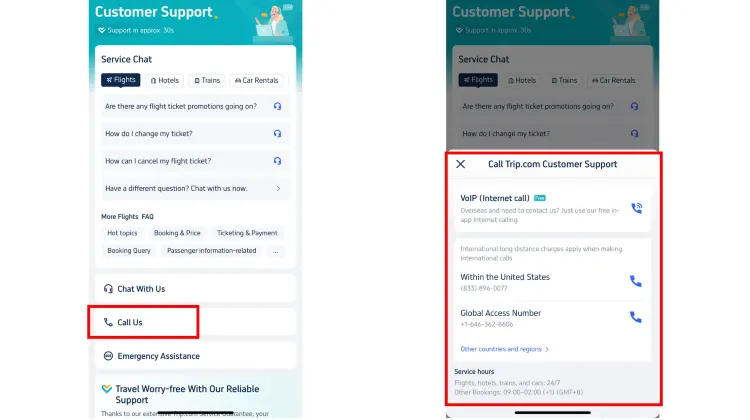
Step 3: Select Call Service to Find Trip.com Phone Number
To make a phone call, tap on "Call Us" to go to the Trip.com phone number page. You can pick either an internet call or a global call depending on what you need.
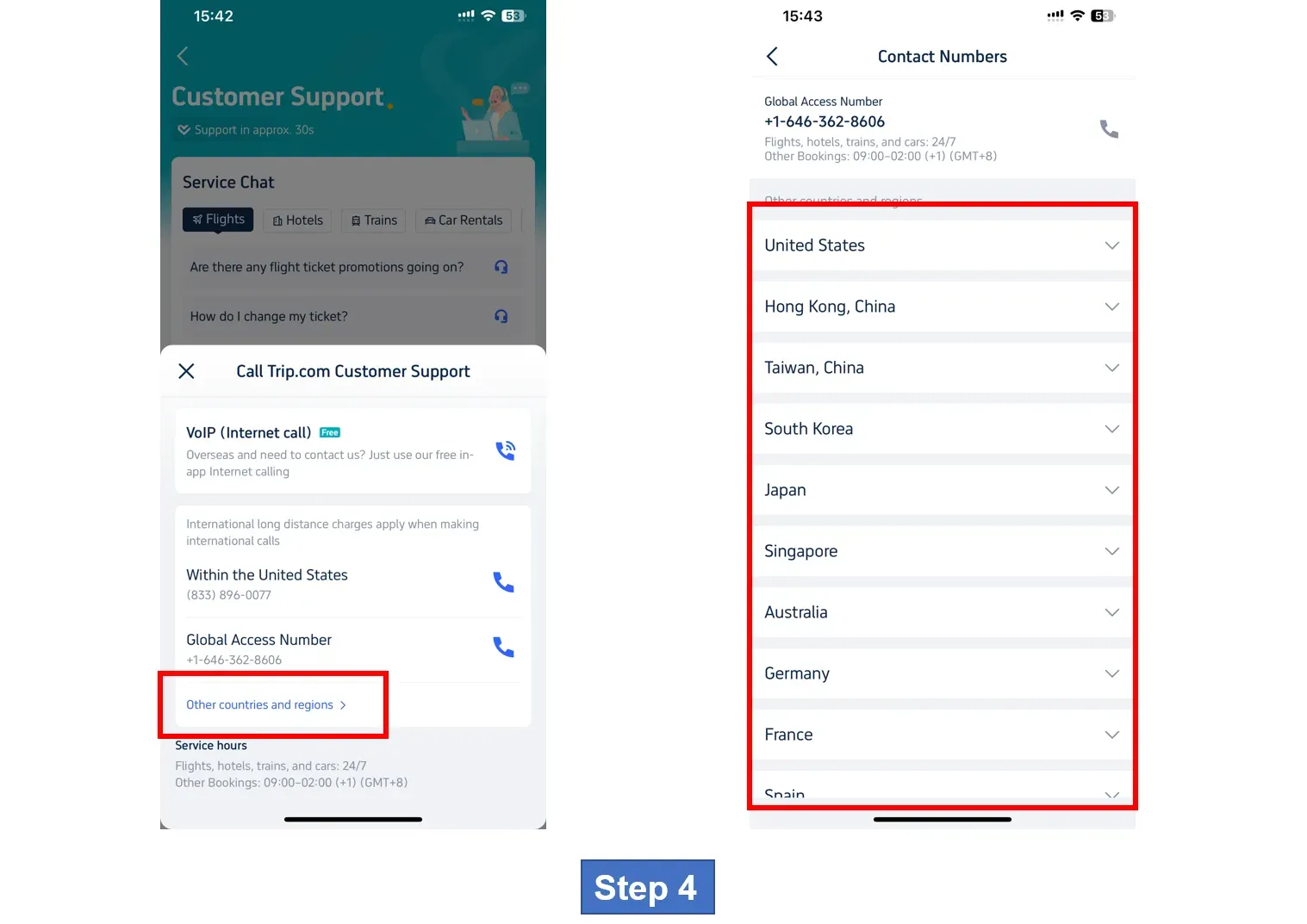
Step 4: Find Trip.com Phone Number for Other Countries/Regions
If you want to find phone numbers to contact teams in other countries and regions, click on the button "Other countries and regions" to see the detail.
*The screenshots are only for reference.
Recommended Hotels
Top Global Hotels
Shanghai Hotels
Bangkok Hotels
Tokyo Hotels
See All Hotels










FAQs about Trip.com Phone Number
-
What are the official operating hours for the Trip.com customer service phone lines?
-
In how many different languages can I receive assistance when calling their support team?
-
What is the typical expected wait time to connect with a live representative?
-
Where can I find the specific phone number for my country within the mobile app?
-
Is it possible to contact Trip.com via the internet to avoid international calling charges?
Disclaimer: This article has been provided by an individual contributor or third party platform. If there is any discrepancy regarding the copyright, please contact us directly and we will delete the content immediately.
Trending Searches
-
Air travel guide
-
Latest flight deals
-
Getting around
-
eSIM/SIM card
- China eSIM
- Taiwan eSIM
- eSIM UK
- eSIM Thailand
- eSIM Vietnam
- Cheapest Time to Fly to London
- Spirit Airlines Carry on Size
- How to book multi city flights
- Do you need a passport to go to Puerto Rico
- Manila Ocean Park
- Harbin Ice and Snow World
- Disneyland Tickets
- Shanghai Disneyland Fast Pass
- GuangZhou Metro Map
- Where to Stay in Vancouver