How to Find Cheap Flights with Trip.com Map View?


If you’re flexible with where or when you travel, Trip.com’s Map View is a powerful tool to uncover cheap flights you might otherwise miss.
Instead of searching one destination at a time, Map View lets you compare fares visually and spot the best deals at a glance.
To Shanghai
To Bangkok
To Tokyo
See all flights


What Is Trip.com Map View?

Trip.com App UI
Trip.com Map View is a feature that displays flight prices on an interactive world map.
You can see multiple destinations and their fares simultaneously, making it ideal for travelers who want the cheapest option, not just a fixed route.
It’s especially useful if you’re open to different destinations or planning a spontaneous trip.
How to Access Map View on Trip.com?
Step 1: Open the Trip.com website or app
Head to Trip.com on your browser or launch the app on your phone.
Once you're on the homepage, tap or click on the “Flights” tab to start searching for airfare deals and exploring destinations.
For those using Trip.com app, you’ll want to navigate to the "Flights" tab.


Step 2: Enter your departure city
If you have fixed travel plans, enter your exact dates.
But if you’re flexible, try browsing different days or even months, shifting your trip by a few days can sometimes unlock significantly cheaper fares and better flight options.

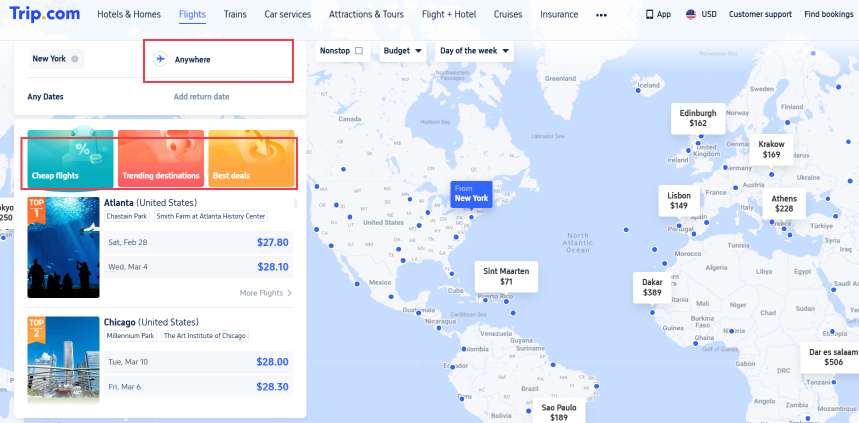
Step 3: Switch to "Map View" to see prices displayed across destinations
This interactive map lets you compare fares at a glance, making it easy to spot the cheapest cities instantly.
Zoom in or out, move around different regions, and explore nearby countries to uncover unexpected deals and budget-friendly travel ideas in just seconds.
How to Find Cheap Flights Using Map View?

Travel Deal Poster
🌍 Compare Destinations Instantly
Instead of guessing where to go, Map View shows prices across regions and countries. This helps you discover unexpectedly affordable destinations.
📅 Use Flexible Dates
Changing travel dates within Map View can reveal big price differences. Midweek departures and off-peak days often show noticeably lower fares.
🔍 Zoom and Filter
Zoom in on specific regions or apply filters such as airlines, flight duration, or price range to narrow down the best-value options.
🔔 Pair with Price Alerts
Once you spot a route you like, set up price alerts so you’ll be notified when fares drop further.
Best Times to Use Map View
- When you’re destination-flexible
- Planning trips during off-peak or shoulder seasons
- Searching for budget-friendly getaways
- Looking for last-minute or spontaneous travel deals
Get Well-Connected!
See all attractions
 460802 booked


Pro Tips for Bigger Savings

Final Thoughts
Trip.com Map View turns flight searching into a visual experience, making it easier to spot low fares and travel smarter.
If you’re chasing the best deals and open to new destinations, this tool can help you stretch your travel budget and uncover hidden gems around the world.
[10% OFF] Recommended Hotels
Download Trip.com App to get 10% off hotels right away for first-timers! Check out best hotels for your next adventure.
Top Global Hotels
Shanghai Hotels
Bangkok Hotels
Tokyo Hotels
See All Hotels










FAQ: Trip.com Map View for Cheap Flights
-
What is Trip.com Map View?
-
How do I access Map View on Trip.com?
-
Can I find cheaper flights using Map View?
-
Does Map View support flexible travel dates?
-
Is Trip.com Map View available on mobile?
Disclaimer: This article has been provided by an individual contributor or third party platform. If there is any discrepancy regarding the copyright, please contact us directly and we will delete the content immediately.
Find Cheap Travel Deals & Explore Destinations on Trip.com
-
Air travel guide
-
Latest flight deals
-
Getting around
-
eSIM/SIM card