Trip.com Flight Ticket Guide: Booking, E-Tickets & Policies

By Riley H.
April 7, 2026

How to book a flight ticket? On Trip.com, you'll find easy booking process with multiple payment methods. You can also compare ticket fares among top international airlines.
From step-by-step booking guide to flight refund & cancellation policies, this guide tends to make your next air travel smoother. Read on to find more details!
To Bangkok
To Shanghai
To Tokyo
See all flights


How to Book Cheap Flights on Trip.com?
Follow these steps to book your next flight.
Step 1: Access the Platform
Open the Trip.com website or download Trip.com app first.
Step 2: Search for Flights
On the fights page, enter your departure and destination cities, travel dates, and preferred cabin class (Economy, Business, etc.). Choose between one-way, round-trip, or multi-city itineraries.
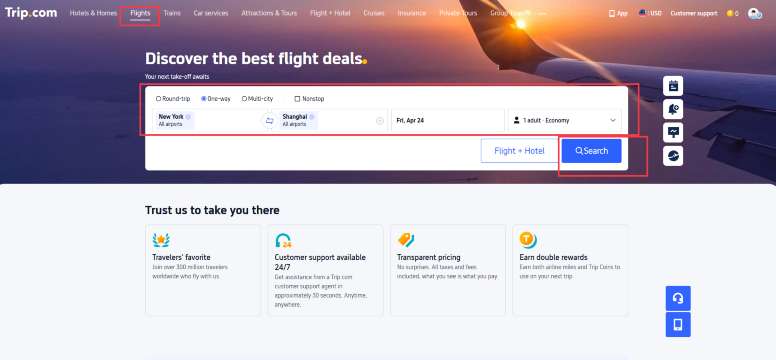
Step 3: Filter & Compare
Use filters for price, duration, and airline preferences to find the best deal for your budget.
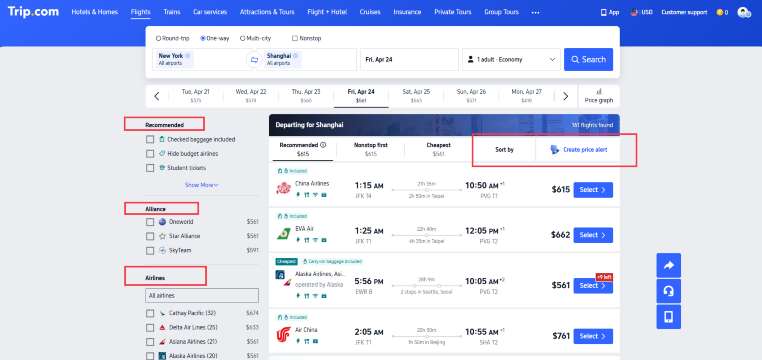
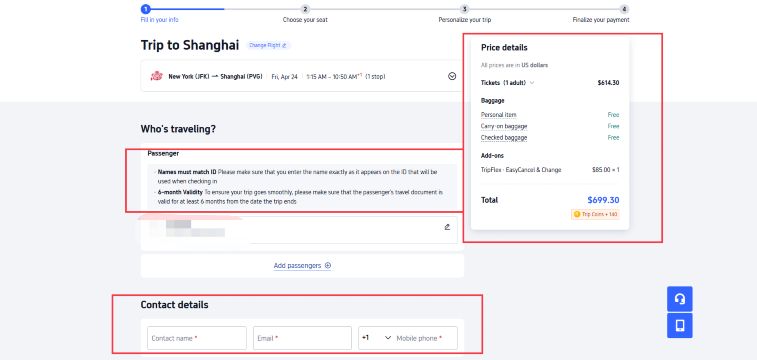
Step 4: Fill in Passenger Information and Pay
Enter the details for your personal informatoin. Ensure names match the ID and passport valid for at least 6 months. Review your itinerary and make your preferred payment.
Tip: Check the latest Trip.com Flight Deals for discounts and promotional codes.
How to Get Your E-Ticket on Trip.com?
An e-ticket is convenient for your check-in process. Follow these steps to get your e-ticket on Trip.com.
Step 1: Go to Account & Enter "Flight Status"
Go to your account first. Find "Upcoming" to view your active trips. Tap on your specific flight to enter the "Flight Status" page.
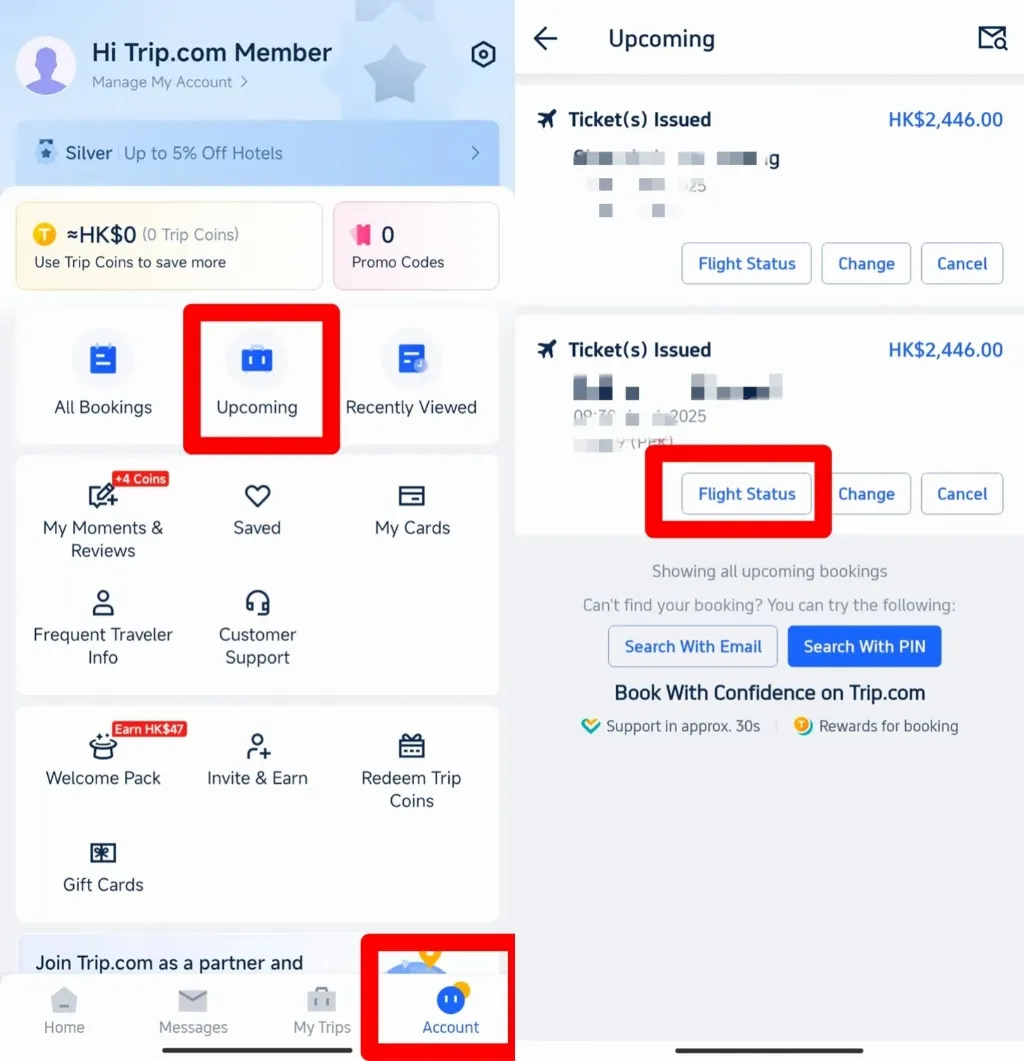
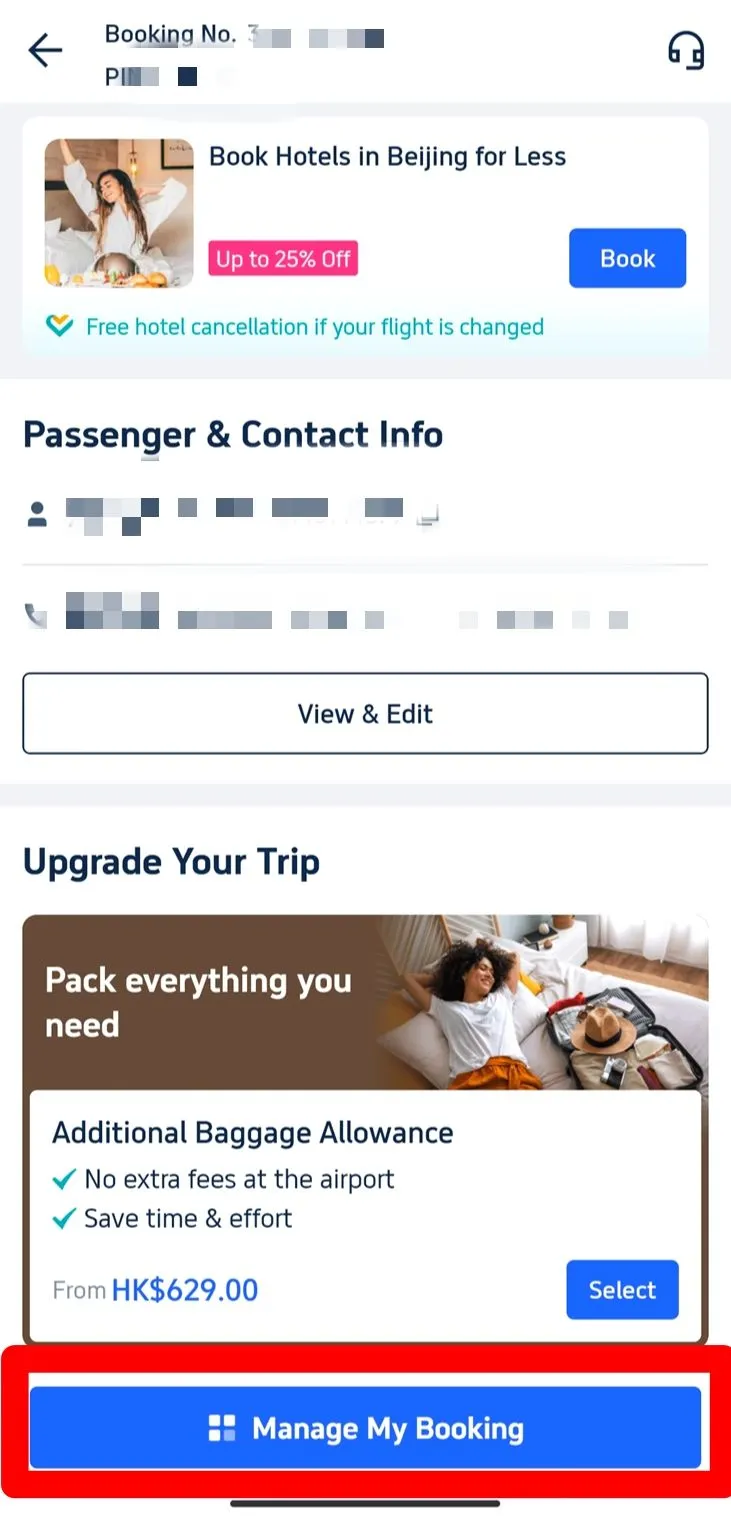
Step 2: Manage Booking & Get a E-Ticket
Select "Manage My Booking" and locate the "Get a Receipt" or "E-Ticket" option under the "More Options" menu.
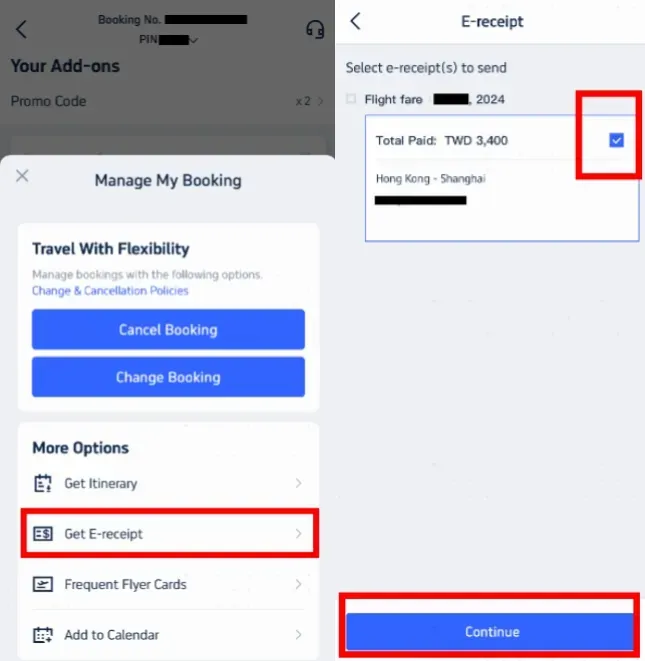
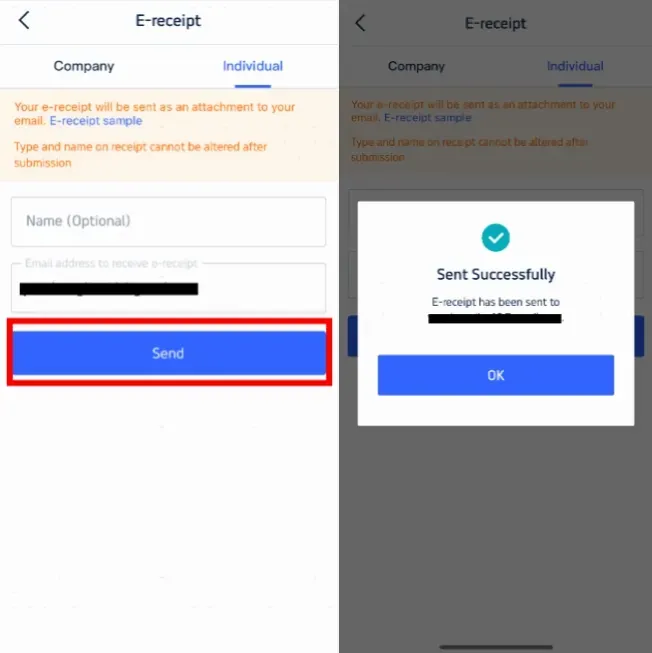
Step 4: Enter Details for Receipt
Choose the receipt type (Individual or Business), enter your email address, and tap "Send." You will receive a digital version of your official flight e-ticket shortly.
Printing & Check-In Procedures
While digital copies are sufficient for most domestic travel, we recommend carrying a printed copy for international flights. It ensures that you can present your itinerary at immigration or security checkpoints even without an internet connection.
Online vs. Airport Check-In
- Online Check-In: Most airlines allow you to check in via their official website or app 24–48 hours before departure. Use your Booking Reference (PNR) found on your Trip.com e-ticket to select seats and download your boarding pass.
- Airport Check-In: Present your digital or printed e-ticket along with your passport/ID at the airline's check-in counter or self-service kiosk.
Get Well-Connected!
See all attractions
 453506 booked


Trip.com Flight Ticket Policies: Refund & Cancellation
Trip.com’s cancellation policies vary depending on the airline’s fare rules and the type of ticket purchased.
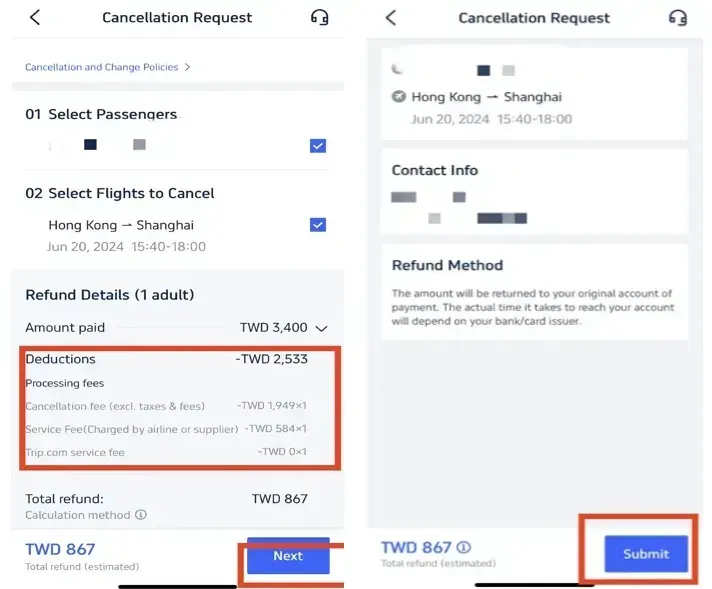
Before canceling, check the "Refund & Cancellation Policy" carefully in your booking details to see if your ticket is refundable or subject to a fee.
How to cancel your flight on Trip.com?
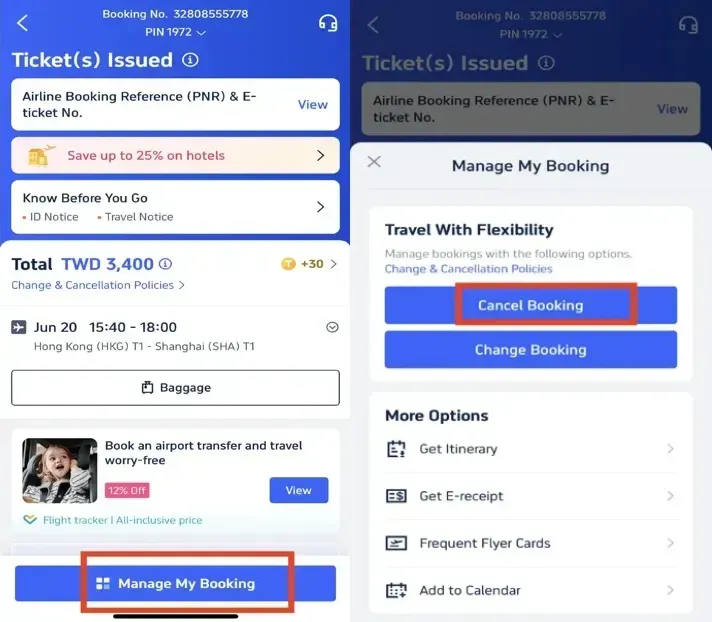
- Step 1: Go to "My Trips" and select the flight you wish to modify.
- Step 2: Tap "Cancel Booking" and follow the prompts to see the estimated refund amount.
- Step 3: Submit your request. Refunds are processed according to airline timelines and may take several business days to reflect in your account.
Trip.com Membership Perks
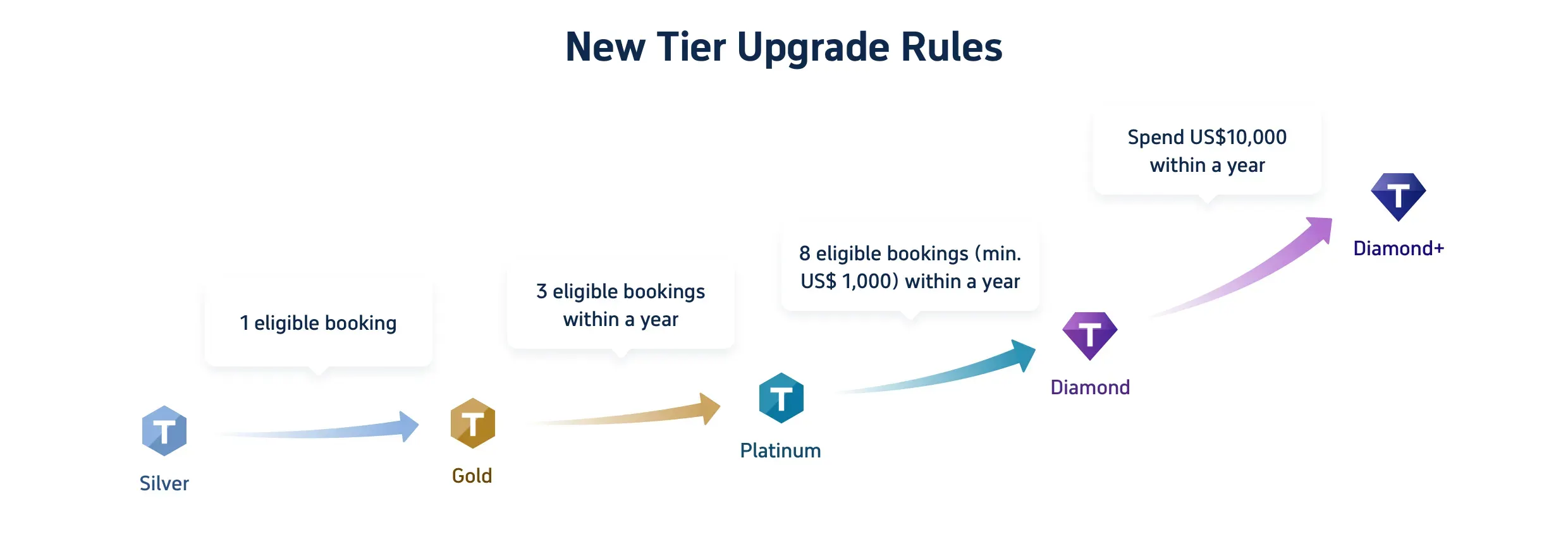
Booking flights earns you Trip Coins, which can be used to save on future hotels and flights. As you move from Silver to Diamond+ status, you'll unlock exclusive benefits.
Benefits & Trip Coins for 5 Member Tiers
Tier | Hotel Deals | Extra Trip Coins | VIP Lounge Access | Priority Support |
Silver | Exclusive Member Rates | Standard | - | Standard |
Gold | Exclusive Member Rates | +10% | - | Standard |
Platinum | Exclusive Member Rates | +30% | 1 Time / Year | Standard |
Diamond | Exclusive Member Rates | +40% | 2 Times / Year | Standard |
Diamond+ | Exclusive Member Rates | +50% | 3 Times / Year | 24/7 VIP Service |
FAQs about Trip.com Flight Ticket
-
Where is my E-Ticket?
-
Do I need to print my ticket?
-
How do I check in?
-
Can I cancel or change my flight?
-
What if my name is misspelled?
Disclaimer: This article has been provided by an individual contributor or third party platform. If there is any discrepancy regarding the copyright, please contact us directly and we will delete the content immediately.
Trending
-
Air travel guide
-
Latest flight deals
-
Getting around
-
eSIM/SIM card
- eSIM Japan
- eSIM Thailand
- Italy eSIM
- China eSIM with VPN
- eSIM Philippines
- JetBlue Carry On Size
- How Old Do You Have to Be to Get a Hotel Room
- Flexible Flight
- Is cancun safe
- Do you need a passport to go to Puerto Rico
- China Ski Resorts
- EPCOT Tickets
- Universal Studios Hollywood Early Entry
- Universal Studios Japan Rides
- georgia aquarium tickets