Trip.com Travel Planner: Make Planning Your Travels Effortlessly


Planning a trip can be overwhelming, from choosing flights and hotels to mapping out activities and transportation. The Trip.com Itinerary Planner is designed to make this process effortless by combining all your travel details in one smart, easy-to-use platform.
Whether you’re traveling solo or with a group, it helps you stay organized from start to finish.
to Washington
to New York
to Los Angeles
See all flights


🧭 What is Trip.com Itinerary Planner?
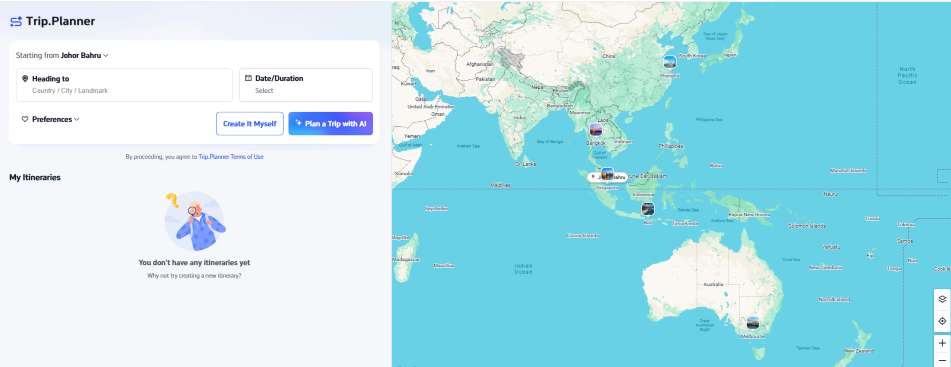
The Trip.com Itinerary Planner is a built-in feature within the Trip.com app and website that lets users plan, organize, and customize their entire trip, from flights to attractions in one place.
It automatically syncs your bookings, recommends activities based on your destination, and provides route guidance for your daily plans.
💡 Key Features of Trip.com Itinerary Planner
Feature | Description |
|---|---|
Automatic Trip Sync | All your booked flights, hotels, and attractions through Trip.com are automatically added to your itinerary. |
Smart Recommendations | Suggests top attractions, tours, and dining options based on your location, travel dates, and interests. |
Customizable Daily Schedule | Add, edit, or rearrange activities easily. You can plan by hour or by day. |
Offline Access | Download your itinerary for offline viewing, perfect for destinations with weak internet connection. |
Google Maps Integration | Shows estimated travel time and directions between your planned stops. |
Share with Friends | Share itineraries with travel companions so everyone stays updated. |
Cross-Device Sync | Accessible across phone, tablet, and desktop for seamless planning anywhere. |
🌍 Why Use Trip.com Itinerary Planner?

✅ All-in-One Travel Organizer
Keep all your travel essentials flights, hotels, car rentals, and attractions organized in one smart timeline.
No more juggling between booking emails or separate apps; Trip.com automatically compiles everything into a single, easy-to-read itinerary.
✅ Time-Saving Convenience
Forget about manually tracking bookings or creating spreadsheets.
The Trip.com Itinerary Planner auto-syncs your reservations and suggests activities that fit your schedule, saving hours of planning time. You can also duplicate or edit past itineraries to reuse for future trips.
✅ Personalized Experience
The planner uses intelligent recommendations to match your travel preferences.
Whether you love local food, hidden gems, or family-friendly attractions, Trip.com curates suggestions tailored to your interests, destination, and trip duration.
✅ Real-Time Updates
Receive instant notifications for flight changes, gate updates, or hotel check-in reminders directly within the app.
You’ll also get weather alerts and local travel advisories to help you adjust your plans on the go.
Search Top 10 U.S. Hotels
See All Hotels
 NO.1
NO.1






✅ Perfect for Multi-City or Group Trips
Whether you’re backpacking across Europe or exploring multiple cities in Japan, the Trip.com Itinerary Planner helps you visualize complex routes easily.
Add stops, rearrange cities, and share the entire schedule with your travel companions in just a few taps.
✅ Seamless Cross-Device Access
Your itinerary syncs across all your devices, phone, tablet, or desktop so you can view or update your plans anytime, anywhere.
✅ Offline Access
Download your full itinerary for offline use, ideal for destinations with limited internet connectivity.
You’ll still have access to key booking details, maps, and contact numbers even when you’re offline.
🧳 How to Use Trip.com Itinerary Planner
Through Trip.com official website
Step 1: Open Trip.com website and click 'Trip Planner'
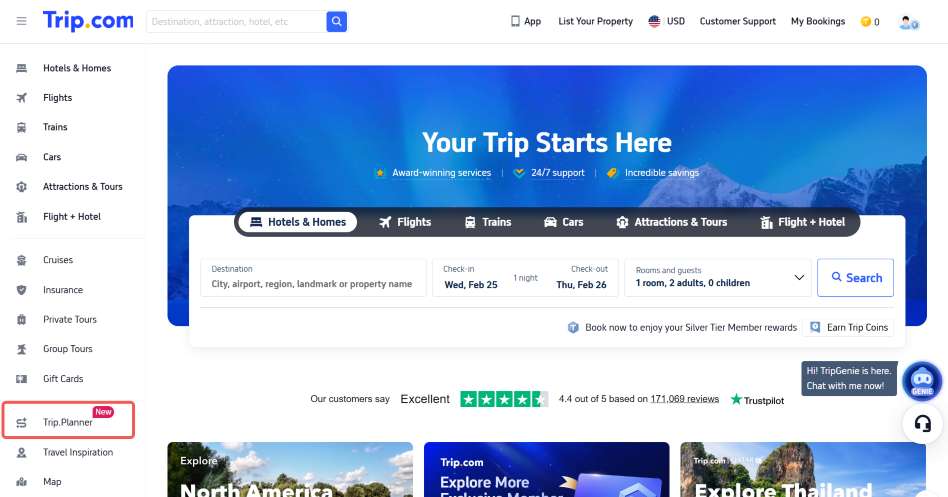
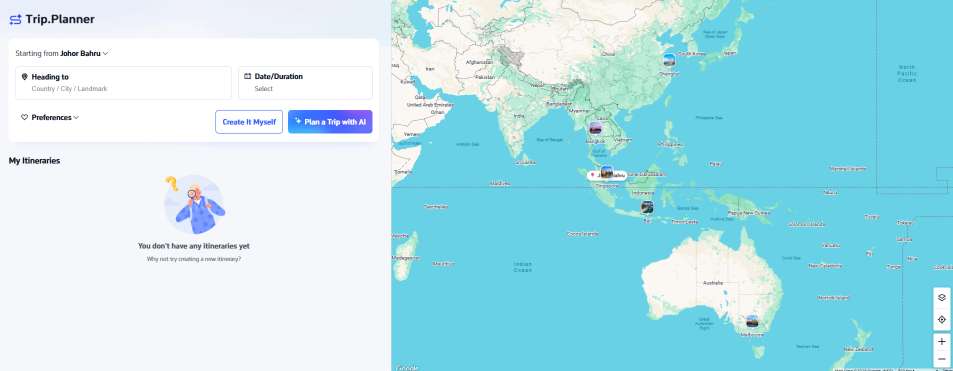
Step 2: You can choose the starting point, heading to and date
- You can also choose your own preferences whether you want to travel with whom, you travel style, travel pace, accommodation and any other additional needs
- Click button 'Create It Myself' if you want to create your own intinerary or 'Plan a Trip with AI' if you want your trip plans more easier
Step 3: Itinerary done by AI
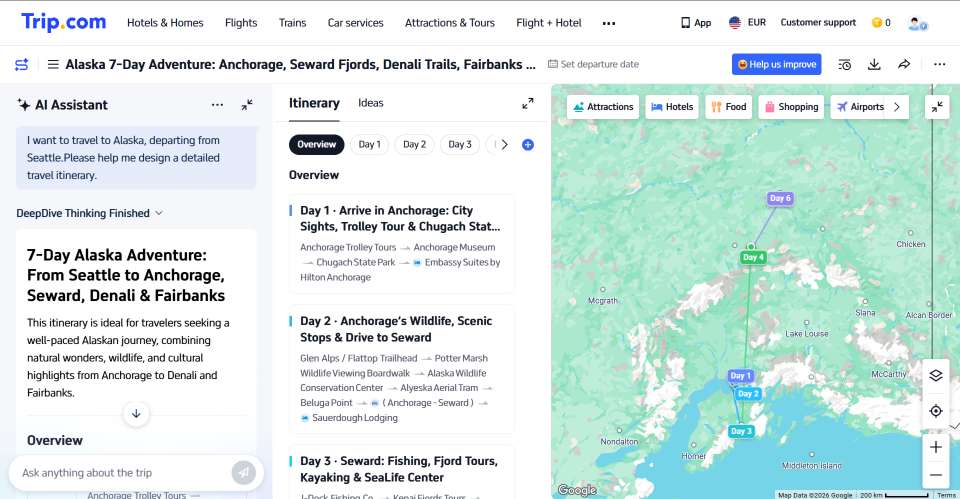
Step 4: View itinerary
- You can either share to other people via QR code or delete your itinerary to make new


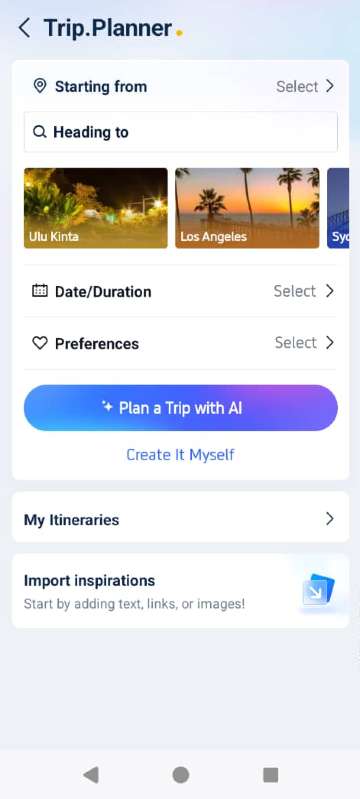
Through Trip.com App
Step 1: Open Trip.com app and click 'Trip Planner'
Step 2: You can choose the starting point, heading to and date
- You can also choose your own preferences whether you want to travel with whom, you travel style, travel pace, accommodation and any other additional needs
- Click button 'Create It Myself' if you want to create your own intinerary or 'Plan a Trip with AI' if you want your trip plans more easier
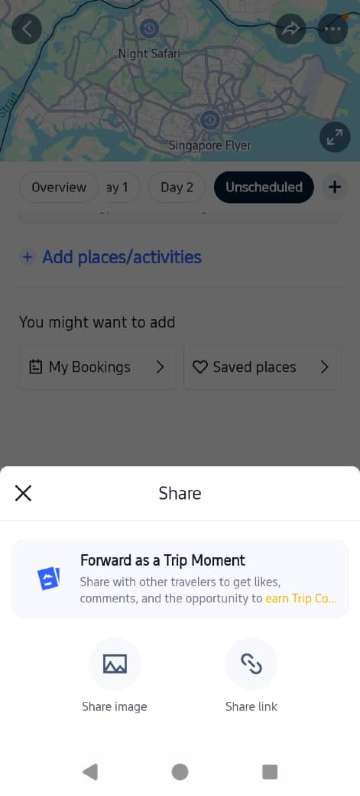
Step 3: Itinerary done by AI
- You can also add places or activities
- You might want to add your hotels bookings or saved place
Step 4: View itinerary
 |  |  |  |
💬 Trip.com Itinerary Planner Review
Many travelers praise the Trip.com Itinerary Planner for its convenience and user-friendly design. The tool automatically compiles bookings, suggests must-see attractions, and helps users optimize time efficiently.
It’s particularly useful for travelers who want to visualize their day-by-day plans without juggling multiple apps.
User's Reviews:
🎁 Bonus Tip: Use Promo Codes
🧭 Final Thoughts

The Trip.com Itinerary Planner is more than just a travel tool, it’s your digital trip assistant. With automatic syncing, smart recommendations, and flexible customization, it ensures every journey is smooth and stress-free.
So whether you’re planning a short city getaway or a long multi-destination adventure, let Trip.com take care of the details while you focus on creating memories.
FAQ: Trip.com Itinerary Planner
-
Do I need to add bookings manually?
-
Can I share my itinerary with others?
-
Does the Trip.com Itinerary Planner work offline?
-
Is the Itinerary Planner available on both desktop and mobile?
-
Does the Trip.com Itinerary Planner send reminders?
-
Can I plan multi-city trips using Trip.com’s Itinerary Planner?
-
Is Trip.com Itinerary Planner free to use?
Disclaimer: This article has been provided by an individual contributor or third party platform. If there is any discrepancy regarding the copyright, please contact us directly and we will delete the content immediately.
Find Cheap Travel Deals & Explore Destinations on Trip.com
-
Air travel guide
-
Latest flight deals
-
Getting around
-
eSIM/SIM card