What Is Frequent Flyer Number and How Do You Use It?

New to loyalty programs? Your frequent flyer number is the key! Add it when you're checking out to earn miles on every available flight. Here’s what it is, how to get it, and where to find it so you can start earning and unlocking all the wonderful perks that comes with it.
to Washington
to New York
to Los Angeles
to San Diego
to Boston
See all flights


What is a Frequent Flyer Number?
A frequent flyer number (FFN) is the unique ID for your airline loyalty account. By adding it into flight bookings, the airline can credit miles or points which tracks your elite stauses. Think of it as your loyalty "account number" which is something totally different from a ticket number or booking reference.
Some program examples:
- United MileagePlus (Star Alliance)
- Delta SkyMiles (SkyTeam)
- American AAdvantage (oneworld)
Normally, joining any loyalty program is FREE! Once you've received your loyalty number, enter it every time you book. Whether you are traveling on long-haul flights or just regular work trips, do not let go of any chance to add up your mileage! Frequent flyer number not only earns you a chance for a free flight, but many more perks such as: earlier boarding, preferred seats, extra check-in baggages, and dedicated customer support. Even for travelers who flys occasionally, focusing on flying with just one alliance can benefit from this system over time.
Note: If you're booking through Trip.com, enter your frequent flyer number during checkout so the airline can credit miles automatically for eligble fares. Once you are logged in, you'll also earn Trip Coins on top once your trip is completed.
Frequent Flyer Number: How to Get One (Free & Fast)
- Pick a program you'll actually use. Normally the airline you fly the most or the alliance you prefer.
- Join the airline's frequent flyer program (FFP) on its website or app. You will then receive your number immediately after sign up.
- Start using it on your every bookings. Consider starting with a program in the same ailliance you use most (Star Alliance, SkyTeam, Oneworld) so you can earn with partner airlines using just one single number.
Tip: When you are deciding on which airline to choose from, go with the one you tend to fly with the most often. The elite statuses for your account are normally recognized with all of its alliance partners as well. Still deciding on which program to choose from? Take a look at where you fly the most and check which airlines operate most in those routes!
Search Top 10 U.S. Hotels
See All Hotels
 NO.1
NO.1






Where to Find (or Recover) Your Frequent Flyer Number?
- Email/app: It's typically in your welcome email and your profile on the airline's wesbite or app.
Delta Airlines Welcome Email:Source: Delta Airlines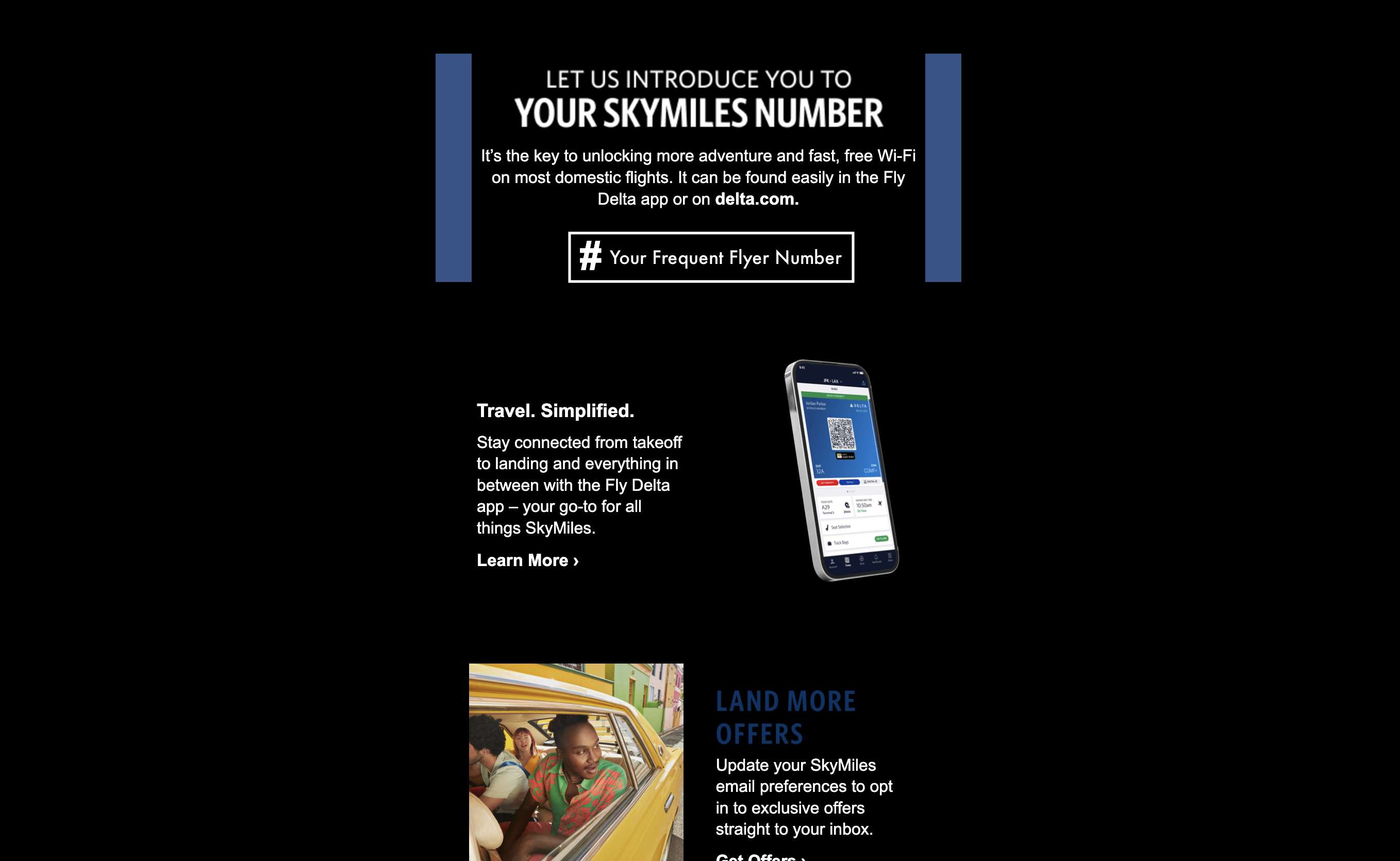
- Past documents: Previous boarding passes and e-tickets sometimes show it your FFN as well.
- Can't find it? Log in and check "My Account".
Delta Airlines My Account PageSource: Delta Airlines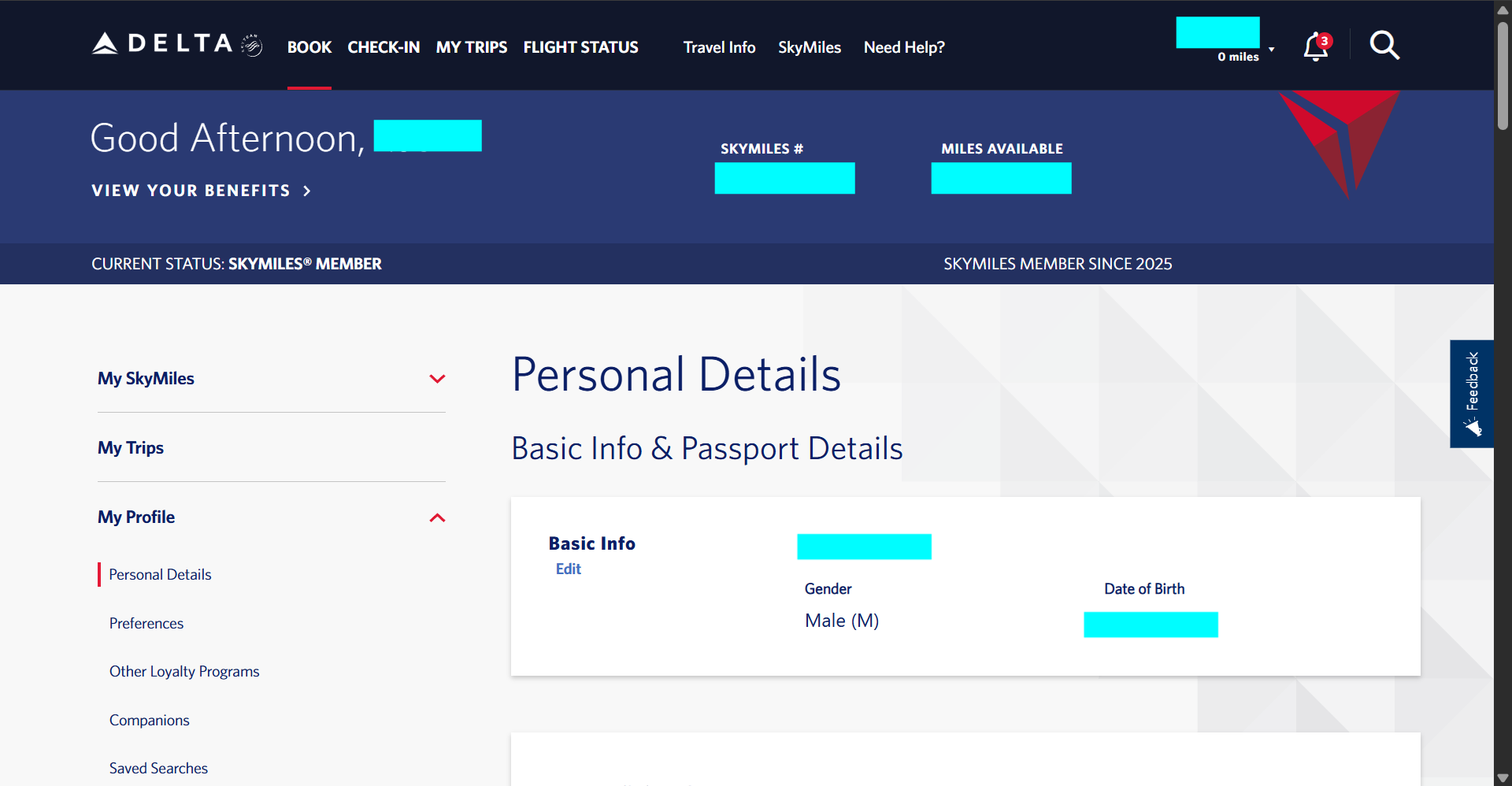
- Most loyalty programs lets you retrieve your FFN by verifying your email or phone number and other personal details on their login page.
- If you really have trouble finding it, contact the airline's support team to recover your number or reset access.
How to Add Your Frequent Flyer Number on Trip.com
- On the Trip.com app (fastest):
Search flights → choose your fare → traveler details → under the Passport field, add Frequent Flyer Number → continue to payment.
On the Trip.com app, you could add it under "Traveler Details,“ and then open "Frequent Flyer Program (Optional)," select your airline. Lastly, enter your membership number to earn airline miles as well as Trip Coins.
Adding Your Frequent Flyer Number Using Trip.com — 5 steps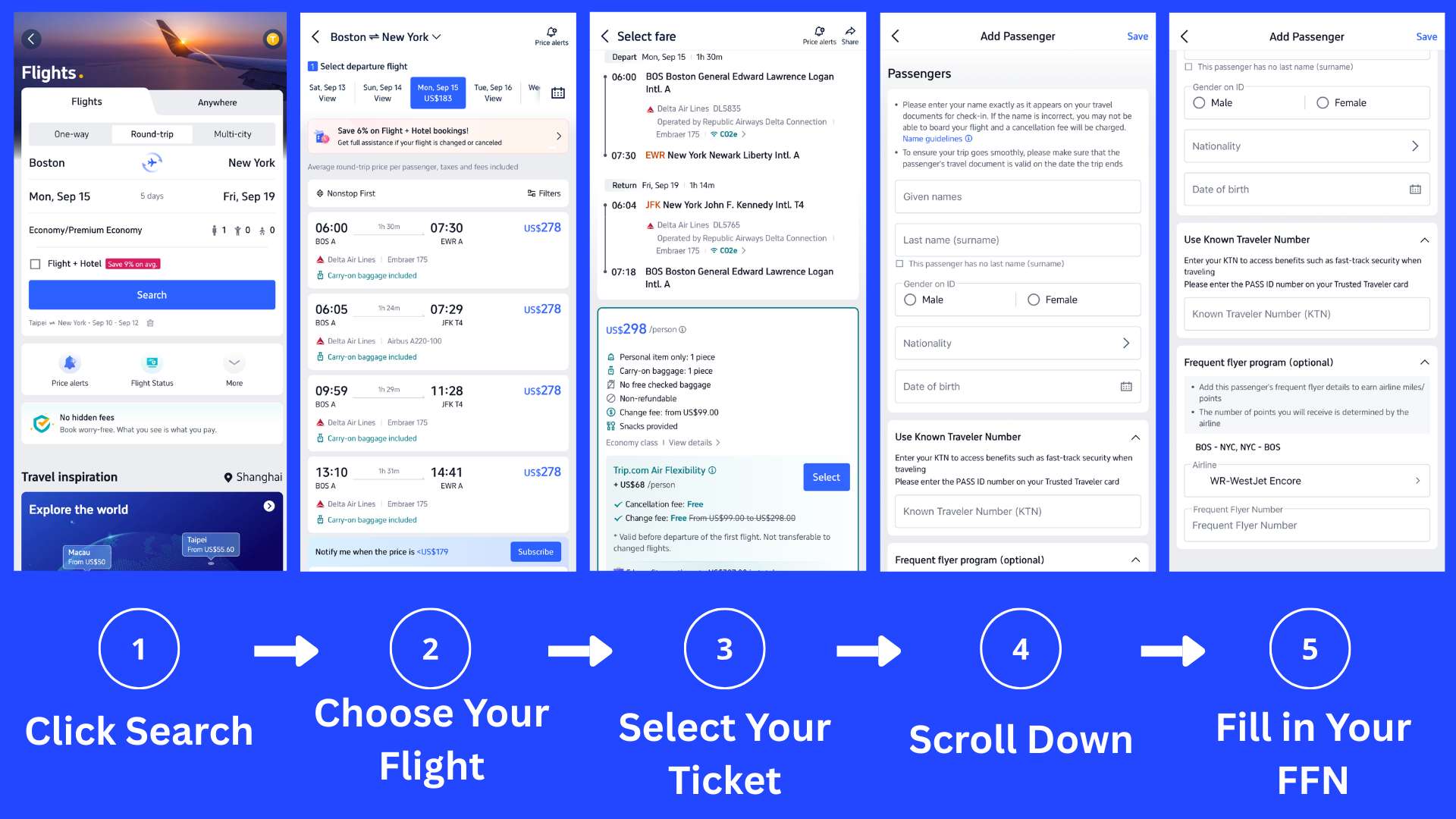
- On the Trip.com website:
Search flights → choose your fare → scroll down to Who's Traveling → fill in Frequent Flyer Number, click save → continue to payment. For group bookings, make sure that each traveler's frequent flyer number is entered under the correct passenger name. - After Booking:
Use Manage Booking to add/edit your FFN (if enabled for that carrier). If miles don't post, submit a missing miles claim with the airline using your ticket number, dates, and boarding pass image. If online editing isn't available, you can usually add the number during online check-in or ask an airport agent to attach it before boarding.
Car Rentals
Car Rental Promo Code - 8% Off
New User Enjoy up to 8% Off
TRIPCAR8
Frequent Flyer Number vs. Trip Coins
Topic | Airline miles/points (via your frequent number) | Trip Coins (Trip.com rewards) |
Credited by | The airline to your frequent flyer account | Trip.com to yout Trip Coins balance |
When awarded | After you travel (traveline varies by airline) | After you complete the trip (you must actually fly/stay) |
What affect earning | Fare class, route, airline rules | Logged-in status, product type, promos; amounts paid with Trip Coins or certain promotions typically don't earn new Trip Coins |
Value / Redemption | Award flights, upgrades, partner awards (varies by program) | 100 Trip Coins = US$1 off at checkout |
Where usable | Airline + alliance partners (flights/upgrades/others per program) | Most Trip.com products: flights, hotels, many local experiences, train tickets, airport transfers, car rentals (availability may vary) |
Boosters | Elite status/co-brand cards (program-dependent) | Trip.com member tiers add extra Trip Coins (e.g., +10% Gold, +30% Platinum, +40% Diamond, +50% Diamond+) |
Fine print | Name on ticket must match FFP profile; keep boarding passes for claims | No Trip Coins on canceled trips; portion paid with Trip Coins/promos typically doesn't earn new Trip Coins |
Simple takeaway: Your frequent flyer number builds airline miles and status inside one program or alliance; Trip Coins act like cash-back at Trip.com. So why not use both to maximize value on each of your bookings!
Details on Trip Coins—value, usage, earning conditions, and tier multipliers—come from Trip.com's offical explainer.
See all attractions





Frequent Flyer Number: Make Sure Your Flight Actually Earns
- Check the fare's earning rate (especially basic economy/discounted classes).
- Enter your frequent flyer number at checkout on Trip.com (or in Manage Booking).
- Match your name exactly with your FFP profile to avoid credit failures.
- Keep proof (e-ticket & boarding pass images) until miles/points post.
- If miles don't post: File a missing miles claim with the airline—one claim per missing segment.
- Before departure: Verify your frequent flyer number is on the reservation. You can usually see it in the airline app once you've added your booking reference
- After changes: if you rebook, get upgraded, or switch flights same-day, re-check that your frequent fluer number stayed attached—sometimes it drops during reissue.
Frequent Flyer Number FAQs
-
Is a frequent flyer number the same as loyalty number?
-
Can I use my frequent flyer number for someone else's ticket?
-
Do frequent flyer numbers or miles expire?
-
Can I add a frequent flyer number after booking?
Disclaimer: This article has been provided by an individual contributor or third party platform. If there is any discrepancy regarding the copyright, please contact us directly and we will delete the content immediately.
Trending Searches
-
Air travel guide
-
Latest flight deals
-
Getting around
-
eSIM/SIM card