

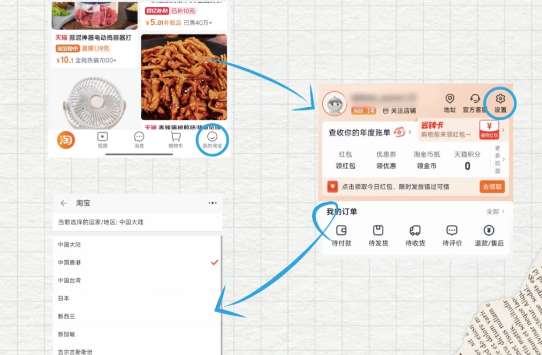
To switch Taobao to English, download the Chinese version of the app (淘宝), not the overseas version, which may require a Chinese app store account. Sign up with your phone number or email. Once logged in, go to "My" → "Settings" → "Region/Country" and select a supported country like Singapore to switch the app to English.
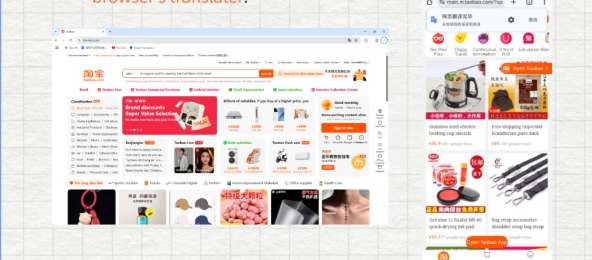
If your country isn’t listed, choose "Global" for basic English. Alternatively, use your browser’s translation tool, like Chrome or Safari, to translate Taobao.com into English. This provides an easier way to navigate the site. In this guide, you'll find more practical info about how to use Taobao in China and abroad. Read on!


What Is Taobao?

Taobao is China’s largest online shopping platform, where you can buy just about anything—from clothing and electronics to groceries and gadgets.
It’s affordable, has millions of sellers, and offers international shipping (with a few tips for foreign shoppers). While Taobao does have an English version for certain countries, switching it over can be a bit tricky (we’ll explain how below).
How to Change Taobao to English?
Credit: Rednote, ExpatPedia
While Taobao's English interface isn't available globally, it works in 10 countries. Here's how to switch it on and fix common issues.
Which Countries Support Taobao in English?
The English version is available if you set your region to one of the following countries: Singapore, Malaysia, Thailand, Australia, New Zealand, Kazakhstan, Uzbekistan, Kyrgyzstan, Mongolia, or Georgia.
How to Switch Taobao to English:
- Download the Right Taobao App:
Avoid the “TAOBAO” overseas version in app stores—use the Chinese version “淘宝” instead. You may need a Chinese Apple ID or Android app store account to download it. Ask a Chinese friend to help if needed. - Register or Log In:
Sign up with your phone number or email (passport verification might be required later to avoid account issues). - Change Region & Language:
- Open Taobao → Tap “My” (bottom right)
- Go to “Settings” (top right, looks like a gear)
- Select “Region/Country”
- Choose one of the supported countries (e.g., Singapore), and the app will automatically switch to English.
- Alternative Option:
If none of the above works, you can use your browser’s translate feature. Open Taobao.com in a browser like Chrome or Safari and use the built-in translation tool.
(Advice from Rednote, ExpatPedia)
Credit: Rednote, ExpatPedia
Why Is My Taobao Missing the English Option?
You might run into the issue of not being able to access Taobao in English. Here’s how to fix it:
Issue 1: VPN Isn’t Working
Fix: Taobao detects your actual IP address, not the VPN. To resolve this, use the Chinese version of the app and select a supported region (like Singapore) directly—no need for a VPN.
Issue 2: Selected a Supported Country but Still Showing Chinese
Fix: Log out of the app, clear the cache, then log back in. If it still doesn't switch to English, contact Taobao customer service. They can often enable the English version manually for foreign users.
Issue 3: Can’t Find the Chinese Version of Taobao
Fix: If you can’t find the Chinese version of Taobao, try using a Chinese friend’s Apple ID to download it from the Chinese App Store. On Android, you can search for "淘宝" on platforms like Huawei AppGallery or 360 Mobile Assistant.
 384349 booked


How to Shop on Taobao and Pay?
Once you have the English interface set up (or use a translation tool), shopping on Taobao becomes a breeze.
Credit: shanghai.gov
1. Search for Products (2 Easy Ways)
Keyword Search:
You can enter an English word (like "wireless headphones") or use Google Translate to convert it to Chinese (like "无线耳机") and then copy and paste. For better results when searching for brands, try using a mix of English and Chinese (e.g., "Nike" or "耐克").
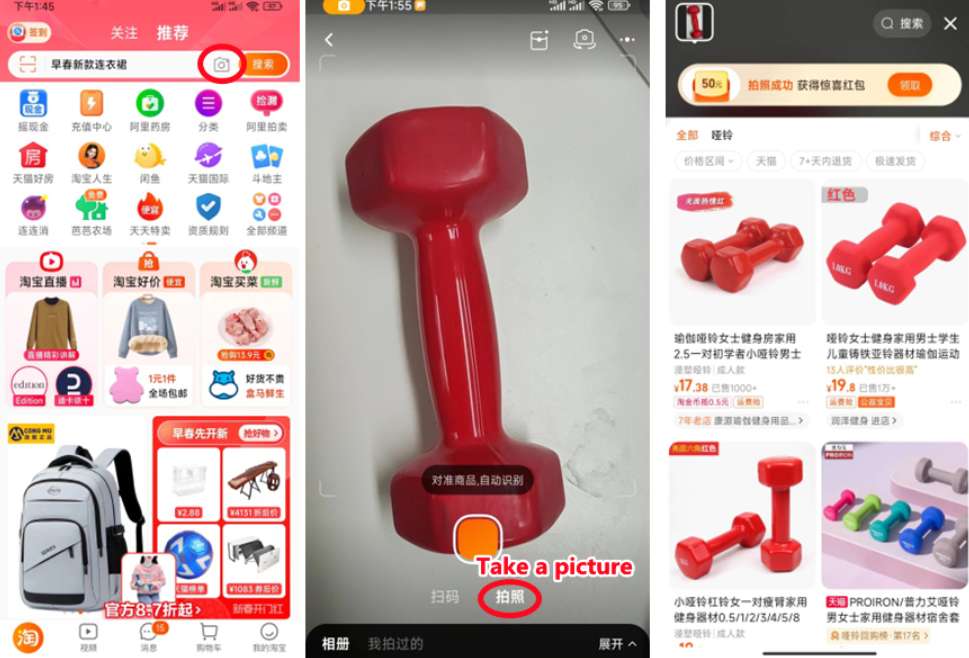
Image Search:
Click the camera icon in the search bar → Upload a photo of the item you want (from your phone or the internet) → Taobao will find matching or similar products. This is especially useful if you don't know the Chinese name of the item.
Credit: shanghai.gov
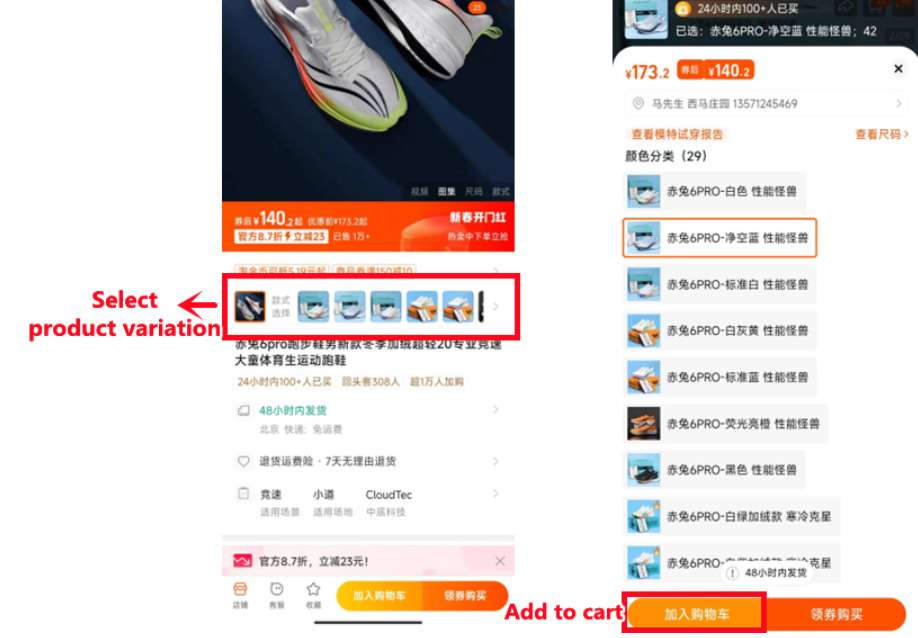
2. Pick a Product & Check the Details
Click on a product to see photos, descriptions, and seller ratings. Pay attention to these key factors:
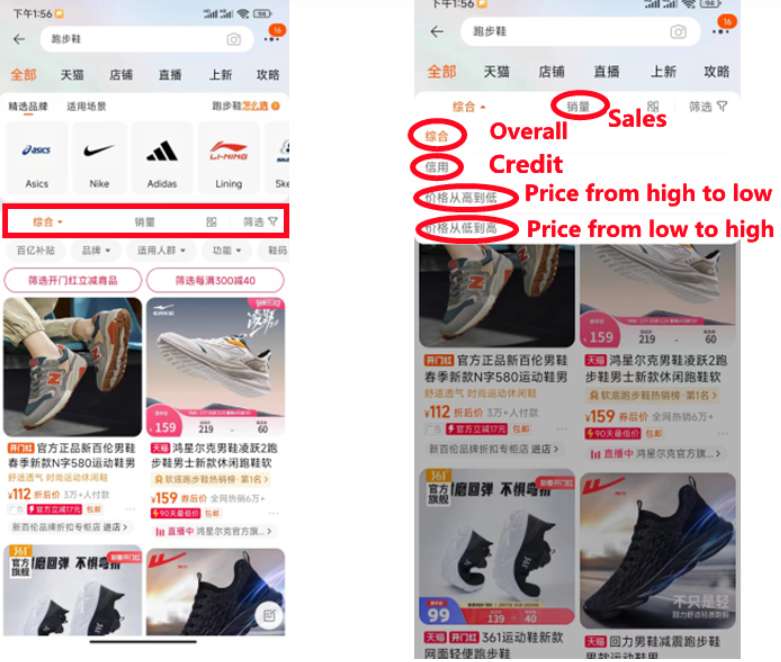
- Sales: Higher sales often indicate reliability. You can filter searches by "Sales" to find popular products, but be cautious—some sales numbers may be inflated, so always check the reviews.
- Reviews: Look for reviews with photos, as they give a better sense of the product’s real quality. Use Google Translate to read Chinese reviews if needed.
- Seller Rating: Aim for sellers with 4.8 stars or higher—higher ratings usually mean the seller is more trustworthy.
Credit: shanghai.gov
3. Add to Cart & Check Out
- Select Product Options: Choose the variant you want, such as size, color, or quantity.
- Add to Cart or Buy Now: Click “Add to Cart” to save items for later, or “Buy Now” to proceed directly to checkout.
- Go to Your Cart: Open your shopping cart, select the items you want, and click “Check Out.”
- Enter Your Delivery Address: Input your shipping address. International addresses can be used for direct delivery or via a consolidation service.
Credit: shanghai.gov
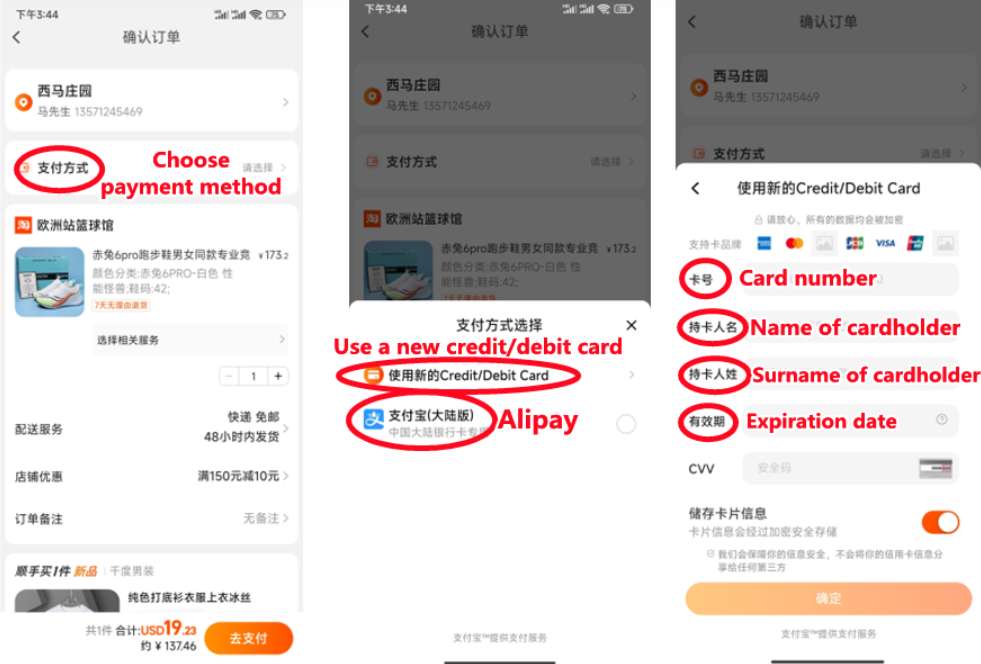
4. Choose a Payment Method
Taobao offers three main payment options for international shoppers—no Chinese bank account needed:
- Credit/Debit Cards: Visa, Mastercard, and American Express are accepted. Simply enter your card details when prompted, and the payment will be processed directly.
- Apple Pay: If you have an iPhone, link your credit or debit card to Apple Pay. You can then check out with one click, which is much faster than entering card details each time.
- Alipay: Download the Alipay app, activate it with your foreign bank card, and link it to your Taobao account. Using Alipay can also reduce the risk of your account being banned, as Alipay verification makes your account appear more legitimate.
Credit: shanghai.gov
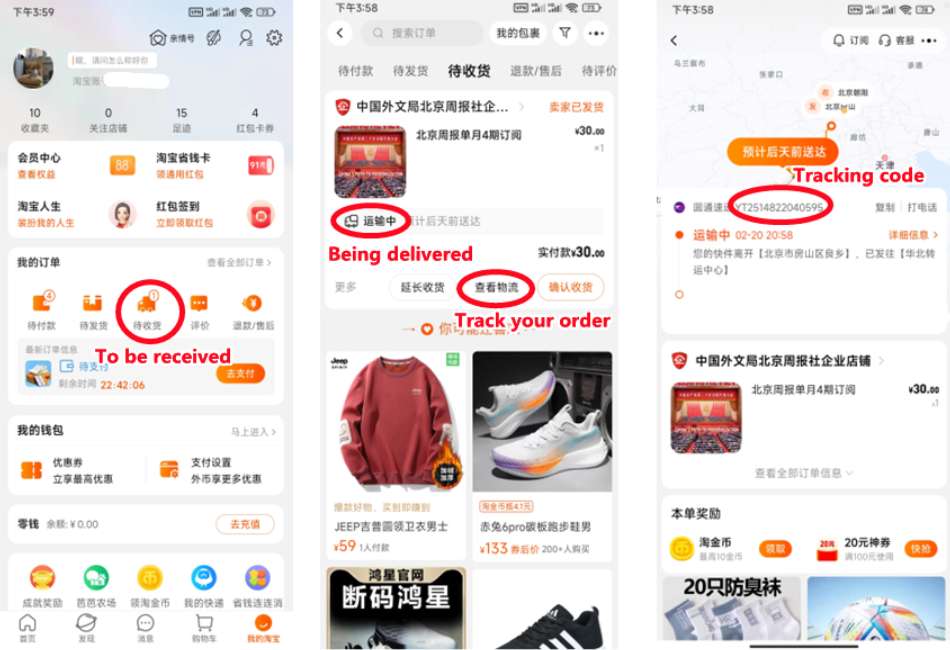
5. Track Your Order
After completing your payment, go to “My Orders” to check the status of your purchase. Once the seller ships your items, you’ll receive a tracking number. You can use Cainiao (Taobao’s logistics partner) or 17Track to monitor your shipment and stay updated on its delivery progress.
How to Use Taobao Shipping Methods as a Foreigner?
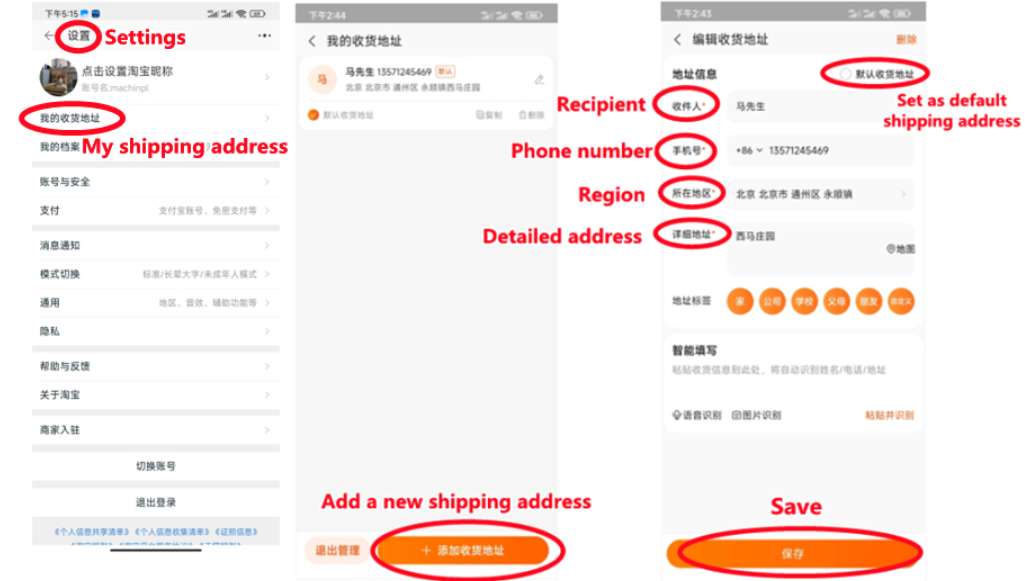
Credit: shanghai.gov, Enter your information and shipping address
Taobao Shipping Methods
Taobao offers three shipping options—choose based on your budget and how quickly you need your items:
1. Direct Shipping (Best for Beginners)
Items are shipped directly to your international address.
- Advantages: Simple and hassle-free, no extra steps.
- Disadvantages: Shipping costs are relatively high, calculated per package.
2. Consolidated Shipping (via Cainiao)
All your orders are first sent to Cainiao’s warehouses in China. Once all items arrive, you combine them into one package and pay the international shipping fee.
- Advantages: Cheaper than direct shipping, as you save on multiple package fees.
- Disadvantages: Takes longer—1–2 weeks for consolidation plus shipping time.
- Note: You need the Chinese version of Taobao to use this feature.
3. Third-Party Forwarding (Cheapest for Bulk Orders)
Use a Chinese consolidation company (found via WeChat mini-programs or online). Enter the company’s warehouse address as your shipping address on Taobao. They gather, pack, and ship your items internationally.
- Money-Saving Tip: For bulk orders, choose sea shipping (16–18 days to the US/Europe) instead of air. Companies like UPS will deliver to your door, and you won’t need to handle customs or extra taxes.
How to Use Taobao in the US?
VPN & Language
No VPN needed. Download the Chinese Taobao app and set your region to Singapore to access English.
Customs & Duties
As of August 2025, the US no longer offers duty-free treatment for low-value shipments. Expect duties and fees on most orders.
Shipping Times
- Direct/air: ~1–3 weeks
- Sea/economy: Several weeks to over a month
Tips for US Buyers
- Avoid counterfeit/restricted items.
- Choose shipping based on speed vs. cost.
- Track packages and use reliable forwarders if needed.
Steps to Shop
- Download Chinese Taobao app.
- Register with email/phone; verify identity if prompted.
- Set region to Singapore for English.
- Choose a shipping method (direct, consolidated, or third-party).
- Pay with Visa, Mastercard, Apple Pay, or Alipay—no Chinese bank account required.
What Are the Differences between Taobao & Other Shopping Apps?
Feature | Taobao | Amazon | AliExpress |
|---|---|---|---|
Variety | Huge; millions of sellers | Wide, mostly popular brands | Large; mostly Chinese sellers |
Price | Usually cheaper | Higher, includes fees | Affordable, frequent discounts |
International Shipping | Direct, consolidated, or third-party | Mostly direct | Direct shipping worldwide |
Language | Chinese (English in some regions) | English & local languages | English (limited translations) |
Payment | Alipay, Visa, Mastercard, Apple Pay | Credit/debit cards, Amazon Pay | Credit/debit cards, PayPal, Alipay |
Shipping Speed | Slower for international orders | Fast (Prime) domestically | Slower; depends on method |
Best For | Bargains, variety, bulk orders | Convenience, fast delivery | Cheap international shopping |
How to Get the Cheapest Deals on Taobao?
Taobao is already affordable, but these tips can help you save even more:
1. Shop During Major Sales
Taobao’s biggest sales can offer 30–70% off:
- 618 Sale: June 1–18 (biggest mid-year sale)
- Double 11 Sale: November 11 (world’s largest shopping day, discounts up to 80%)
- New Year Sale: Late December–early January
Set reminders—sellers often release coupons 1–2 weeks before the sale.
2. Use Store & Platform Coupons
- Store Coupons: Most sellers offer coupons like “$5 off $30” on their store homepage—tap “Coupons” to collect.
- Platform Coupons: Taobao’s main page has daily coupons (search “Taobao platform coupons”) that can be stacked with store coupons for extra savings.
3. Join Group Buys (“Tuan Gou” 团购)
Group buys let you get lower prices by purchasing with other shoppers:
- Look for “Group Buy” labels on products and join existing groups (no need to invite friends).
- Prices in group buys are usually 10–30% cheaper than regular prices—perfect for small items like phone cases or socks.
[5% Off] Must-Visit Attractions in China
Check some of the top attractions in China below!👀



[8% Off] Best China Hotel Recommendations




FAQs about Taobao in English
Can I switch Taobao to English?
Yes, the Chinese Taobao app allows English for select countries by changing the region in settings.Which countries support Taobao English?
Supported regions include Singapore, Malaysia, Thailand, Australia, New Zealand, Kazakhstan, Uzbekistan, Kyrgyzstan, Mongolia, and Georgia.How do I change Taobao to English on mobile?
Open the Chinese “淘宝” app → Tap My → Settings (gear icon) → Region/Country → Select a supported country.Do I need a VPN to switch Taobao to English?
No. VPNs don’t affect the language. Taobao detects your real location, so just set a supported region in the app.What if my country isn’t listed for English?
Select Global for basic English, or use a browser with translation (like Chrome or Safari).