Trip.com E-Ticket & Boarding Pass: How to Get and Use

By Trip.com
June 16, 2026

Trip.com provides users with e-tickets for flight and train tickets. I will tell you everything about Trip.com e-tickets - what e-tickets are, how to get them, how it differs from boarding pass and how to print them. Keep reading!
to Bangkok
to Manila
to Shanghai
to Tokyo
to Seoul
See all flights


What is a Trip.com Flight E-Ticket?

An e-ticket on Trip.com is like a digital plane ticket you buy online or on their app. It is safer than a paper ticket because you don't need to print it - all your info is stored securely with the airline database.
What is Boarding Pass & How it Differs from Trip.com E-Ticket?
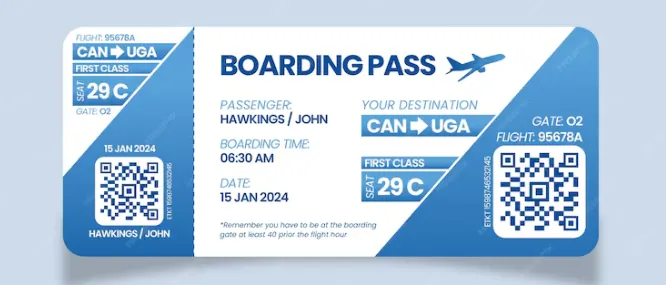
Source from Freepic
A boarding pass is a document provided by an airline after you have checked in, which allows you to board the plane. There are detailed information such as your seat number, boarding gate and boarding time on it.
A Trip.com e-ticket is the proof of your flight booking issued by Trip.com after you purchase a flight through their platform. It contains key information such as your flight number, departure/arrival city and time, as well as passenger names. You need this e-ticket to check in with the airline (either online or at the airport), and then the airline will provide you with your boarding pass.
Aspect | Boarding Pass | Trip.com E-Ticket |
Purpose | Allows you to board the plane | Proves you’ve purchased the flight |
Key Details | Seat number, boarding gate, boarding time | Flight number, travel dates, passenger names |
When You Get It | After checking in | Immediately after booking |
How to Use Trip.com E-Ticket & Boarding Pass
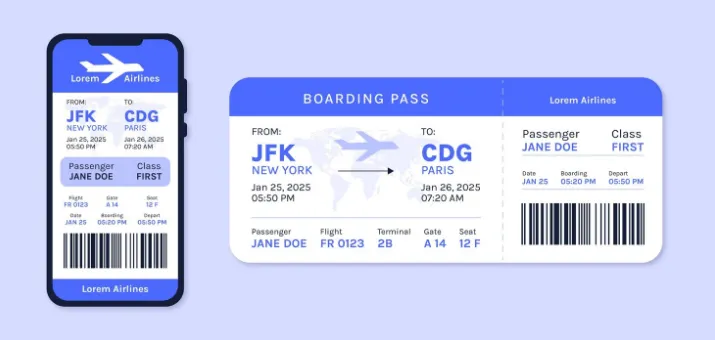
- Using Trip.com e-ticket
- When checking in (through the airline's website/app or at the airport counter/kiosk), provide the airline with detailed information about your e-ticket (such as the booking reference number).
- If there are any issues during this process, your reservation may need to be verified.
- Using the airline-issued boarding pass
- Show it and your valid ID/passport at the airport security checkpoint.
- When the airline starts boarding, you need to show it at the boarding gate to be allowed to board.
See all attractions







How to Get an E-Ticket for Flight
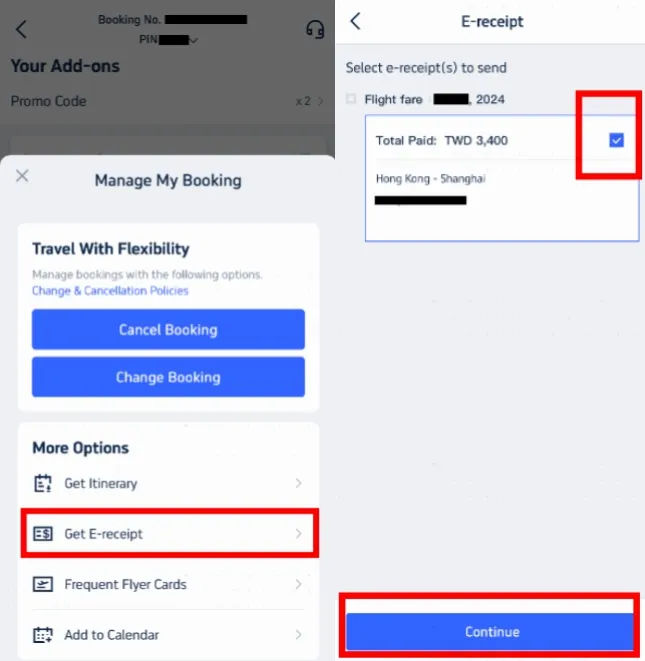
Step 1: Open “Manage My Booking”
- Open the Trip.com app and sign in.
- Go to 'Manage My Booking.'
- Look for 'More Options' and click 'Get a Receipt.'
Step 2: Select Your E-Receipts
- On the receipt page, pick the flight e-tickets you need.
- Choose the right e-tickets and click 'Continue.'
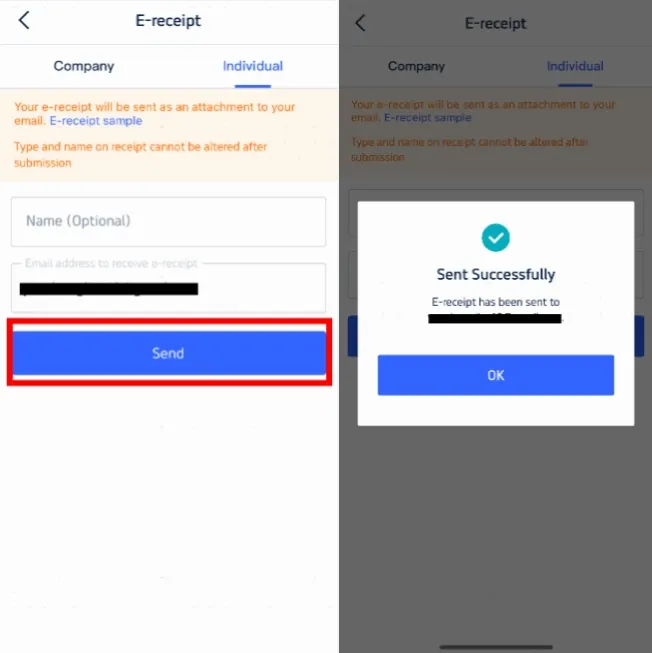
Step 3: Enter Details for the Receipt
- If you're an individual traveler, choose 'Individual.'
- Enter your name (optional) and the email where you want the receipt sent.
- Remember, you can't change the receipt type or name after you submit.
- Click 'Send' to finish.
Step 4: Confirm & Receive the E-Receipt
- You will get a message saying the e-receipt was sent.
- Click 'OK' and check your email to download it.
- This e-receipt is your online flight e-ticket. You can print it if you want, but you don't have to.
How to Print an E-Ticket for the Flights?
Once you purchase your ticket online, Trip.com will send you an email with your e-ticket attached. Look for this email in your inbox.
【Note】
- On flights within the same country, it is usually not necessary to print an e-ticket during security checks, but it is a good idea to keep the e-ticket on your mobile phone just in case.
- For international flights, it is recommended to carry a printed copy of the e-ticket for presentation at different checkpoints.
Step 1: Download the E-Ticket
- Open the email and download the attached e-ticket file on your device.
Step 2: Print the E-Ticket
- Open the downloaded file and print it using the printer.
[5% Off] How to Get an E-Ticket for the Trains

Trip.com train e-tickets are like digital train tickets with barcodes, containing all your travel information. They will be sent to you in PDF format via email, so you can save them on your mobile phone or computer. Nowadays, almost all train companies offer electronic tickets. When you book on Trip.com, your e-ticket will be stored in their app.
The following is a step-by-step guide for obtaining and using electronic train tickets
Step 1: Book Your Train Ticket
- Visit the Trip.com website or open the Trip.com app.
- Select "Train" from the menu.
- Enter the place you want to go, the date of your trip, and any other details, and then click "Find Trains".
- Choose the train that suits you and complete the ticket booking. According to the requirements of China Railway Corporation, please be sure to enter your full name and ID number.
Step 2: Receive Your E-Ticket
- Once you have booked your flight ticket, you will receive an email with the PDF format of your e-ticket attached. You can also find and download the e-ticket under the booking details section of the Trip.com app.
Step 3: Use the E-Ticket
- On the day of your trip, go to the railway station to look for the waiting hall.
- When boarding, scan the barcode on your e-ticket in front of the self-service machine. If you don't have a scanner, please show your e-ticket to the staff so that they can check it manually.
Step 4: Scan at Boarding and Arrival
- Scan your passport or ID at the entrance to enter the station.
- Use the information on the e-ticket to find the train you want to take, such as the train number, carriage and seat.
- After arriving at the destination, scan your passport or ID card again at the exit to exit the station.
[8% Off] Global Hotel Recommendations
Search Top Global Hotels
See All Hotels
 NO.1
NO.1






FAQs about Trip.com E-Ticket & Boarding Pass
-
How do I get my Trip.com e-ticket after booking?
-
Do I need to print my Trip.com e-ticket to check in?
-
What info is included in a Trip.com e-ticket, and why is it important?
-
What if my Trip.com e-ticket is lost or I can’t find it?
-
Do I need my Trip.com e-ticket to get a boarding pass at the airport?
-
Can I get a boarding pass through Trip.com for all airlines?
Disclaimer: This article has been provided by an individual contributor or third party platform. If there is any discrepancy regarding the copyright, please contact us directly and we will delete the content immediately.
Trending Searches
-
Air travel guide
-
Latest flight deals
-
Getting around
-
eSIM/SIM card