Online Flight Check-In: Everything You Need to Know

By tinafa
June 22, 2025

Let’s face it—no one likes long airport lines. Online check-in makes travel easier and less stressful, whether you're a frequent flyer or a first-timer. This guide covers how it works, when to do it, and what to expect—so you can breeze through the airport with confidence (and maybe grab a coffee, too).

Online Check-In: What Is It?
Before you arrive at the airport, you can conveniently confirm your flight and get your boarding pass by checking in online. Travelers can check in online 24 to 48 hours before departure by visiting the airline's website or mobile app, frequently through travel portals like Trip.com, rather than standing in large lineups at the check-in desk.
Checking in online is simple with Trip.com. When your airline's check-in window opens, you will receive instructions and reminders after making your reservation. From there, you can:
- Enter your ticket number or booking reference.
- Choose the seat of your choice.
- Select whether to print, email, or use a mobile device for your boarding pass.
- Spend less time at the airport, particularly if you are only bringing hand luggage.
to Bangkok
to Manila
to Shanghai
to Tokyo
to Seoul
See all flights


Online Check-In—Advantages of Online Check-In

Online check-in can significantly enhance your trip experience; it's not just about ease. The following are the main justifications for why more and more tourists opt to check in online, particularly when making reservations on websites like Trip.com:
✨ Benefits of Online Check-In at a Glance
✅ Benefit | ✈️ What It Means for You |
|---|---|
⏱Save Time | Skip airport lines and check in from your phone or laptop. |
💺Choose Your Seat Early | Select your preferred seat—like window, aisle, or extra legroom—in advance. |
📱Get Your Boarding Pass | Receive a digital or printable boarding pass right after check-in. |
🧳Add Luggage Details Early | Some airlines let you add or pay for checked baggage online. |
🚫Avoid Airport Crowds | Spend less time waiting at the counter, especially during busy travel periods. |
See All Hotels
 NO.1
NO.1



Step-by-Step Instructions for Online Check-In
It's really simple to check in online, especially if you made your reservation on Trip.com. Here is a quick, easy method to help you go from "not checked in" to "boarding pass in hand" in a matter of minutes:
🔹Step 1: Go to the airline's website or app.
Check your email confirmation or smartphone alerts after making your travel arrangements on Trip.com. When your airline opens online check-in, which is typically 24 to 48 hours before departure, we will notify you.
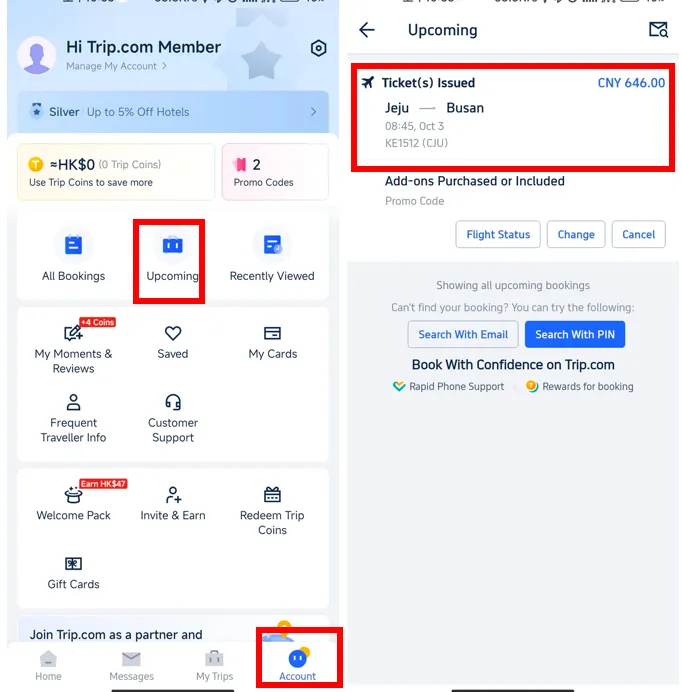
🔹Step 2: Enter the Passenger Details and Booking Reference
Go to the check-in page of the airline. Enter your last name and booking reference number, which are located in your Trip.com reservation.
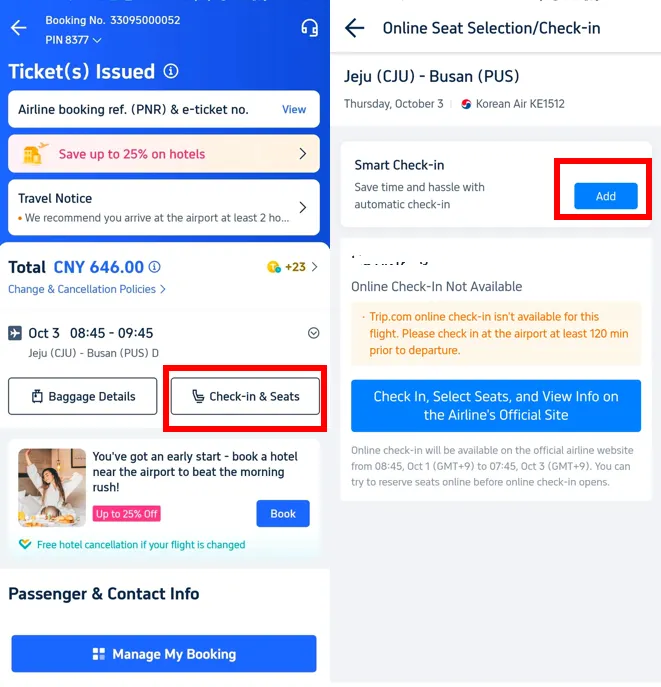
🔹Step 3: Choose or Verify Your Seat
Aisle? Window? More space for the legs? This is your opportunity to reserve your preferred seat on the aircraft.
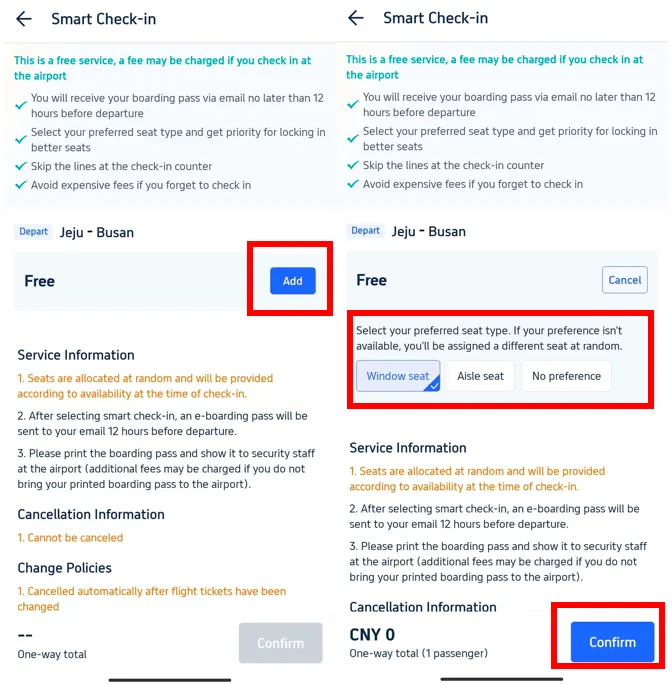
🔹Step 4: Select the Format for Your Boarding Pass
Choose whether to print your boarding pass at home, download it to your phone, or receive it by email. Simple!
Car Rentals
Car Rental Promo Code - 8% Off
New User Enjoy up to 8% Off
TRIPCAR8
Online Check-in—Boarding Pass Options
Can't decide which kind of boarding permit is ideal for you? Here's a preview:
| Boarding Pass Type | Description | Best For | Pros | Things to Note |
|---|---|---|---|---|
📱 Mobile Boarding Pass | Download to your phone or airline app—no printing required. | Travelers with carry-on only, tech-savvy | Fast, convenient, eco-friendly | Make sure your phone is charged; QR scan required |
🖨 Print-at-Home | Print your boarding pass at home before heading to the airport. | Paper-lovers, planners, backup-minded | Easy to carry, works without phone or signal | Must print in advance; don’t lose the paper |
🖥 Airport Kiosk | Use a self-service kiosk at the airport to check in and print. | Last-minute planners, spontaneous flyers | No need to prep ahead; easy on the spot | May have lines at peak times; allow extra time |
See all attractions



FAQs: Online Flight Check-In
-
What does online check-in mean?
-
When Can I Use the Internet to Check In?
-
Can I switch seats once I've checked in online?
Disclaimer: This article has been provided by an individual contributor or third party platform. If there is any discrepancy regarding the copyright, please contact us directly and we will delete the content immediately.
Explore other attractions & destinations
-
Air travel guide
-
Latest flight deals
-
Getting around
-
eSIM/SIM card
- China eSIM
- eSIM Japan
- Taiwan eSIM
- Best VPN in China
- eSIM Philippines
- China Southern Free Transit Hotel
- Family Friendly All Inclusive Resorts
- Flexible Flight
- Beijing studio minisite
- Things To Do in Guangzhou
- Cheap Tickets for Shanghai Disneyland
- China Holidays
- Universal Studios Singapore
- SHIBUYA SKY Ticket
- Manila Ocean Park