How to Set Trip.com Price Alert and Find Cheap Flights?


Finding cheap flights doesn’t have to feel like guessing. With smart tools like Price Alerts and Flexible Dates search on Trip.com, you can track fares, compare options, and book at the right time with confidence. Here’s how to do it.
To Shanghai
To Bangkok
To Tokyo
See all flights


What Is Trip.com Price Alert?
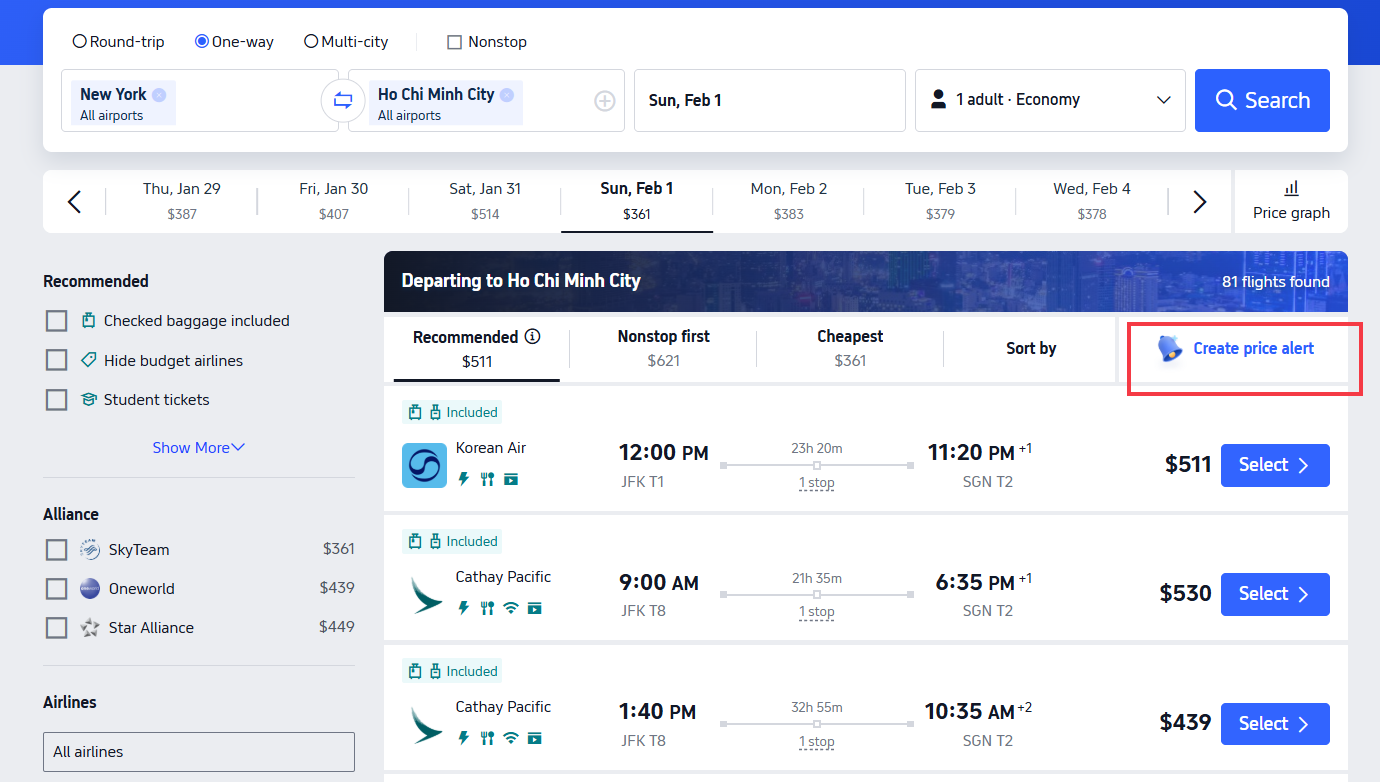
Create price alert
Trip.com Price Alert is a free, global feature (app/desktop) that automates flight fare tracking for your chosen routes, dates, and cabin class. It eliminates constant manual checks by sending instant notifications when prices drop to your target budget.
How to Set Price Alerts on Trip.com?
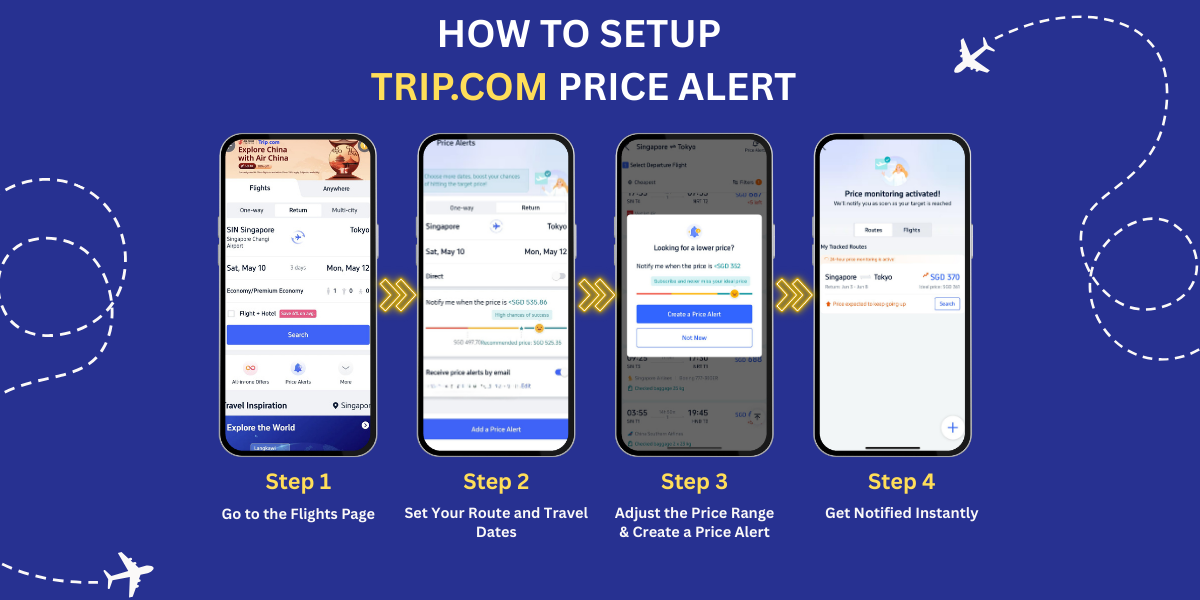
Trip.com Price Alerts help you track flight prices so you never miss a deal. Perfect for U.S. travelers, these alerts can help you plan around busy travel times like Thanksgiving, Christmas, or summer holidays.
The Price Alerts setup process is similar for the Trip.com mobile app and desktop website. No membership or account upgrade is required (a free Trip.com account is all you need).
Step 1: Access the flights section
Open the Trip.com app or go to the website. Log in to your free account and tap (or click) Flights.
On the Flights page, scroll down a little. Right below the search box—where you enter your cities and dates—you’ll see the Price Alert button. It’s easy to spot.
Step 2: Enter your flight details
On the Price Alert page, enter your trip details. You don’t have to fill in every field, but adding more details helps you get more accurate alerts.
- Departure and arrival city or airport
- Trip type: One-way or Round-trip (add a return date if you choose round-trip)
- Travel dates (you can set alerts for more than one date range for the same route)
- Seat class: Economy, Business, or First (Economy is the default)
Step 3: Set your target price range
Use the price slider to set your budget. It shows the current average price for your route so you have a point of reference.
As you move the slider, the color indicator (red, yellow, or green) updates in real time. This helps you see your chances of finding a lower fare and adjust your budget accordingly.
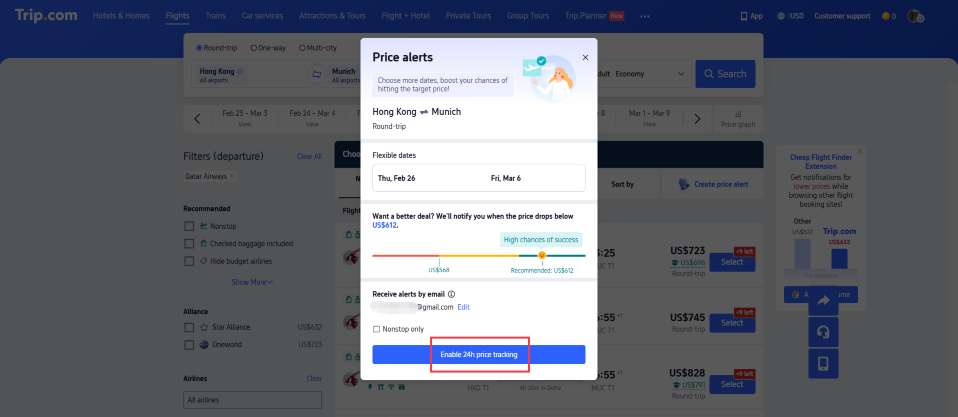
Step 4: Choose your notification method, then confirm
Select how you want to receive price drop alerts (you can select both for maximum coverage):
- App Push Notifications: Instant alerts to your phone (enable Trip.com push permissions in your device settings first)
- Email Notifications: Alerts sent to the email linked to your Trip.com account (useful if you don’t have the app open)
Click/tap the Confirm or Turn On Alert button to finalize your setup. You can view, edit, or cancel all your active Price Alerts at any time in your Trip.com Personal Center (under the Flights > Price Alerts tab).
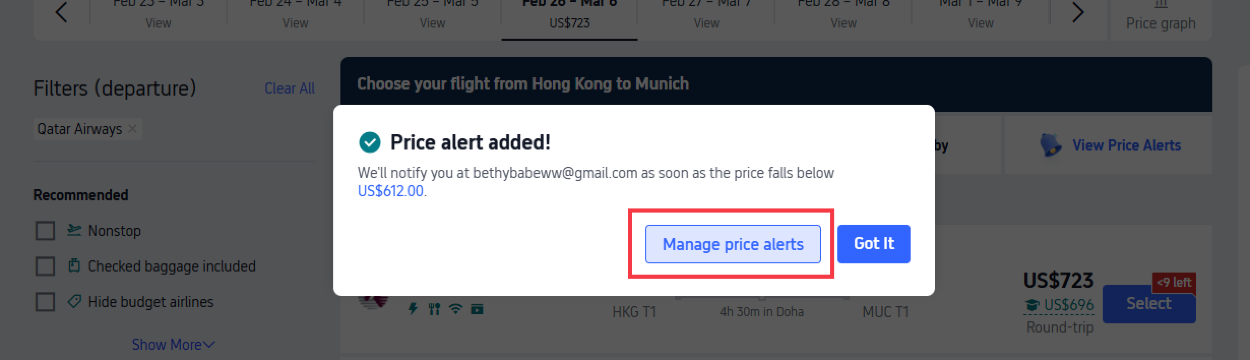
Pro Tip: Set 2-3 price alerts for the same route (e.g., a "budget" green alert, a "stretch" yellow alert) to cover different fare scenarios.
Get Well-Connected!
See all attractions
 440424 booked


6 Ways to Predict Flight Price Drops on Trip.com
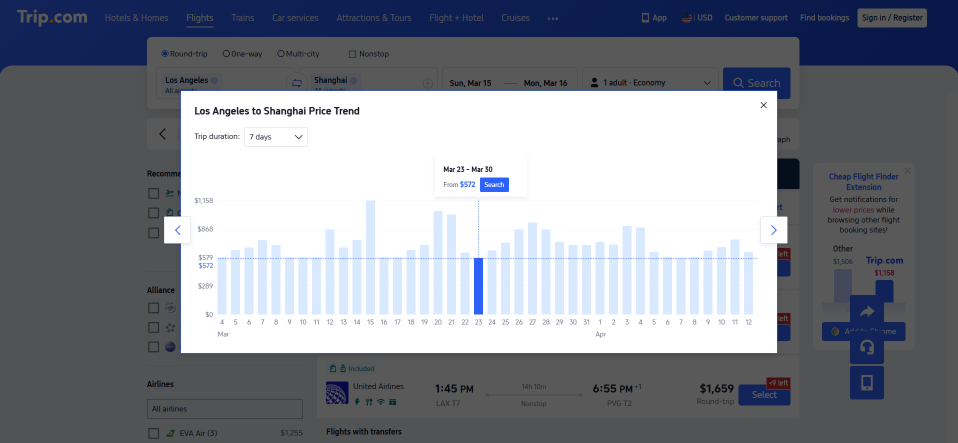
Trip.com gives you real-time, free tools to predict fare drops. Combine these platform-specific cues with basic global airline trends, and you’ll know exactly when to wait for a drop (or book fast to avoid a hike).
- Check the Price Trend Graph: The 7/14/30-day graph (flight search page) is the most reliable cue—if it shows a steady gradual drop, hold off and keep your Price Alert active. If it shows a rise, book immediately.
- Look for Price Drop Tags: Trip.com labels flights with real-time tags (e.g., Limited-Time Price Drop, Today Only Special, Member Exclusive Fare)—these mean fares are below the 7-day average; book fast (seats are limited).
- Act on Pre-Notifications: The Trip.com app sends minor fare drop pre-alerts (e.g., Fare down 8%—almost at your target!)—this is a clear sign a full drop is coming in 1–3 days.
- Follow Global Promo Announcements: Trip.com posts global sales (airline anniversary deals, Black Friday, seasonal sales) on its homepage banner and sends push/email alerts 1–3 days early. Set a Price Alert for the sale window to lock in the lowest fares.
- Book for Off-Seasons: Flight prices drop globally when your destination is in its off-season (low tourist demand). Trip.com’s flight search page flags a destination’s season status—use this to time your booking.
- Watch for Low Inventory Warnings: If Trip.com shows Few seats left or Limited inventory, fares will rise soon (airlines hike prices for scarce seats). Book immediately—no drop is coming.
When Is the Cheapest Time to Book Flights on Trip.com?
Flight prices on Trip.com change with supply and demand, so these booking tips work for most routes.
Best Booking Windows on Trip.com
- International long-haul: Book 3–6 months in advance (airlines release the most discounted seats for future travel first).
- Regional short-haul: Book 1–2 months in advance.
Trip.com Shoulder Season = Biggest Savings
For the lowest fares, book flights during a destination’s shoulder season—the time between peak and off-season. With fewer travelers, airlines lower ticket prices, and Trip.com often adds extra seasonal discounts on top.
More Ways to Save on Trip.com

Price Alerts are foundational—pair them with these global Trip.com promos and hacks for maximum savings:
Trip.com Promo Codes and Membership Award
- Free Trip.com membership perks: Member-only fares, price protection (refund for fare drops post-booking), and point redemptions (1 point = ~$0.01 USD for future bookings).
- Trip.com Promo Codes: Check Trip.com promo page for early access to flash sales, Student Flight Discount, Black Friday/Cyber Monday fares, and airline alliance deals.
- Shoulder season bookings: Book flights for a destination’s shoulder season (pre/post-peak) for 20–40% lower fares—Trip.com flags these on its homepage.
Trip.com Air Flexibility
A paid add-on that makes travel easier. It works worldwide, shows clear fees, and lets you lock in low fares with no pricey change or cancellation fees. Use it once before your first flight to get these main benefits:
- 1 free flight change: Adjust dates, times, or even routes—only pay the fare difference if the new flight is pricier.
- 1 free full refund: Cancel your booking and get your money back to your original payment method (no Trip.com credit).
- Priority customer support: Skip long queues for last-minute changes or issues.
Note: The Air Flexibility service fee itself is non-refundable—only the flight fare is refunded/credited.
Trip.com Flexible Dates Search
The easiest free way to save $100+ on global flights:
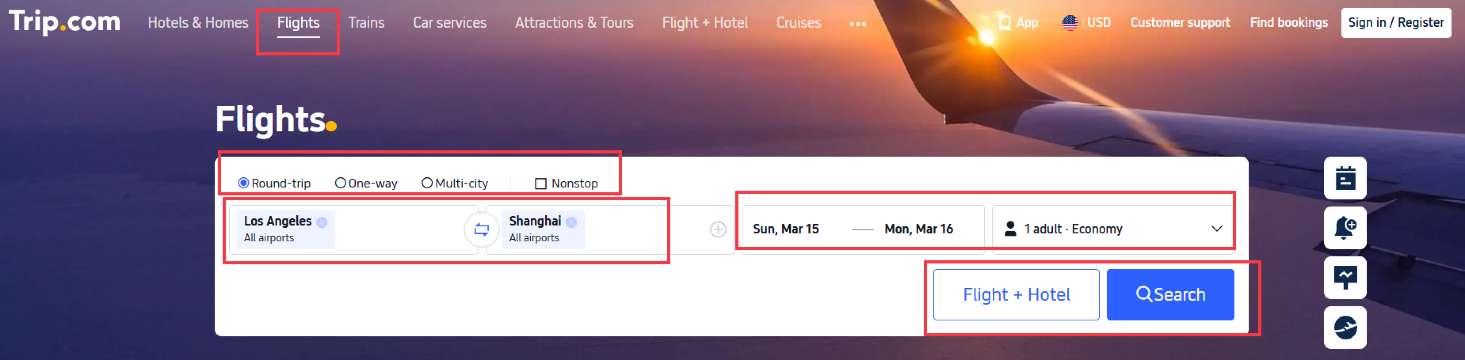
- When searching for flights, click Flexible Dates (next to the date picker on the search bar).
- Trip.com shows a calendar view of the cheapest fares for the next 1–2 weeks for your route.
- Shift your trip 1–2 days to lock in the lowest price—no extra steps required.
[10% OFF] Global Hotel Recommendations (Also with Flexible Booking)
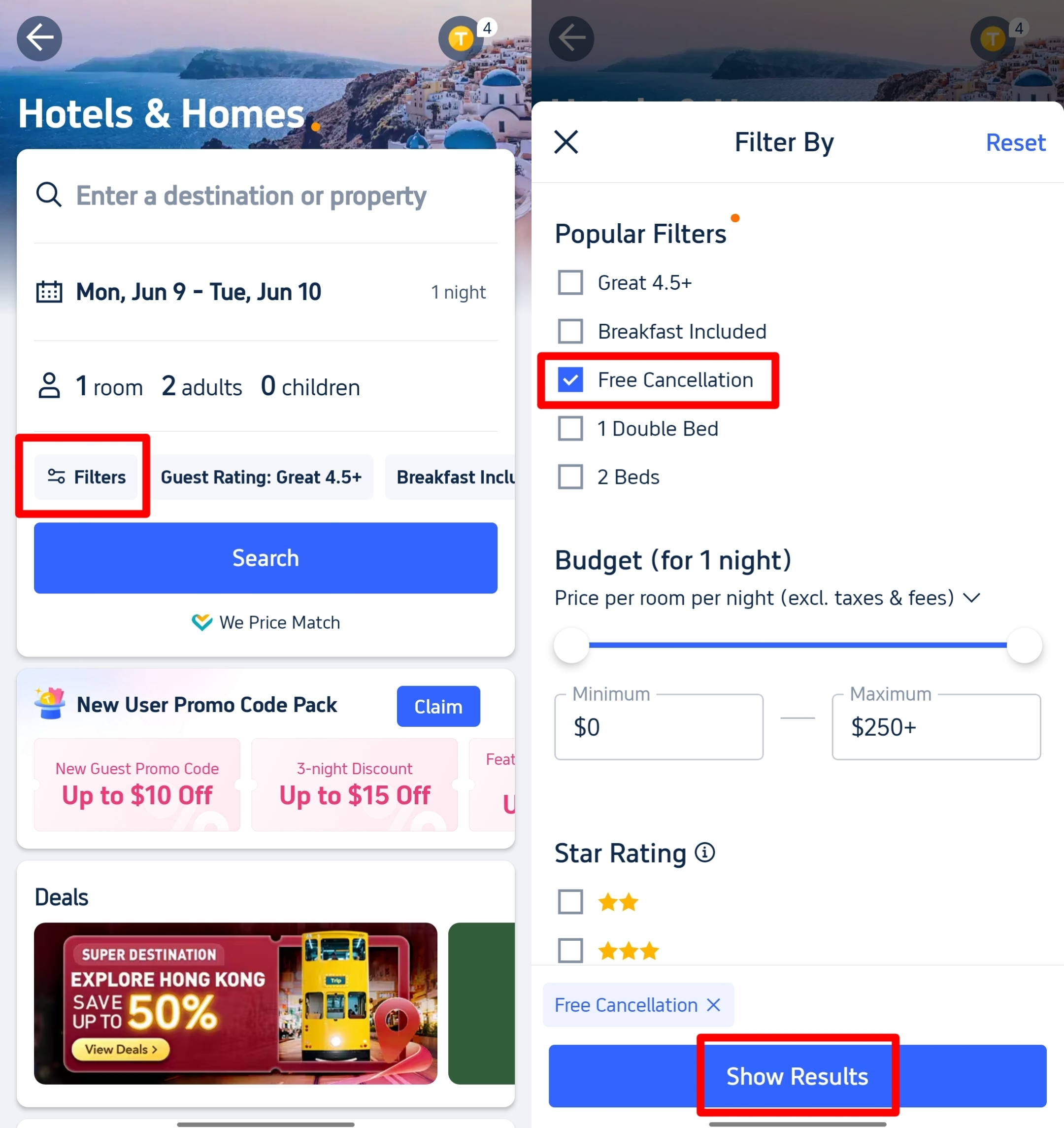
Download Trip.com App to get 10% off hotels right away for first-timers! Check out best hotels for your next adventure. Search Best Hotels and you can filter by free cancellation tag to book flexible hotels!
Top Global Hotels
Shanghai Hotels
Bangkok Hotels
Tokyo Hotels
See All Hotels










FAQs about Trip.com Price Alert
-
When Is Trip.com the Cheapest to Book Flights?
-
How long does a Trip.com Price Alert stay active?
-
Can I set Price Alerts for multi-city flights?
-
Do I need to have the Trip.com app open to get push notifications?
-
Can I set multiple Price Alerts for the same flight route?
Disclaimer: This article has been provided by an individual contributor or third party platform. If there is any discrepancy regarding the copyright, please contact us directly and we will delete the content immediately.
Trending
-
Air travel guide
-
Latest flight deals
-
Getting around
-
eSIM/SIM card
- China eSIM
- Taiwan eSIM
- eSIM Vietnam
- eSIM USA
- China eSIM with VPN
- How Early to Get to Airport for Domestic Flight
- Hong Kong Metro Map
- Vietnam Plug Type
- taipei night market
- Zhangjiajie National Forest Park
- Universal Studios Hollywood Tickets
- Universal Studios Hollywood Early Entry
- Edge New York Tickets
- Things To Do in Guangzhou
- Where to Stay in Toronto First Time