How Can I Get a Flight Refund? Policies, Steps & Tips


If you need to cancel a flight booked through Trip.com, getting a refund is straightforward.
Simply log in to your account, go to My Trips, select Manage My Bookings, and choose the flight to cancel. Review the ticket’s refund policy, submit your refund request with a reason, and track the process in your account.
In this guide, you'll learn voluntary & involuntary flight refund rules, how to get a refund on Trip.com, processing times, and Air Flexibility benefits for more flexible travel.
To Shanghai
To Bangkok
To Tokyo
See all flights


Understanding Flight Refund Rules: 3 Key Factors

How to get a flight refund? Photo via Unsplash (by Hanson Lu)
Before canceling a flight, confirm these three factors, they determine your refund outcome:
- Fare rules of your ticket
- Airline’s refund policy
- Reason and timing of your cancellation
Rule 1: Fare Rules Are the Most Important Factor
Every ticket has fare rules listed in the booking terms. Most people skip this step, but it’s critical. There are three main fare types:
- Non-refundable tickets: Usually cheap promotional economy fares. If you cancel for personal reasons, you won’t get the ticket price back. Only unused taxes and surcharges may be refunded. The only exception is involuntary cancellations (airline issues or force majeure), which qualify for full refunds.
- Fully refundable tickets: Pricier but flexible. Cancel anytime, and you get your money back minus a small airline processing fee (varies by carrier and cabin).
- Partially refundable tickets: Cancel within a set window (e.g., 72 hours before takeoff) for a partial refund. Miss the deadline, and only taxes are refundable.
Tip: Always check fare rules before booking. A cheaper ticket may cost more if you need to cancel later.
Rule 2: Airlines Make the Final Call (Not Booking Platforms)
Many travelers think Trip.com controls refunds, but airlines have the final say. They approve refund requests and calculate fees based on fare rules.
Trip.com’s role is to help:
- Submit your request to the airline
- Provide a simple interface to track status via My Trips
- Offer customer support if your request hits issues
This is helpful for first-time users, since you don’t need to deal directly with airline customer service.
Rule 3: Check These 4 Details before Applying for a Refund
Don’t submit a request until you confirm:
- Is your ticket non-refundable, fully refundable, or partially refundable?
- What fees will you pay (airline + platform, if any)?
- Is there a deadline to apply for a refund (e.g., within 30 days of the flight date)?
- Can you get unused taxes and surcharges back even if the ticket is non-refundable?
Understanding the U.S. 24-Hour Flight Cancellation Rule (2026)
Booking a flight to, from, or within the U.S.? The U.S. Department of Transportation (DOT) gives you a 24-hour window to cancel or hold your reservation. Here’s what you need to know:
- Book Directly: The rule applies if you book directly with the airline at least 7 days before departure.
- Your Options: Cancel within 24 hours for a full refund, or ask for a 24-hour fare hold.
- Which Airlines: All U.S. carriers must follow this rule.
- OTAs (like Trip.com): Not legally required, but many offer similar policies for your convenience.
- Airline Specifics: Some, like Delta, allow cancellations until midnight the day after booking.
Tip: Always double-check the airline’s policy — some go beyond the minimum DOT requirements for even more flexibility.
Voluntary vs. Involuntary Flight Refunds: What’s the Difference?
Flight refunds fall into 2 main categories, and each has distinct policies that determine how much money you’ll get back.
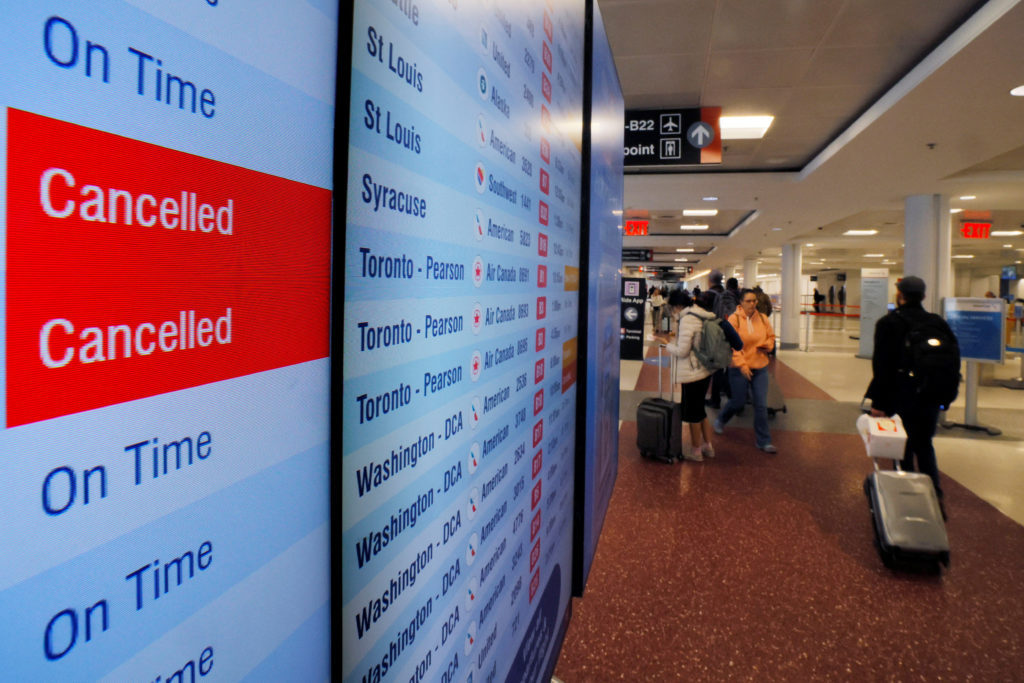
Tell the difference between voluntary & involuntary flight refunds
Voluntary Flight Refunds (Personal Reasons)
Voluntary refunds are when you cancel your flight due to personal plan changes (e.g., schedule conflicts, sudden illness).
- Applies after the 24-hour window or for cancellations due to personal plans (illness, conflicts, etc.).
- Refund depends on fare rules, ticket type, airline penalties, and service fees.
- Non-refundable tickets may still allow you to reclaim taxes and surcharges.
Involuntary Flight Refunds (Airline or External Causes)
Involuntary refunds apply when you can’t take your flight due to factors outside your control, usually caused by the airline or force majeure.
Common Scenarios | Refund Principles | Key Tips for Processing |
|---|---|---|
Airline-initiated flight cancellation (no suitable alternative flight) | Full refund of ticket price (including taxes and surcharges), no cancellation fees | Confirm the official cancellation notice from the airline first |
Severe flight delay (usually 3–5 hours or more, leading you to abandon the trip) | Full or partial refund based on airline policy | Obtain a delay certificate from the airport or airline |
Force majeure (natural disasters, airport closures, strikes) | Fee-free refund or rebooking | Keep relevant proof (e.g., weather alerts, official announcements) |
Airline changes your flight schedule significantly without notice | Full refund or free rebooking to a preferred flight | Check the schedule change notification email carefully |
Step by Step Guide:How to Get a Flight Refund on Trip.com?
Applying for a refund on Trip.com is straightforward. Follow these steps to complete the process in minutes:
Step 1: Log into your Trip.com account
Visit the Trip.com website or open the mobile app, then sign in with your registered account.
Step 2: Access your bookings
Navigate to the My Trips section and select Manage My Bookings to find the flight you want to cancel.
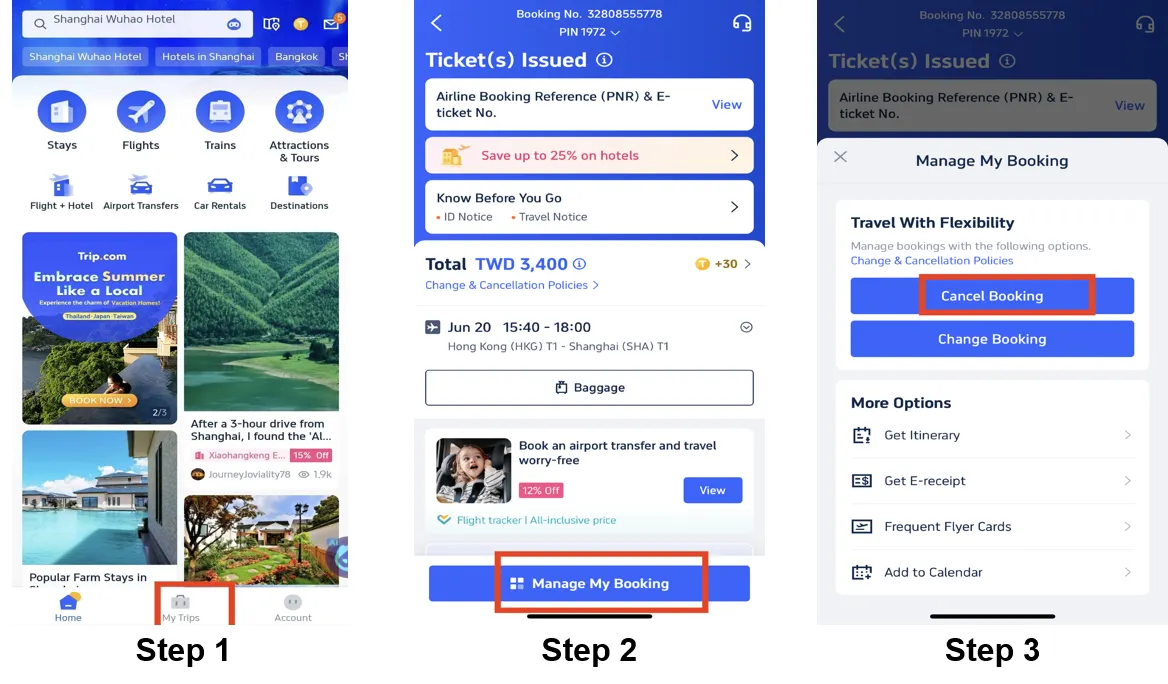
Step 3: Initiate cancellation
Click the Cancel Booking button next to your flight details.
Step 4: Review the refund policy
Check the specific refund rules for your ticket, including any applicable fees and refundable amounts, then click Next.
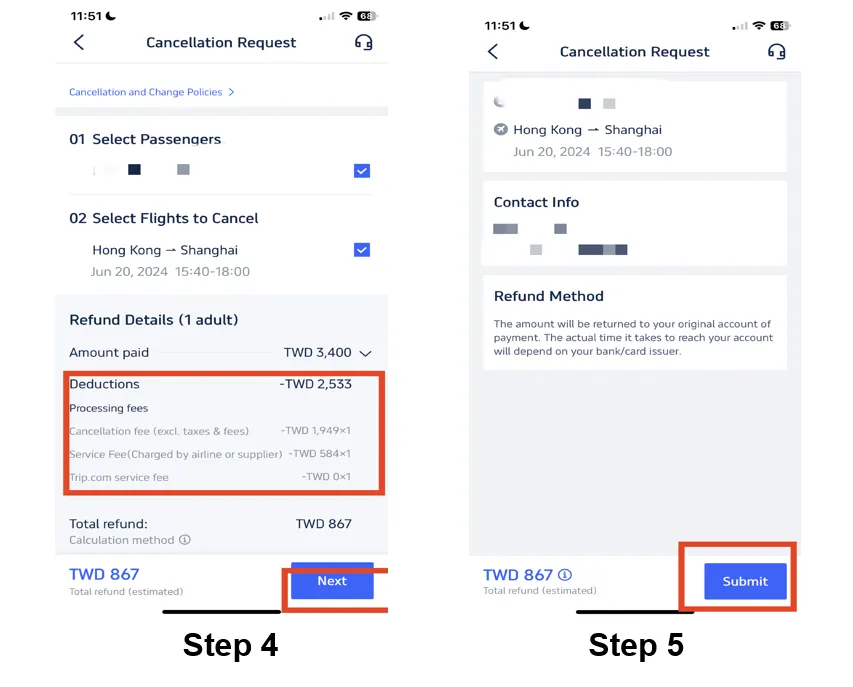
Step 5: Submit your refund request
Fill in the required information (e.g., cancellation reason) and tap Submit to confirm your application.
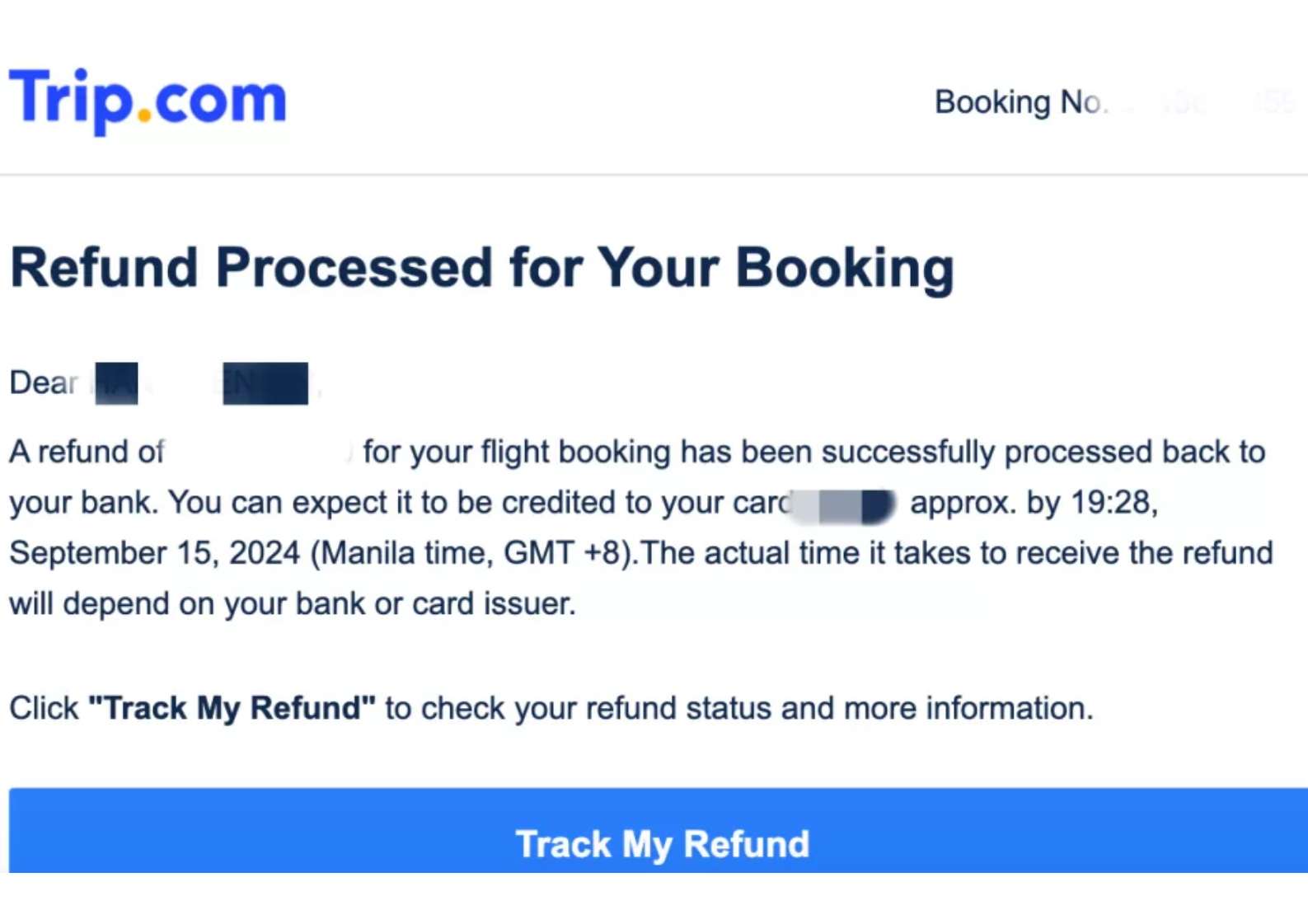
Step 6: Track your refund status
Go back to My Bookings to monitor the progress. You’ll receive an email notification once your refund is approved.
How Long Does It Take to Get a Flight Refund?

SEA Airport prepares for delays and cancellations
Refund processing times vary by platform and payment method. Here’s what you can expect:
Refund Timelines on Trip.com
The duration depends on how you paid for your ticket:
- Credit/Debit Card: 7–15 business days
- PayPal/E-wallets: 3–7 business days
- Bank Transfer: Up to 30 business days
Refund Timelines for Other Airlines
Most major U.S. and international carriers process refunds within 7–21 business days once approved. Low-cost carriers might take longer—sometimes up to 30 days—due to stricter rules and higher request volumes. Always check the airline’s official website for the most accurate timing.
Get Well-Connected!
See all attractions
 451941 booked


Trip.com Air Flexibility: Save on Flight Cancellation & Changes
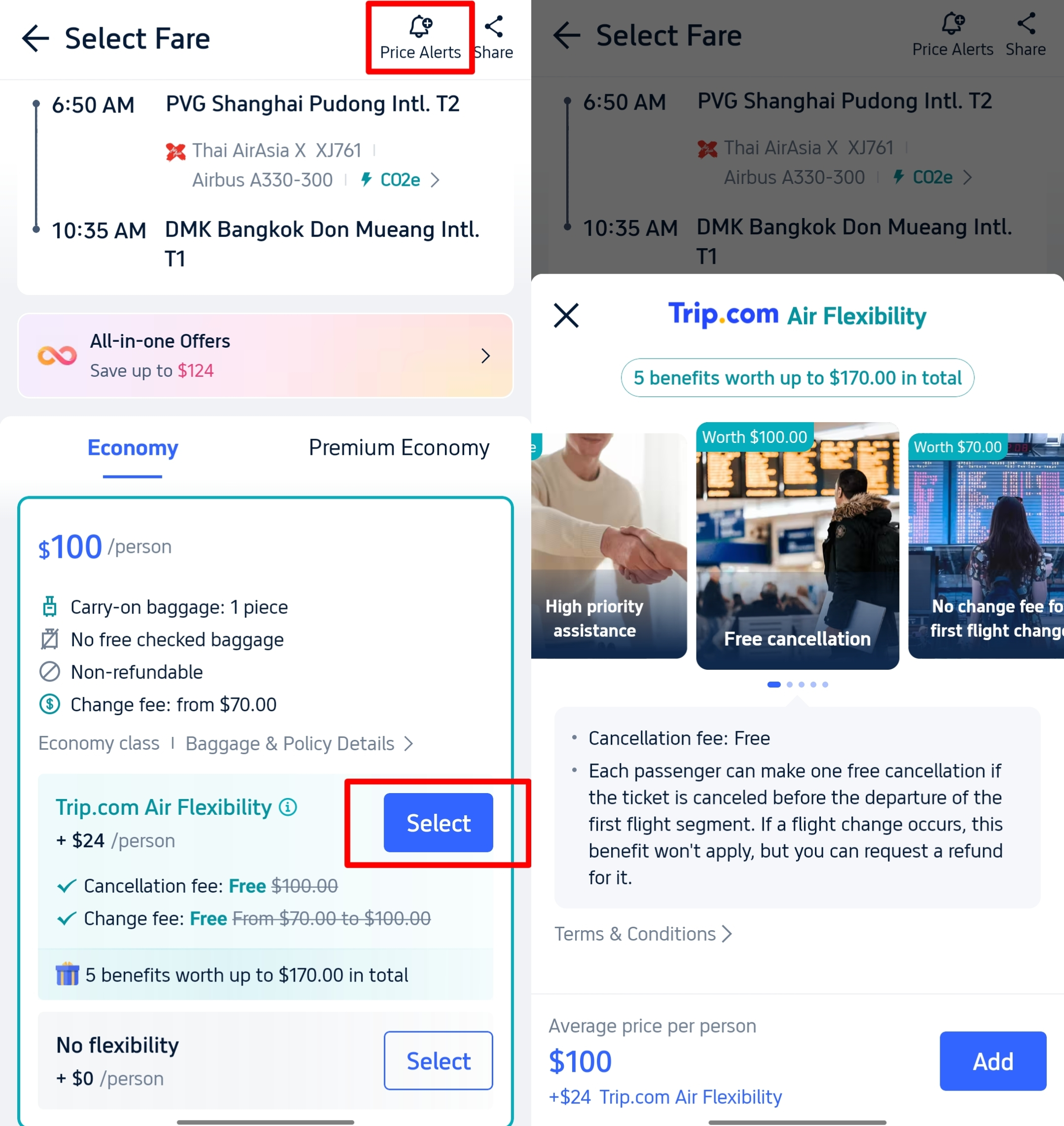
If your travel plans are always up in the air, Trip.com’s Air Flexibility service is worth every penny. It’s not travel insurance, but a budget-friendly add-on that saves you from costly change and cancellation fees.
- Affordable cost: Only $10–$30 per ticket, way cheaper than airline flexible fares.
- Key benefits: 1 free flight change (adjust date, time, or even route—only pay the fare difference if the new flight is pricier) + 1 free full ticket refund (money goes back to your original payment method, no store credit) + priority customer support.
- Wide applicability: Works with flights from multiple airlines, giving you more options than airline-specific flexible fares.
- Important rule: You can choose either the free change or free refund—once you use one, the other expires. Note that the Air Flexibility service fee itself is non-refundable.
Flight Refunds Made Simple
Canceling a flight doesn’t have to be stressful. How much you get back depends on your ticket type and the airline’s rules, and refunds usually take anywhere from a few days to a few weeks depending on your payment method.
Trip.com also offers flexible options to help you save on fees or switch flights without hassle. Check your booking details and airline policy so you can plan ahead and travel with peace of mind.
[10% OFF] Recommended Hotels
Download Trip.com App to gain 10% off hotels right away for first-timers! Check out best hotels for your next adventure.
Top Global Hotels
Shanghai Hotels
Bangkok Hotels
Tokyo Hotels
See All Hotels










FAQs about Flight Refund
-
Can I get a refund for my flight?
-
What determines my refund amount?
-
What if the airline cancels my flight?
-
How do I request a refund on Trip.com?
-
How long does a refund take?
Disclaimer: This article has been provided by an individual contributor or third party platform. If there is any discrepancy regarding the copyright, please contact us directly and we will delete the content immediately.
Popular Searches
-
Air travel guide
-
Latest flight deals
-
Getting around
-
eSIM/SIM card