Trip.com Hotel Refunds: Cancellation Policy, Time & Status

By Trip.com
June 24, 2026

Learn how long Trip.com hotel refunds take, understand Trip.com hotel cancellation policies, and track hotel refund status.
How to Get Trip.com Hotel Refunds - Step by Step Guidelines
Step 1: Login to the Trip.com app to get a hotel refund
Open the Trip.com app on your phone and sign in. Tap on "My Trips" to see all your past and upcoming travel plans.
Step 2: Find the hotel booking
Find the trip you need to cancel and tap on it. This will open up all the details about that specific booking.
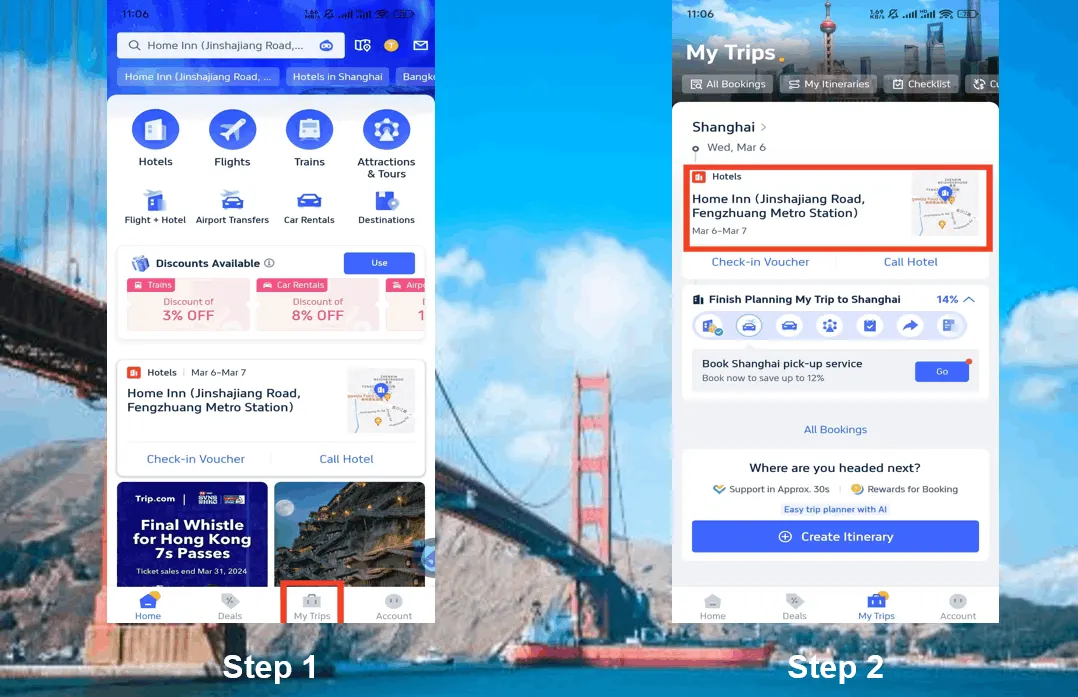
Step 3: Request the Trip.com for a hotel refund
Tap the "Cancel Booking" button to cancel your hotel. Be aware that some hotels don't offer refunds, while others might give you a full or partial refund if you cancel before a specific date.
Step 4: Provide the Reason for Cancellation
Take some time to explain why you're canceling your hotel reservation, and then tap the "Submit" button to finish the cancellation process.
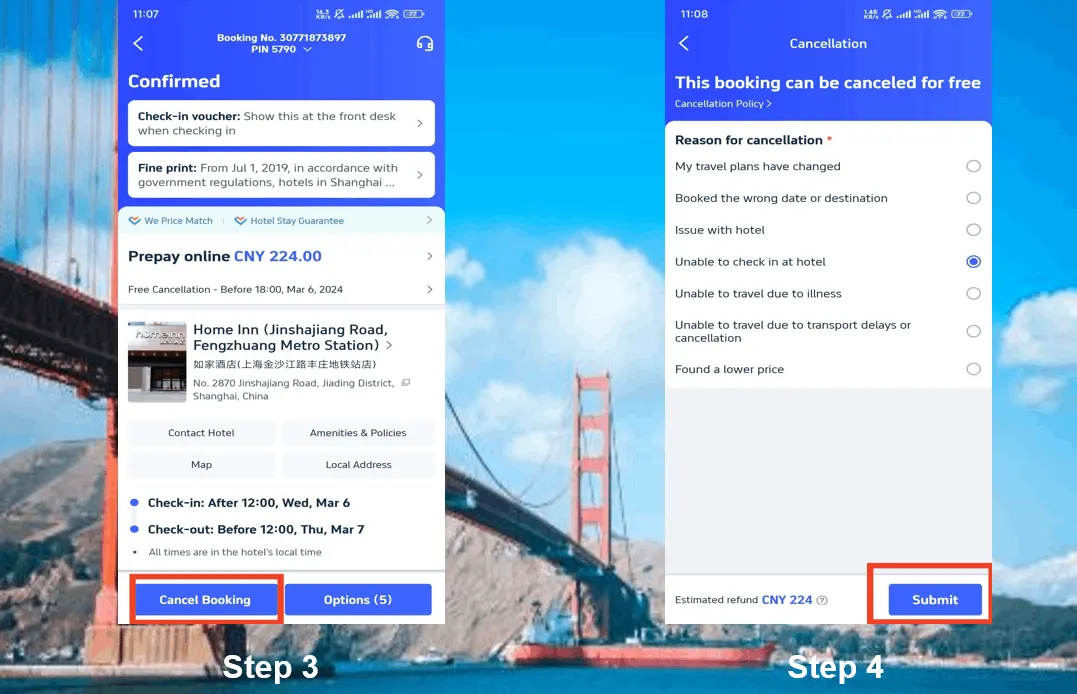
Step 5: Confirm the Trip.com Hotel Refund
After you've sent your cancellation request, tap "View cancellation policy" to see the specifics of your refund.
Step 6: Check Your Hotel Refund Status
Check your refund detail and refund info to complete the process.
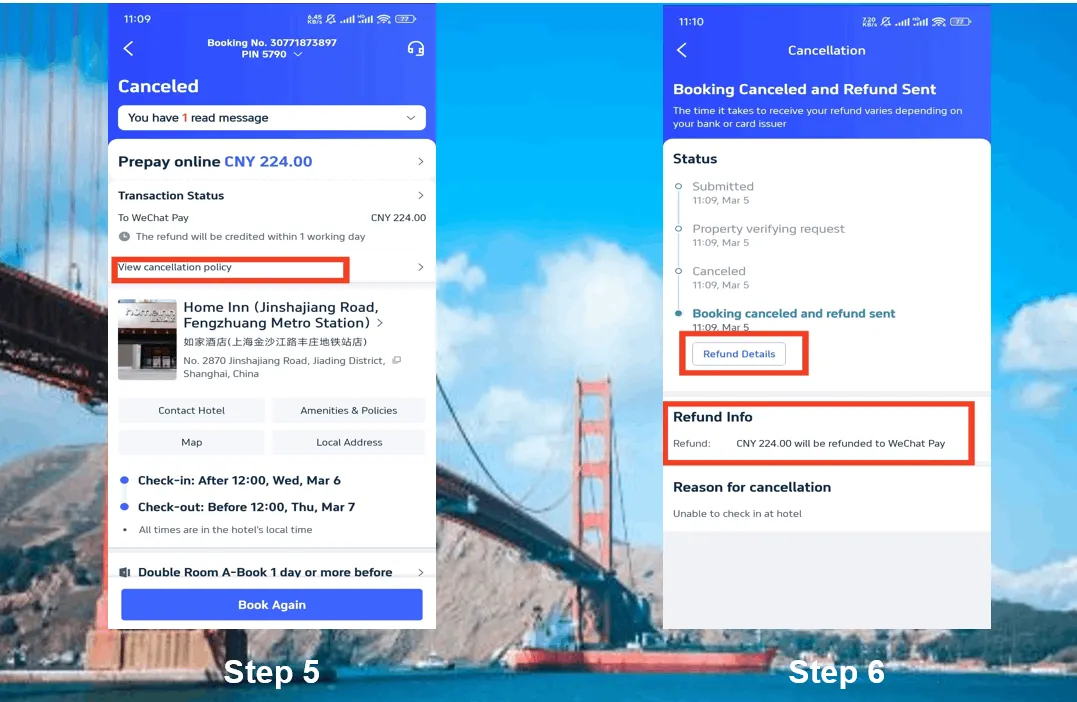
*The screenshots are only for reference.
How Long Does a Trip.com Hotel Refund Take?
Trip.com hotel refund timelines depend on 3 key factors, the below info is ONLY for reference, refund time may change according to different hotels & cards.
Factor | Timeframe Example | Notes |
Payment Method | Credit card: 3–7 business days PayPal: 1–3 days | Banks process refunds slower than digital wallets. |
Hotel Policy | Free - cancellation: 24–48 hours Non - refundable (with exception): 5–10 days | Strict policies add review time. |
Request Timing | Off - peak vs. holiday seasons | Refunds take longer during busy travel periods. |
If no refund in 10 days, use Trip.com “Help & Support” to escalate.
What’s Trip.com’s Hotel Cancellation Policy? Rules & Fees
Trip.com enforces hotel - specific rules (they don’t set policies—hotels do!).
Policy Type | Key Details | Common Scenarios |
Free Cancellation | Cancel ≥24–48 hours before check-in | Full refund, no fees. |
Partial Refund | Cancel <24 hours before check-in | Fee often = 10–50% of booking cost. (for ref only) |
Non - Refundable | No refund after booking | Only waived for emergencies (e.g., medical proof). |
Always check your hotel booking’s “Cancellation Policy” section for exact terms!
See all attractions
 2592 booked






How to Check Trip.com Hotel Refund Status?
Track your refund in 2 simple ways:
- Trip.com App:
- Go to “My Orders” → Select the hotel booking → Tap “Refund Status”.
- Email Updates:
- Trip.com sends confirmation emails at 3 stages:
- “Refund Requested” (submission)
- “Refund Approved” (hotel/airline confirmation)
- “Refund Completed” (sent to your payment method)
If no email/update after 7 days, contact support with your booking ID.
[8% Off] Global Hotel Recommendations
Search Top Global Hotels
See All Hotels







FAQs about Trip.com Hotel Refund
-
Can I cancel Trip.com hotel booking?
-
Is Trip.com refund immediate?
-
How long does Trip.com take to refund
-
Does Trip.com hotel group booking cancellation have stricter rules?
-
What to do if my Trip.com hotel refund stuck for 2 weeks?
Disclaimer: This article has been provided by an individual contributor or third party platform. If there is any discrepancy regarding the copyright, please contact us directly and we will delete the content immediately.
Trending Searches
-
Getting around
-
Popular attractions
-
eSIM/SIM card
- SHIBUYA SKY Ticket
- Shanghai Disneyland Tickets
- Universal Studios Hollywood Tickets
- Universal Studios Hollywood Early Entry
- Shanghai Tower Tickets
- Beijing studio minisite
- Sphere Tickets
- Universal Studios Japan Tickets
- Universal Studios Singapore
- Shanghai Disneyland Early Entry
- georgia aquarium tickets
- Great Wall of China
- Edge New York Tickets
- Hong Kong Disneyland
- Chengdu Panda
- China eSIM
- Taiwan eSIM
- Best VPN in China
- eSIM South Korea
- eSIM Vietnam
- Hong Kong Metro Map
- AirAsia Baggage Allowance
- Thailand Customs Prohibited Items
- Hong Kong Disneyland
- Super Nintendo World Japan
- Disney World Tickets
- GuangZhou Metro Map
- Universal Studios Singapore
- SHIBUYA SKY Ticket
- China Holidays