How to Use WeChat Pay for Foreigners? | Learn How to Pay in China

Welcome to China, a profound country in Asia with mind-blowing landscapes, rich culture & a variety of food. One of the core things to know is how to pay in China. In fact, China has been almost completely cashless.
WeChat Pay, as the primary digital payment method in China, has become a crucial part of most people's lives here. You don't have to worry about carrying lots of cash and being alerted all the time. In this guide, you'll learn how to use WeChat Pay as a foreigner. Read on!
to Shanghai
to Beijing
to Guangzhou
See all flights


What Is WeChat & WeChat Pay?
WeChat began as a messaging app (similar to WhatsApp), but it has evolved into an "everything app." WeChat Pay is its built-in digital wallet!
Scan a QR code to buy a bottle of water or pay for your subway ride, book movie tickets, or set the bill at a fancy restaurant. It's all done with a quick scan of your phone. For us travelers, it's a true lifeline to get involved in the local life of China.
WeChat Pay vs Alipay: Which Is Better for Foreigners?
Compared to Alipay, WeChat Pay offers a more convenient way to pay daily expenses in China. Check out the differences between these two giant apps in China!
Feature | WeChat Pay | Alipay |
Use for | Social payments & small daily transactions | Financial services & larger payments |
Best for | Small purchases | Investments |
Linked cards | Supports international Visa/Mastercard | Supports international cards |
Security | High | High |
While cash will still be accepted, you might get occasions when small vendors get no change. So I think that's the real reason to go digital for speed and convenience!
See all attractions
 372696 booked


How to Set Up WeChat Pay for Foreigners?
Step 1: Creating Your WeChat Account
- Go to the App Store and download the "WeChat" app
- Sign up using your US phone number
- Fill in your name and set a password
Step 2: Add Your Wallet!
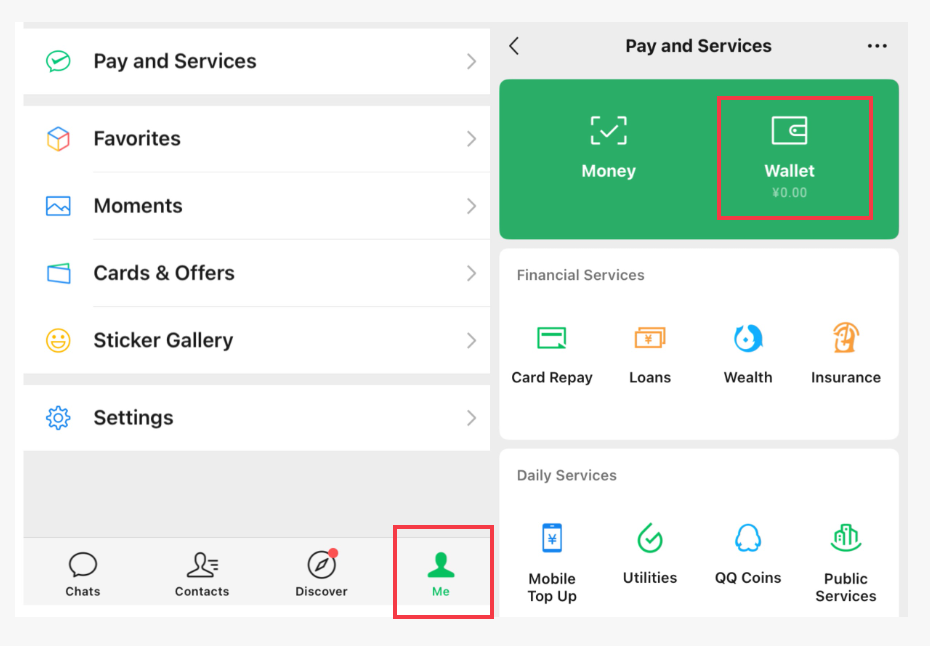
- Tap on the "Me"
- Tap on "Services" and see a "Wallet" icon
- Tap on "Cards" and then "Add a Card"
- Enter your international credit card info
Step 3: Identity Verification Process for Foreigners
- Upload your passport
- Take a selfie for comparison
- Wait a few minutes to get the confirmation
How to Add Money to Your WeChat Pay Wallet?
For foreigners using a linked international credit card, you do not need to "add money" or "top up" your WeChat Pay balance. Since you've already linked an international credit card, WeChat Pay securely processes the payment when you pay for something.
What if a Chinese friend wants to send you money?
If a friend in China sends you a red packet, that money will go into your WeChat Pay Balance. You can then spend this balance directly without touching your linked card. This is great, but for most tourists, you'll primarily be relying on your linked card for payments!
Using WeChat Pay in Different Travel Scenarios
Travel Scenario | WeChat Pay Support | Key Features & Tips |
Restaurants & Cafés | Yes | Scan QR codes to pay; from street vendors to high-end restaurants |
Shopping | Yes | Accepted at most stores for clothing or accessories |
Public Transportation | Yes | Use “Ride Code” in WeChat’s “Services” – “Transportation” for buses or subways in supported cities |
Ride-Hailing | Yes | Pay directly within the Didi app via WeChat Pay; supports auto-deduct for convenience |
Tourist Attractions | Yes | Buy tickets via WeChat mini-programs |
Food Delivery | Yes | Use WeChat’s “Meituan Waimai” mini-program for food delivery; supports English interfaces |

Shanghai Disney Resort
4.7/5
44998 reviewsThe trip was a success. The day was long and challenging. It takes about 35 minutes to walk the zigzag route to the Disneyland entrance. The rest of the day was spent at a similarly brisk pace. Waiting in lines takes about 2 hours, which leaves your legs feeling very tired, and there are few benches. The rides are more geared toward children and teenagers. There are no extreme rides. Most of the rides are similar: either carousels or car rides with views of different locations with 5D effects. The rides are interesting, but after so many hours of waiting in lines, I would have liked more. There are plenty of good, clean restrooms. The parades and closing show are impressive (they are much more exciting than the rides). Be sure to wear comfortable, closed-toe shoes (sandals are not allowed on all rides) and a hat. This amusement park is definitely worth a visit once.

The Palace Museum
4.9/5
47488 reviewsThanks to your passionate guidance, my whole family had a wonderful trip. Also, you need to have at least a basic level of English listening comprehension to understand the content. You answered every question with sincerity and stayed energetic until the very end, even though you must have been tired. You are welcome to look around the interior of the Forbidden City again after the tour ends. We made the most of our two and a half hours. Thank you.

Chimelong Paradise
4.7/5
3667 reviewsThe teenager loved it. Come around lunchtime, it's not so hot, and you'll catch a parade of heroes on the main walkway, lots of different shows throughout the grounds, and animated characters based on the park's theme. There aren't as many slides as they say, but there's plenty of adrenaline.
WeChat Pay Features Every Foreigner Should Know
WeChat Pay QR code scanning
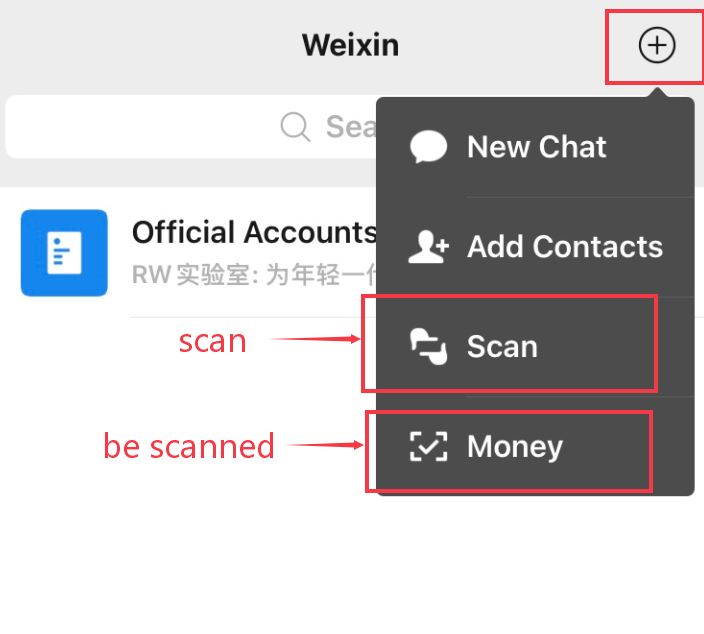
- You scan their code: This is the most common method for paying. Tap the "+" in the top right, and select "Scan". Point your camera at their QR code. You then enter the amount and your payment password.
- They scan your code: At larger stores like supermarkets or convenience stores, you'll generate your own payment code. Tap the "+" in the top right and select "Money". A barcode and QR code will appear. The cashier scans this, and the amount is automatically deducted.
Splitting bills and group payments on WeChat Pay
After one person pays for dinner, you can use the "Split Bill" feature in your group chat to divide the cost. Everyone just taps to pay their share.
WeChat Pay transaction history and receipt management
Your WeChat Wallet keeps a detailed history of every single transaction. It’s an amazing tool for budgeting on the go. You can see the merchant, the time, and the amount in RMB.
Is WeChat Safe?
Your phone is now your wallet, so it's smart to be safe!
Protecting your WeChat account and wallet
- Set a payment PIN: You'll create a 6-digit PIN when you set up your wallet. This is required for most payments and adds a crucial layer of security. Do not share it with anyone!
- Enable biometrics: Use Face ID or fingerprint authentication for an even faster and more secure payment process.
- Be careful of public Wi-Fi: Avoid making payments on unsecured public Wi-Fi networks if possible. Use your data plan for better security.
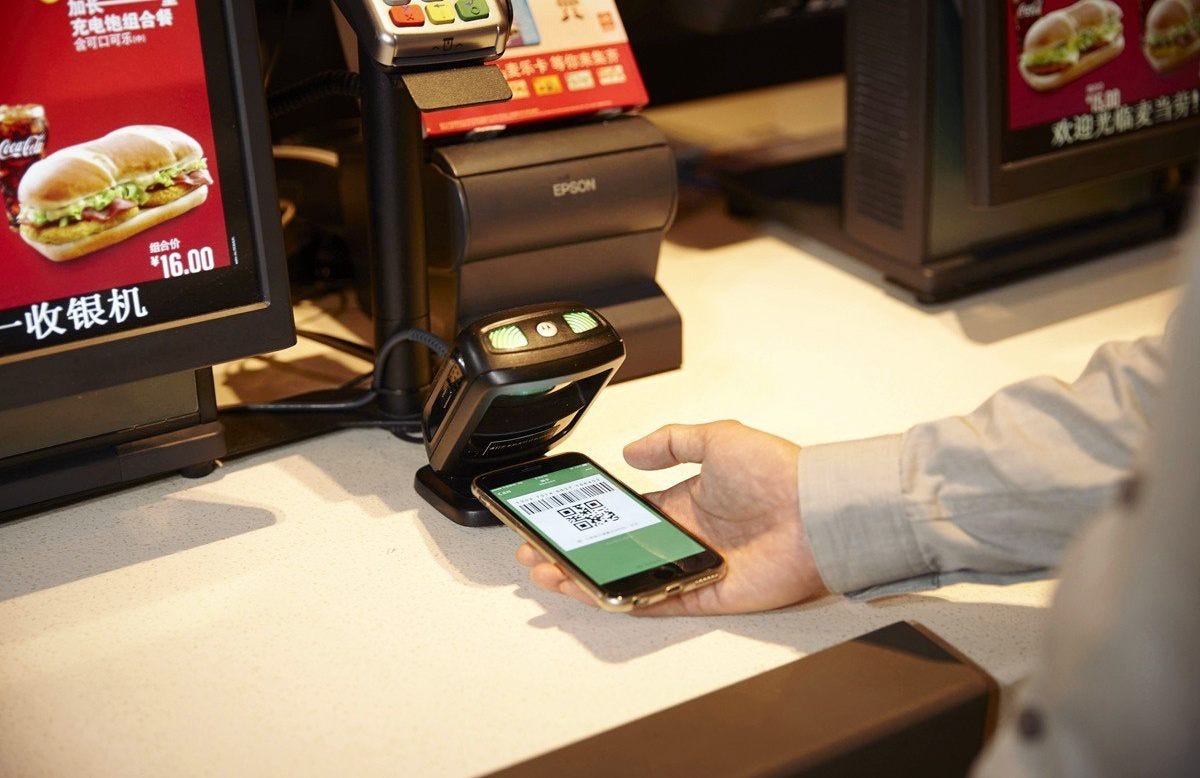
Credit: from Medium | Show your QR code to pay
What to do if your phone is lost or stolen?
- Act fast: Find another device (a friend's phone or a computer) and log into the WeChat support center website:
weixin110.qq.com. - Freeze your account: You can log in with your associated phone number, email, or QQ ID and choose to freeze your account immediately. This will prevent anyone from using your WeChat Pay.
- Contact your bank: Call your credit card company and inform them of the situation.
Avoiding common scams and unfamiliar QR codes
While rare, scams still exist. Be cautious of randomly placed QR codes in public places that aren't clearly associated with a vendor. Only scan codes provided by a merchant at the point of sale. Never scan a code sent to you by a stranger!
Car Rentals
Car Rental Promo Code - 8% Off
New User Enjoy up to 8% Off
TRIPCAR8
Backup Payment Methods in China
- If WeChat Pay doesn't work for no reason (e.g., due to poor internet), I'll still recommend carrying a small amount of cash along with you! About ¥500-¥1000 RMB (around $70-$140 USD) in small bills is perfect for those rare "just in case" moments.
- If you can't make a payment for a service like a ride-hailing at your hotel, the concierge can often help! They can make the payment on your behalf, and you can settle the bill with them using your credit card.
- It's also recommended to use Alipay to pay your bills in China. It works the same way and is also widely accepted!
Practical Tips for a Smooth WeChat Pay in China
- Set up WeChat before your trip to China! Follow these steps mentioned above. Create your own account and get familiar with where the "Scan" and "Money" buttons are.
- Get a fast and reliable China eSIM plan on Trip.com for your trip to China in advance. So that you can get a smooth payment for your bills!
- Try to check your transaction history each week or every night to stay on top of your budget.
- Have your WeChat app open and ready to scan before you get to the front of the line
- In Mandarin, WeChat is called "Wēixìn" (微信). Learn to say this name in Chinese will make it clear what you want to do.
- After paying, it's polite to briefly show the confirmation screen to the cashier!
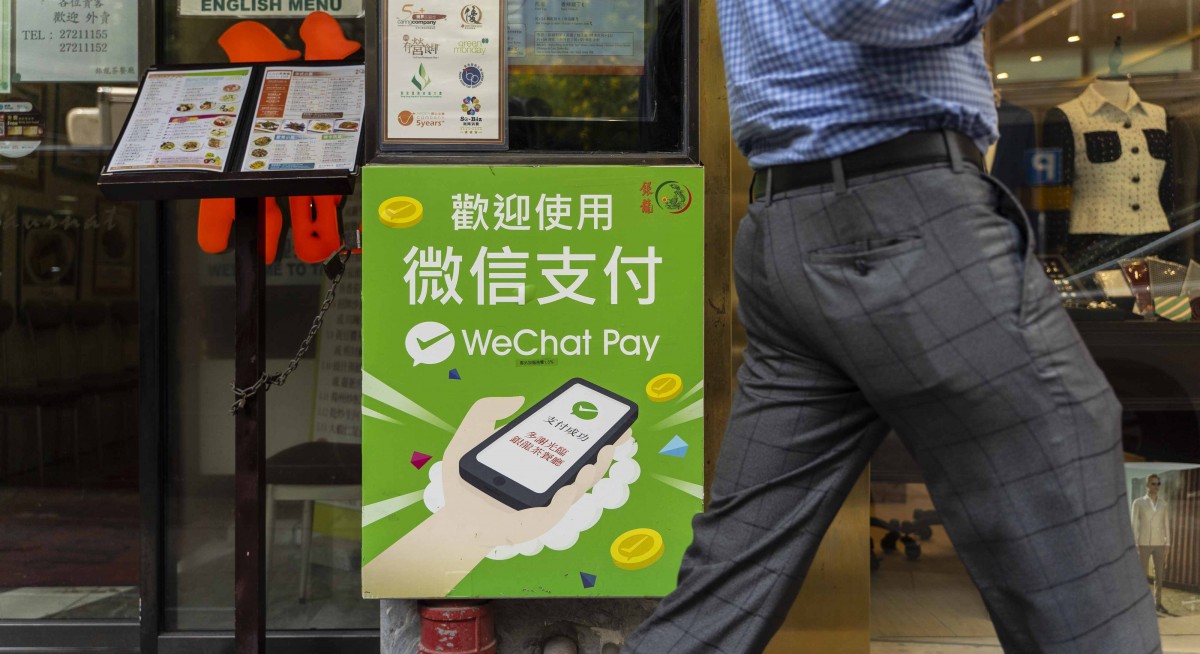
Credit: from The Edge Singapore | You're welcome to use WeChat Pay in China!
Have an amazing time in China! With WeChat Pay in your pocket, you're ready to explore with ease and confidence!
See All Hotels




FAQs about WeChat Pay
-
Can I use WeChat Pay without a Chinese bank account?
-
What are the daily and monthly spending limits on WeChat Pay?
-
Will WeChat Pay work after I leave China?
Disclaimer: This article has been provided by an individual contributor or third party platform. If there is any discrepancy regarding the copyright, please contact us directly and we will delete the content immediately.
Trending Searches
-
Featured travel guide
-
Top-rated stays
-
Getting around
-
eSIM/SIM card
- Hotels in Shanghai
- Hotels in Guangzhou
- Hotels in Beijing
- Hotels in Bangkok
- Hotels in Shenzhen
- Hotels in Tokyo
- Hotels in Hong Kong
- Hotels in Chongqing
- Hotels in Seoul
- Hotels in Chengdu
- Hotels in Las Vegas
- Hotels in Zhangjiajie
- Hotels in Kuala Lumpur
- Hotels in Ho Chi Minh City
- Hotels in Taipei
- Hotels in Hangzhou
- Hotels in Singapore
- Hotels in Xi'an
- Hotels in Osaka
- Hotels in New York